The effects of alcohol on
sustanon 250 leucine for – real weight loss & bodybuilding benefits?
[Solved] Formatting the email
✦
✦
✦
AI is analyzing the discussion...
Translate
▼
English
Spanish
French
German
Italian
Portuguese
Russian
Chinese
Japanese
Korean
Arabic
Hindi
Dutch
Polish
Turkish
Vietnamese
Thai
Swedish
Danish
Finnish
Norwegian
Czech
Hungarian
Romanian
Greek
Hebrew
Indonesian
Malay
Ukrainian
Bulgarian
Croatian
Slovak
Slovenian
Serbian
Lithuanian
Latvian
Estonian
Show original
Translating...
Oct 13, 2021 2:18 pm
(@suentke)
Active Member
Hi there,
I want to customize the email which is sent, when a comment was added in one post. But I cannot find where I can do it? Maybe it´s too easy, but please help me
thanks and best regards
Süntke
Support
Translate
▼
English
Spanish
French
German
Italian
Portuguese
Russian
Chinese
Japanese
Korean
Arabic
Hindi
Dutch
Polish
Turkish
Vietnamese
Thai
Swedish
Danish
Finnish
Norwegian
Czech
Hungarian
Romanian
Greek
Hebrew
Indonesian
Malay
Ukrainian
Bulgarian
Croatian
Slovak
Slovenian
Serbian
Lithuanian
Latvian
Estonian
Show original
Translating...
Oct 13, 2021 5:35 pm
(@asti)
Illustrious Member
Hi Süntke,
All wpDiscuz emails can be found and customize in the Dashboard > wpDiscuz > Phrases > Email tab.
However, judging on the screenshot, this should be an email that's sent from the WordPress "Email me whenever > Anyone posts a comment" option. In this case wpDiscuz doesn't have any relation. It can't be changed by wpDiscuz side.
(@suentke)
Active Member
Posts: 5
Oct 13, 2021 7:06 pm
Translate
▼
English
Spanish
French
German
Italian
Portuguese
Russian
Chinese
Japanese
Korean
Arabic
Hindi
Dutch
Polish
Turkish
Vietnamese
Thai
Swedish
Danish
Finnish
Norwegian
Czech
Hungarian
Romanian
Greek
Hebrew
Indonesian
Malay
Ukrainian
Bulgarian
Croatian
Slovak
Slovenian
Serbian
Lithuanian
Latvian
Estonian
Show original
Translating...
@asti Hi Asti,
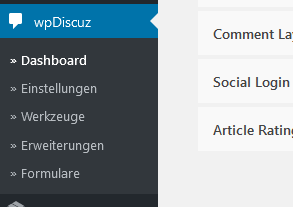
thank you very much for you feedback. I cannot find the Email tab. Here the screenshot in German, but I think you can handle this ;-). Does this tab have to be activated?
best regards
Süntke
Translate
▼
English
Spanish
French
German
Italian
Portuguese
Russian
Chinese
Japanese
Korean
Arabic
Hindi
Dutch
Polish
Turkish
Vietnamese
Thai
Swedish
Danish
Finnish
Norwegian
Czech
Hungarian
Romanian
Greek
Hebrew
Indonesian
Malay
Ukrainian
Bulgarian
Croatian
Slovak
Slovenian
Serbian
Lithuanian
Latvian
Estonian
Show original
Translating...
Oct 13, 2021 7:37 pm
(@suentke)
Active Member
Hi Asti,
The "Phrases" tab is missing as far as you've enabled the "Use Plugin .PO/.MO Files " option. Once you disable it, the phrases tab will appear again.
The option is located in the Dashboard > wpDiscuz > Settings > General Settings tab. More info here: https://wpdiscuz.com/docs/wpdiscuz-7/plugin-settings/general-settings/#use-plugin-po-mo-files
I'd also suggest you read this FAQ: https://wpdiscuz.com/community/f-a-q/how-to-translate-wpdiscuz/
Here is explained how to translate the wpDiscuz plugin.
So now I will check,
best regards
Süntke
Translate
▼
English
Spanish
French
German
Italian
Portuguese
Russian
Chinese
Japanese
Korean
Arabic
Hindi
Dutch
Polish
Turkish
Vietnamese
Thai
Swedish
Danish
Finnish
Norwegian
Czech
Hungarian
Romanian
Greek
Hebrew
Indonesian
Malay
Ukrainian
Bulgarian
Croatian
Slovak
Slovenian
Serbian
Lithuanian
Latvian
Estonian
Show original
Translating...
Oct 14, 2021 12:16 am
(@suentke)
Active Member
This can be closed, it is solved
thx Süntke
Super Globals
Options and Features