The effects of alcohol on
sustanon 250 leucine for – real weight loss & bodybuilding benefits?
✦
✦
✦
AI is analyzing the discussion...
(@asti)
Posts: 8284
Illustrious Member Support
Translate
▼
English
Spanish
French
German
Italian
Portuguese
Russian
Chinese
Japanese
Korean
Arabic
Hindi
Dutch
Polish
Turkish
Vietnamese
Thai
Swedish
Danish
Finnish
Norwegian
Czech
Hungarian
Romanian
Greek
Hebrew
Indonesian
Malay
Ukrainian
Bulgarian
Croatian
Slovak
Slovenian
Serbian
Lithuanian
Latvian
Estonian
Show original
Translating...
Hi,
The issue is fixed on your staging website. Somehow the comment_status was closed on your website. The developers have added the custom code in your active theme functions.php file. You'll need to insert it in the functions.php file.
Then add the CSS code in the "Custom CSS Code " textarea.
div#comments{display:block!important;}
In case you want to say thank you! 🙂 We'd really appreciate if you leave a good review on the plugin page. This is the best way to say thank you to this project and the support team.
Posted : 11/07/2024 2:09 pm
(@navisidhu)
Posts: 14
Active Member
Translate
▼
English
Spanish
French
German
Italian
Portuguese
Russian
Chinese
Japanese
Korean
Arabic
Hindi
Dutch
Polish
Turkish
Vietnamese
Thai
Swedish
Danish
Finnish
Norwegian
Czech
Hungarian
Romanian
Greek
Hebrew
Indonesian
Malay
Ukrainian
Bulgarian
Croatian
Slovak
Slovenian
Serbian
Lithuanian
Latvian
Estonian
Show original
Translating...
@asti Yes It works but.
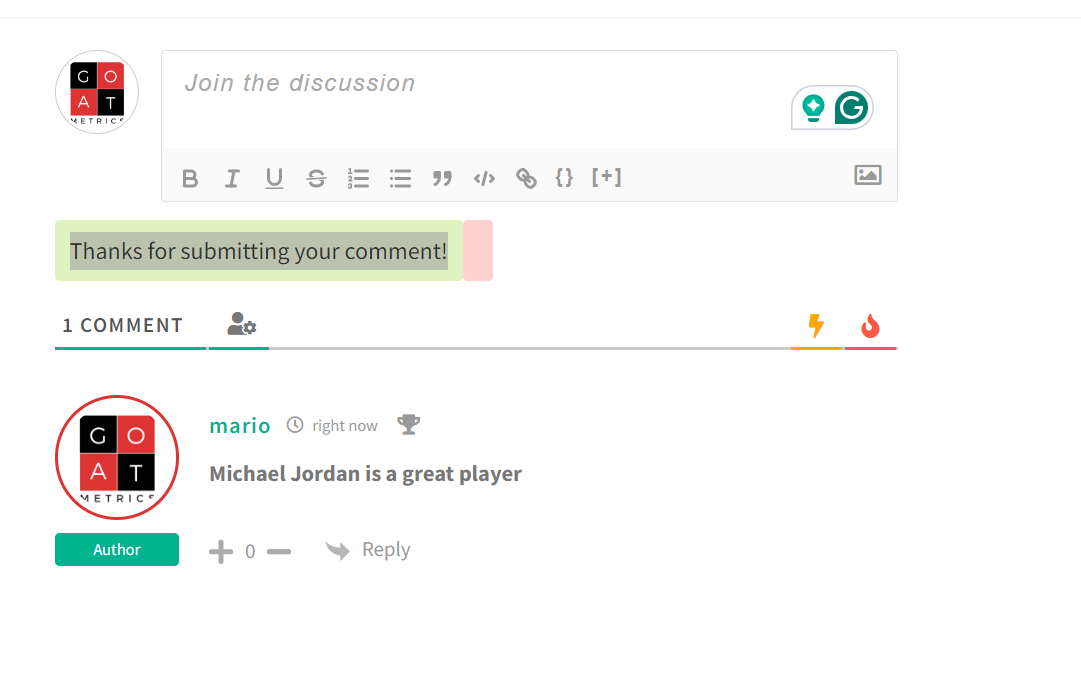
Thanks for submitting the comment is always showing here. It should show only after when the user added a comment.
Posted : 11/07/2024 11:27 pm
(@asti)
Posts: 8284
Illustrious Member Support
Translate
▼
English
Spanish
French
German
Italian
Portuguese
Russian
Chinese
Japanese
Korean
Arabic
Hindi
Dutch
Polish
Turkish
Vietnamese
Thai
Swedish
Danish
Finnish
Norwegian
Czech
Hungarian
Romanian
Greek
Hebrew
Indonesian
Malay
Ukrainian
Bulgarian
Croatian
Slovak
Slovenian
Serbian
Lithuanian
Latvian
Estonian
Show original
Translating...
@navisidhu
You've added the section using custom code, so the issue is related to that custom code. You should check the code and make sure it's correct.
Alternatively, you can use the built-in wpDiscuz "Redirect First Comment To" option. More information can be found here: https://wpdiscuz.com/docs/wpdiscuz-7/plugin-settings/general-settings/#redirect-first-comment-to
In case you want to say thank you! 🙂 We'd really appreciate if you leave a good review on the plugin page. This is the best way to say thank you to this project and the support team.
Posted : 12/07/2024 1:15 pm
(@navisidhu)
Posts: 14
Active Member
Translate
▼
English
Spanish
French
German
Italian
Portuguese
Russian
Chinese
Japanese
Korean
Arabic
Hindi
Dutch
Polish
Turkish
Vietnamese
Thai
Swedish
Danish
Finnish
Norwegian
Czech
Hungarian
Romanian
Greek
Hebrew
Indonesian
Malay
Ukrainian
Bulgarian
Croatian
Slovak
Slovenian
Serbian
Lithuanian
Latvian
Estonian
Show original
Translating...
@asti But the custom code section is used only for adding shortcode. Before it was using same thing, and the form is working good "Whithout showing -Thanks for submitting your comment" all time.
Please have a look again and fix it.
Posted : 13/07/2024 1:46 am
(@navisidhu)
Posts: 14
Active Member
Translate
▼
English
Spanish
French
German
Italian
Portuguese
Russian
Chinese
Japanese
Korean
Arabic
Hindi
Dutch
Polish
Turkish
Vietnamese
Thai
Swedish
Danish
Finnish
Norwegian
Czech
Hungarian
Romanian
Greek
Hebrew
Indonesian
Malay
Ukrainian
Bulgarian
Croatian
Slovak
Slovenian
Serbian
Lithuanian
Latvian
Estonian
Show original
Translating...
@asti I am waiting for your reply.
Apart from that, I need to know when I can setup the role permission, I want that only members can comment using this form, if another user try to fill the form then "Login" or "Register" option should show.
Posted : 17/07/2024 9:46 am
(@asti)
Posts: 8284
Illustrious Member Support
Translate
▼
English
Spanish
French
German
Italian
Portuguese
Russian
Chinese
Japanese
Korean
Arabic
Hindi
Dutch
Polish
Turkish
Vietnamese
Thai
Swedish
Danish
Finnish
Norwegian
Czech
Hungarian
Romanian
Greek
Hebrew
Indonesian
Malay
Ukrainian
Bulgarian
Croatian
Slovak
Slovenian
Serbian
Lithuanian
Latvian
Estonian
Show original
Translating...
@navisidhu
Please leave here the code you're using. I'll ask the developers to check it.
In case you want to say thank you! 🙂 We'd really appreciate if you leave a good review on the plugin page. This is the best way to say thank you to this project and the support team.
Posted : 17/07/2024 10:47 pm
(@navisidhu)
Posts: 14
Active Member
Translate
▼
English
Spanish
French
German
Italian
Portuguese
Russian
Chinese
Japanese
Korean
Arabic
Hindi
Dutch
Polish
Turkish
Vietnamese
Thai
Swedish
Danish
Finnish
Norwegian
Czech
Hungarian
Romanian
Greek
Hebrew
Indonesian
Malay
Ukrainian
Bulgarian
Croatian
Slovak
Slovenian
Serbian
Lithuanian
Latvian
Estonian
Show original
Translating...
[wpdiscuz_comments] I am using this shortcode
Posted : 20/07/2024 8:52 am
(@asti)
Posts: 8284
Illustrious Member Support
Translate
▼
English
Spanish
French
German
Italian
Portuguese
Russian
Chinese
Japanese
Korean
Arabic
Hindi
Dutch
Polish
Turkish
Vietnamese
Thai
Swedish
Danish
Finnish
Norwegian
Czech
Hungarian
Romanian
Greek
Hebrew
Indonesian
Malay
Ukrainian
Bulgarian
Croatian
Slovak
Slovenian
Serbian
Lithuanian
Latvian
Estonian
Show original
Translating...
@navisidhu
I mean the custom code you used for displaying the "Thanks for submitting your comment" message.
In case you want to say thank you! 🙂 We'd really appreciate if you leave a good review on the plugin page. This is the best way to say thank you to this project and the support team.
Posted : 20/07/2024 2:22 pm
(@navisidhu)
Posts: 14
Active Member
Translate
▼
English
Spanish
French
German
Italian
Portuguese
Russian
Chinese
Japanese
Korean
Arabic
Hindi
Dutch
Polish
Turkish
Vietnamese
Thai
Swedish
Danish
Finnish
Norwegian
Czech
Hungarian
Romanian
Greek
Hebrew
Indonesian
Malay
Ukrainian
Bulgarian
Croatian
Slovak
Slovenian
Serbian
Lithuanian
Latvian
Estonian
Show original
Translating...
@asti [wpdiscuz_comments] I only used this code, everything is automatically coming.
Before "Thanks for submitting your comments" was not showing everytime, It was only showing when customer submit the comments.
Now after your development team added some code in function.php, It is showing regularly. Kindly fix that glitch.
Posted : 22/07/2024 9:15 am
(@asti)
Posts: 8284
Illustrious Member Support
Translate
▼
English
Spanish
French
German
Italian
Portuguese
Russian
Chinese
Japanese
Korean
Arabic
Hindi
Dutch
Polish
Turkish
Vietnamese
Thai
Swedish
Danish
Finnish
Norwegian
Czech
Hungarian
Romanian
Greek
Hebrew
Indonesian
Malay
Ukrainian
Bulgarian
Croatian
Slovak
Slovenian
Serbian
Lithuanian
Latvian
Estonian
Show original
Translating...
Before "Thanks for submitting your comments" was not showing everytime, It was only showing when customer submit the comments.
wpDiscuz doesn't have such a feature. This is done through custom code. We need to know what code you have used.
In case you want to say thank you! 🙂 We'd really appreciate if you leave a good review on the plugin page. This is the best way to say thank you to this project and the support team.
Posted : 22/07/2024 2:27 pm
(@navisidhu)
Posts: 14
Active Member
Translate
▼
English
Spanish
French
German
Italian
Portuguese
Russian
Chinese
Japanese
Korean
Arabic
Hindi
Dutch
Polish
Turkish
Vietnamese
Thai
Swedish
Danish
Finnish
Norwegian
Czech
Hungarian
Romanian
Greek
Hebrew
Indonesian
Malay
Ukrainian
Bulgarian
Croatian
Slovak
Slovenian
Serbian
Lithuanian
Latvian
Estonian
Show original
Translating...
Hi @asti ,/wpdiscuz-comment-author-info/
Is it possible to show this information when user click on another user profile
Name Screen name Male/Female Age Hometown Current town Favorite sports team(s) (these should be boxes and they can put one at a time; if they put one, it allows them to add another, etc.) Favorite player(s) (these should be boxes and they can put one at a time and if they put one it allows them to add another etc. etc.) Avatar/photo Email
Here is the website, https://goatmetrics.com/
https://goatmetrics.com/subscribe-register/
I want when a user comment and other user will able to see his comment as well as profile which shows all above fields. Is it possible with any of your addon ?
Posted : 20/08/2024 12:33 am
(@tomson)
Posts: 516
Honorable Member Support
Translate
▼
English
Spanish
French
German
Italian
Portuguese
Russian
Chinese
Japanese
Korean
Arabic
Hindi
Dutch
Polish
Turkish
Vietnamese
Thai
Swedish
Danish
Finnish
Norwegian
Czech
Hungarian
Romanian
Greek
Hebrew
Indonesian
Malay
Ukrainian
Bulgarian
Croatian
Slovak
Slovenian
Serbian
Lithuanian
Latvian
Estonian
Show original
Translating...
Hi @navisidhu ,
I'm sorry but it's not possible. It only displays the default data of WordPress users.
Posted : 22/08/2024 11:08 am
Super Globals
Options and Features