


The effects of alcohol on sustanon 250 leucine for – real weight loss & bodybuilding benefits?
Search
Close
AI Search
Classic Search
 Search Phrase:
 Search Type:
Advanced search options
 Search in Forums:
 Search in date period:

 Sort Search Results by:

AI Assistant
Problem with the pl...
 
Notifications
Clear all

[Solved] Problem with the plugin

31 Posts
4 Users
0 Reactions
2,673 Views
(@shira1)
Posts: 32
Eminent Member
Topic starter
Translate
English
Spanish
French
German
Italian
Portuguese
Russian
Chinese
Japanese
Korean
Arabic
Hindi
Dutch
Polish
Turkish
Vietnamese
Thai
Swedish
Danish
Finnish
Norwegian
Czech
Hungarian
Romanian
Greek
Hebrew
Indonesian
Malay
Ukrainian
Bulgarian
Croatian
Slovak
Slovenian
Serbian
Lithuanian
Latvian
Estonian
 

@asti please see this:

ERROR WPDISCUZ

 
Posted : 13/09/2021 5:53 pm
(@shira1)
Posts: 32
Eminent Member
Topic starter
Translate
English
Spanish
French
German
Italian
Portuguese
Russian
Chinese
Japanese
Korean
Arabic
Hindi
Dutch
Polish
Turkish
Vietnamese
Thai
Swedish
Danish
Finnish
Norwegian
Czech
Hungarian
Romanian
Greek
Hebrew
Indonesian
Malay
Ukrainian
Bulgarian
Croatian
Slovak
Slovenian
Serbian
Lithuanian
Latvian
Estonian
 

@asti It's says that the value must be 3 or bigger than 3


Posted : 13/09/2021 5:54 pm
Asti
 Asti
(@asti)
Posts: 8259
Illustrious Member Support
Translate
English
Spanish
French
German
Italian
Portuguese
Russian
Chinese
Japanese
Korean
Arabic
Hindi
Dutch
Polish
Turkish
Vietnamese
Thai
Swedish
Danish
Finnish
Norwegian
Czech
Hungarian
Romanian
Greek
Hebrew
Indonesian
Malay
Ukrainian
Bulgarian
Croatian
Slovak
Slovenian
Serbian
Lithuanian
Latvian
Estonian
 

@shira1,

this is just the RTL conflict. Simply the labels are messed due to RTL. Just change the next value. 


In case you want to say thank you! 🙂
We'd really appreciate if you leave a good review on the plugin page.
This is the best way to say thank you to this project and the support team.

 
Posted : 13/09/2021 6:14 pm
(@shira1)
Posts: 32
Eminent Member
Topic starter
Translate
English
Spanish
French
German
Italian
Portuguese
Russian
Chinese
Japanese
Korean
Arabic
Hindi
Dutch
Polish
Turkish
Vietnamese
Thai
Swedish
Danish
Finnish
Norwegian
Czech
Hungarian
Romanian
Greek
Hebrew
Indonesian
Malay
Ukrainian
Bulgarian
Croatian
Slovak
Slovenian
Serbian
Lithuanian
Latvian
Estonian

 

@asti I didn't understand what to do, can you explain me pls?


Posted : 13/09/2021 9:07 pm
Asti
 Asti
(@asti)
Posts: 8259
Illustrious Member Support
Translate
English
Spanish
French
German
Italian
Portuguese
Russian
Chinese
Japanese
Korean
Arabic
Hindi
Dutch
Polish
Turkish
Vietnamese
Thai
Swedish
Danish
Finnish
Norwegian
Czech
Hungarian
Romanian
Greek
Hebrew
Indonesian
Malay
Ukrainian
Bulgarian
Croatian
Slovak
Slovenian
Serbian
Lithuanian
Latvian
Estonian
 

You should change the max value instead of min. 

The names of the labels were changed due to RTL. 


In case you want to say thank you! 🙂
We'd really appreciate if you leave a good review on the plugin page.
This is the best way to say thank you to this project and the support team.

 
Posted : 14/09/2021 10:09 am
(@shira1)
Posts: 32
Eminent Member
Topic starter
Translate
English
Spanish
French
German
Italian
Portuguese
Russian
Chinese
Japanese
Korean
Arabic
Hindi
Dutch
Polish
Turkish
Vietnamese
Thai
Swedish
Danish
Finnish
Norwegian
Czech
Hungarian
Romanian
Greek
Hebrew
Indonesian
Malay
Ukrainian
Bulgarian
Croatian
Slovak
Slovenian
Serbian
Lithuanian
Latvian
Estonian
 

@asti It worked! Thank you so much. 

I have a few more problems and I would love for you to help me with them:

1. How do I change the font of the response text and the font of the button?

2. When typing an email in the field of the email, notes appear while typing such as: "You need to type @ in the email" etc. How do you get rid of these notes?

3. I do not want the site to "remember" the respondent's details, so in a situation where the user goes between different posts on the site, I want him to re-type his name and his email each time. The same goes for when the user enters the site on another day and wants to comment on a post, I do not want the site to display his name and email address that he filled in on another day on the site. That's how it is now and I want to change that.

4. When the user presses the "comment" button (even in a situation where he wants to respond to someone else), how do you create a cancel option button?

5. While clicking on the fields, the boxes getting black stroke, how do you change the the color? I did not find the option in the styling options.

Thank you!!


Posted : 15/09/2021 12:18 am
Asti
 Asti
(@asti)
Posts: 8259
Illustrious Member Support
Translate
English
Spanish
French
German
Italian
Portuguese
Russian
Chinese
Japanese
Korean
Arabic
Hindi
Dutch
Polish
Turkish
Vietnamese
Thai
Swedish
Danish
Finnish
Norwegian
Czech
Hungarian
Romanian
Greek
Hebrew
Indonesian
Malay
Ukrainian
Bulgarian
Croatian
Slovak
Slovenian
Serbian
Lithuanian
Latvian
Estonian
 

@shira1,

1. How do I change the font of the response text and the font of the button?

You should use CSS code. 

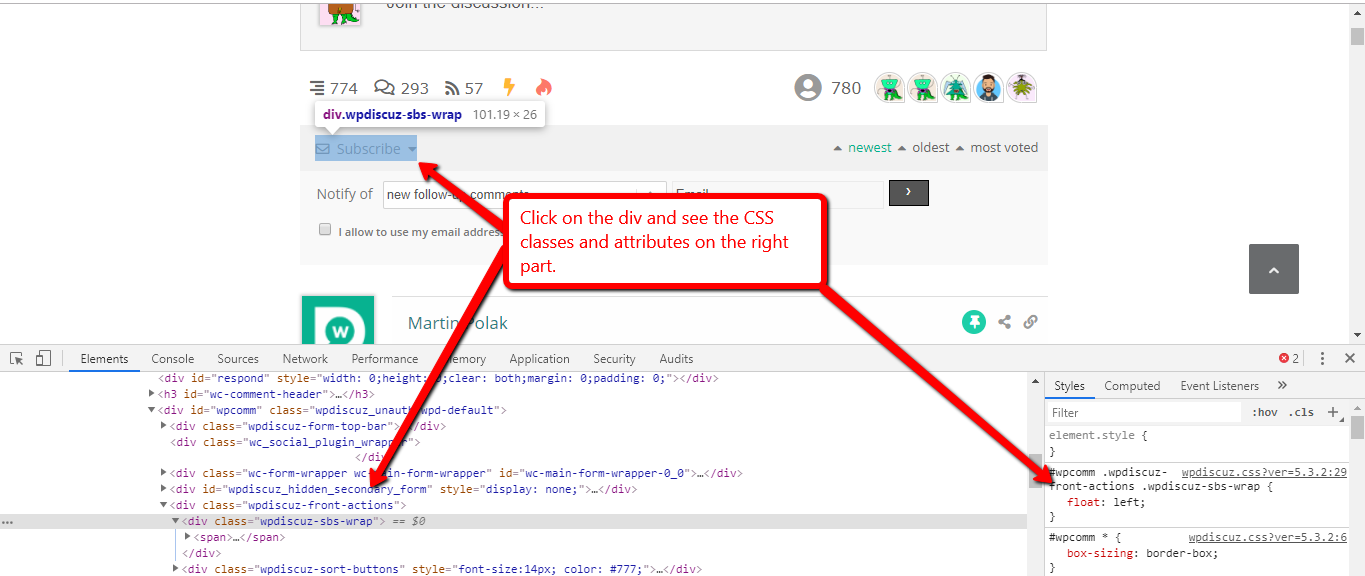
You can find all classes by pressing F12 on the browser and opening Chrome or Firefox Console, it'll help you easily write CSS rules you need to customize. 

CSS

This website should help you to write CSS rules:      https://www.w3schools.com/cssref/default.asp

2. When typing an email in the field of the email, notes appear while typing such as: "You need to type @ in the email" etc. How do you get rid of these notes?

Each email address must contain the @ symbol. 

 I do not want the site to "remember" the respondent's details, so in a situation where the user goes between different posts on the site, I want him to re-type his name and his email each time.

wpDiscuz doesn't have such a feature. 

The same goes for when the user enters the site on another day and wants to comment on a post, I do not want the site to display his name and email address that he filled in on another day on the site. That's how it is now and I want to change that.

Here you can use the "Keep guest commenter credentials in browser cookies for X days" option. Set the value of option 0. More info here: https://wpdiscuz.com/docs/wpdiscuz-7/plugin-settings/comment-form/#keep-guest-commenter-credentials-in-browser-cookies-for-x-days

4. When the user presses the "comment" button (even in a situation where he wants to respond to someone else), how do you create a cancel option button?

I'm really sorry, but wpDiscuz doesn't have such a feature. 

5. While clicking on the fields, the boxes getting black stroke, how do you change the the color?

Here you should use the CSS code as well. 


In case you want to say thank you! 🙂
We'd really appreciate if you leave a good review on the plugin page.
This is the best way to say thank you to this project and the support team.

 
Posted : 15/09/2021 12:31 pm
(@shira1)
Posts: 32
Eminent Member
Topic starter
Translate
English
Spanish
French
German
Italian
Portuguese
Russian
Chinese
Japanese
Korean
Arabic
Hindi
Dutch
Polish
Turkish
Vietnamese
Thai
Swedish
Danish
Finnish
Norwegian
Czech
Hungarian
Romanian
Greek
Hebrew
Indonesian
Malay
Ukrainian
Bulgarian
Croatian
Slovak
Slovenian
Serbian
Lithuanian
Latvian
Estonian
 

@asti About 2: I know that every email should contain @, I just don't want that will apear notes while the user types his email. 

About 4: I want to create a "cancle" button that allows the user to close the comment option

CANCEL BUTTON

like there is in your website. I send you a screenshot from your website:


Posted : 15/09/2021 2:09 pm
Asti
 Asti
(@asti)
Posts: 8259
Illustrious Member Support
Translate
English
Spanish
French
German
Italian
Portuguese
Russian
Chinese
Japanese
Korean
Arabic
Hindi
Dutch
Polish
Turkish
Vietnamese
Thai
Swedish
Danish
Finnish
Norwegian
Czech
Hungarian
Romanian
Greek
Hebrew
Indonesian
Malay
Ukrainian
Bulgarian
Croatian
Slovak
Slovenian
Serbian
Lithuanian
Latvian
Estonian
 

@shira1,

About 2: I know that every email should contain @, I just don't want that will apear notes while the user types his email. 

Please read how the system works. If the user fills his email address incorrectly the message will be displayed after he/she clicks on the "Post Comment" button. The message will be kept until the user fills @ symbol. This can't be fixed by the wpDiscuz side. This validation is being made by the browser.

About 4: I want to create a "cancle" button that allows the user to close the comment option

As I've already mentioned wpDiscuz doesn't have such an option. There is not any solution we can provide you. 


In case you want to say thank you! 🙂
We'd really appreciate if you leave a good review on the plugin page.
This is the best way to say thank you to this project and the support team.

 
Posted : 15/09/2021 4:21 pm
(@shira1)
Posts: 32
Eminent Member
Topic starter
Translate
English
Spanish
French
German
Italian
Portuguese
Russian
Chinese
Japanese
Korean
Arabic
Hindi
Dutch
Polish
Turkish
Vietnamese
Thai
Swedish
Danish
Finnish
Norwegian
Czech
Hungarian
Romanian
Greek
Hebrew
Indonesian
Malay
Ukrainian
Bulgarian
Croatian
Slovak
Slovenian
Serbian
Lithuanian
Latvian
Estonian
 

@asti About 2: The message appeared even before the user finished typing his email. Now I saw that it was gone somehow. 


About 4: So how you created the cancel button? Your comment system in this forum is not built with the wpdiscuz plugin? 


Posted : 16/09/2021 11:05 pm
Asti
 Asti
(@asti)
Posts: 8259
Illustrious Member Support
Translate
English
Spanish
French
German
Italian
Portuguese
Russian
Chinese
Japanese
Korean
Arabic
Hindi
Dutch
Polish
Turkish
Vietnamese
Thai
Swedish
Danish
Finnish
Norwegian
Czech
Hungarian
Romanian
Greek
Hebrew
Indonesian
Malay
Ukrainian
Bulgarian
Croatian
Slovak
Slovenian
Serbian
Lithuanian
Latvian
Estonian
 

@shira1,

About 4: So how you created the cancel button? Your comment system in this forum is not built with the wpdiscuz plugin? 

You've already been answered in the post above. No, here we use the wpForo forum plugin. Those are not the same. wpDiscuz is a commenting plugin. wpForo is a forum plugin. 


In case you want to say thank you! 🙂
We'd really appreciate if you leave a good review on the plugin page.
This is the best way to say thank you to this project and the support team.

 
Posted : 17/09/2021 11:25 am
(@shira1)
Posts: 32
Eminent Member
Topic starter
Translate
English
Spanish
French
German
Italian
Portuguese
Russian
Chinese
Japanese
Korean
Arabic
Hindi
Dutch
Polish
Turkish
Vietnamese
Thai
Swedish
Danish
Finnish
Norwegian
Czech
Hungarian
Romanian
Greek
Hebrew
Indonesian
Malay
Ukrainian
Bulgarian
Croatian
Slovak
Slovenian
Serbian
Lithuanian
Latvian
Estonian
 

@asti What's the difference between the 2 plugins?


Posted : 19/09/2021 1:02 am
Asti
 Asti
(@asti)
Posts: 8259
Illustrious Member Support
Translate
English
Spanish
French
German
Italian
Portuguese
Russian
Chinese
Japanese
Korean
Arabic
Hindi
Dutch
Polish
Turkish
Vietnamese
Thai
Swedish
Danish
Finnish
Norwegian
Czech
Hungarian
Romanian
Greek
Hebrew
Indonesian
Malay
Ukrainian
Bulgarian
Croatian
Slovak
Slovenian
Serbian
Lithuanian
Latvian
Estonian
 

@shira1,

The wpDiscuz is a commenting plugin. It uses for adding a discussion under the post, page, etc,

The wpForo is a forum plugin. It can be used for the communities, support forums, etc.  


In case you want to say thank you! 🙂
We'd really appreciate if you leave a good review on the plugin page.
This is the best way to say thank you to this project and the support team.

 
Posted : 20/09/2021 9:01 am
(@shira1)
Posts: 32
Eminent Member
Topic starter
Translate
English
Spanish
French
German
Italian
Portuguese
Russian
Chinese
Japanese
Korean
Arabic
Hindi
Dutch
Polish
Turkish
Vietnamese
Thai
Swedish
Danish
Finnish
Norwegian
Czech
Hungarian
Romanian
Greek
Hebrew
Indonesian
Malay
Ukrainian
Bulgarian
Croatian
Slovak
Slovenian
Serbian
Lithuanian
Latvian
Estonian
 

@asti Got it. So in your opinion if I want people to comment my posts, what is the right plugin for me?


Posted : 23/09/2021 12:24 am
Asti
 Asti
(@asti)
Posts: 8259
Illustrious Member Support
Translate
English
Spanish
French
German
Italian
Portuguese
Russian
Chinese
Japanese
Korean
Arabic
Hindi
Dutch
Polish
Turkish
Vietnamese
Thai
Swedish
Danish
Finnish
Norwegian
Czech
Hungarian
Romanian
Greek
Hebrew
Indonesian
Malay
Ukrainian
Bulgarian
Croatian
Slovak
Slovenian
Serbian
Lithuanian
Latvian
Estonian
 

@shira1,

The wpDiscuz plugin is necessary for you.  


In case you want to say thank you! 🙂
We'd really appreciate if you leave a good review on the plugin page.
This is the best way to say thank you to this project and the support team.

 
Posted : 23/09/2021 12:56 pm
Page 2 / 3