Hello, I’m trying to make wpDiscuz work with Web 2.0 directory plugin for commenting listings. There’s an incompatibility issue that has been discussed and solved here https://codecanyon.net/comments/17690419 . The fix doesn’t work any more. To be short, wpDiscuz doesn't show commenting form, only the panel with number of comments and settings link.
Could you please send the admin login details to info[at]gvectors.com email address? I'll ask the developers to check the issue for you.
In case you want to say thank you! 🙂 We'd really appreciate if you leave a good review on the plugin page. This is the best way to say thank you to this project and the support team.
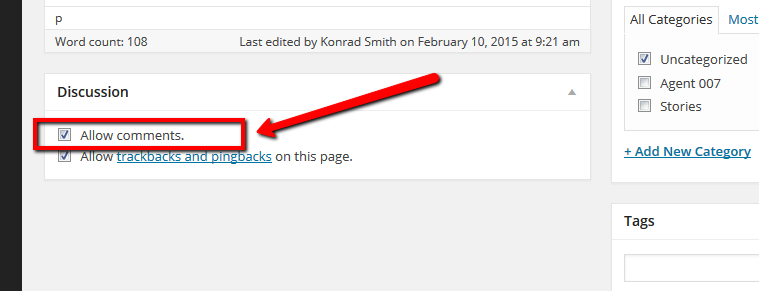
Once we enable the “Allow Comments” option, the comment form appears again.
However, somehow there are two comment forms. This may come from the active theme. We may suggest you using this CSS code:
.comment-box-wrap {
      display: none;
}
It'll hide the second one. Put the code in the Top Admin Bar > Customize > Additional CSS > "Additional CSS" textarea, save it, delete all caches and check again.
Please don't forget to press Ctrl+F5 (twice) on the frontend before checking.
In case you want to say thank you! 🙂 We'd really appreciate if you leave a good review on the plugin page. This is the best way to say thank you to this project and the support team.
try to add the CSS code and check it. If it hides the comment form on other sections, let us know. We'll provide another CSS code.
In case you want to say thank you! 🙂 We'd really appreciate if you leave a good review on the plugin page. This is the best way to say thank you to this project and the support team.
In case you want to say thank you! 🙂 We'd really appreciate if you leave a good review on the plugin page. This is the best way to say thank you to this project and the support team.