Hello, I need some help. When I first added on WPDiscuz, I tested everything, and the comments were working properly. However, a user informed me that it is not working now. I also tested it and found I had the same issue as the user. We try to leave a name/email and comment, but nothing happens. Only some bars up on the corner flash that it is "thinking" and then stop, and nothing has been submitted - it's like the submit button does nothing. Please advise!
Hi, Asti, apologies for the delay. I had other website issues that took precendence over solving this one. Now that they are fixed I'm back to troubleshooting this one. I enabled the option "Use WordPress native AJAX functions" and tried again, but it is still doing the same thing - it has the thinking bars in the corner, and then in some browsers a pop-up with a portion of my website with the Login button pops up and then disappears after like 5 seconds. I double checked my WP setting for discussion to ensure that a guest only needs to give their name and email to be able to post a comment. Also, the rating feature works fine, it is just the commenting portion that is not working. Thanks for any light you can shed on the issue.
@asti Okay, I went to LiteSpeed cache and tried "Purge All" to clear the caches, and I also cleared my browser caches, and the error is still happening.
Something is blocking the native WordPress admin-ajax.php file, as well as wpDiscuz AJAX requests.
Please check your security plugin settings and make sure they’re not blocking WordPress AJAX. This could also be blocked by your .htaccess file.
If none of your plugins are causing the issue, please contact your hosting provider and ask them to check access to the admin-ajax.php file. This can also be restricted on the server side.
@asti I reviewed my security plug-in and didn't find anything that would block the WordPress AJAX as well as the .htaccess file.
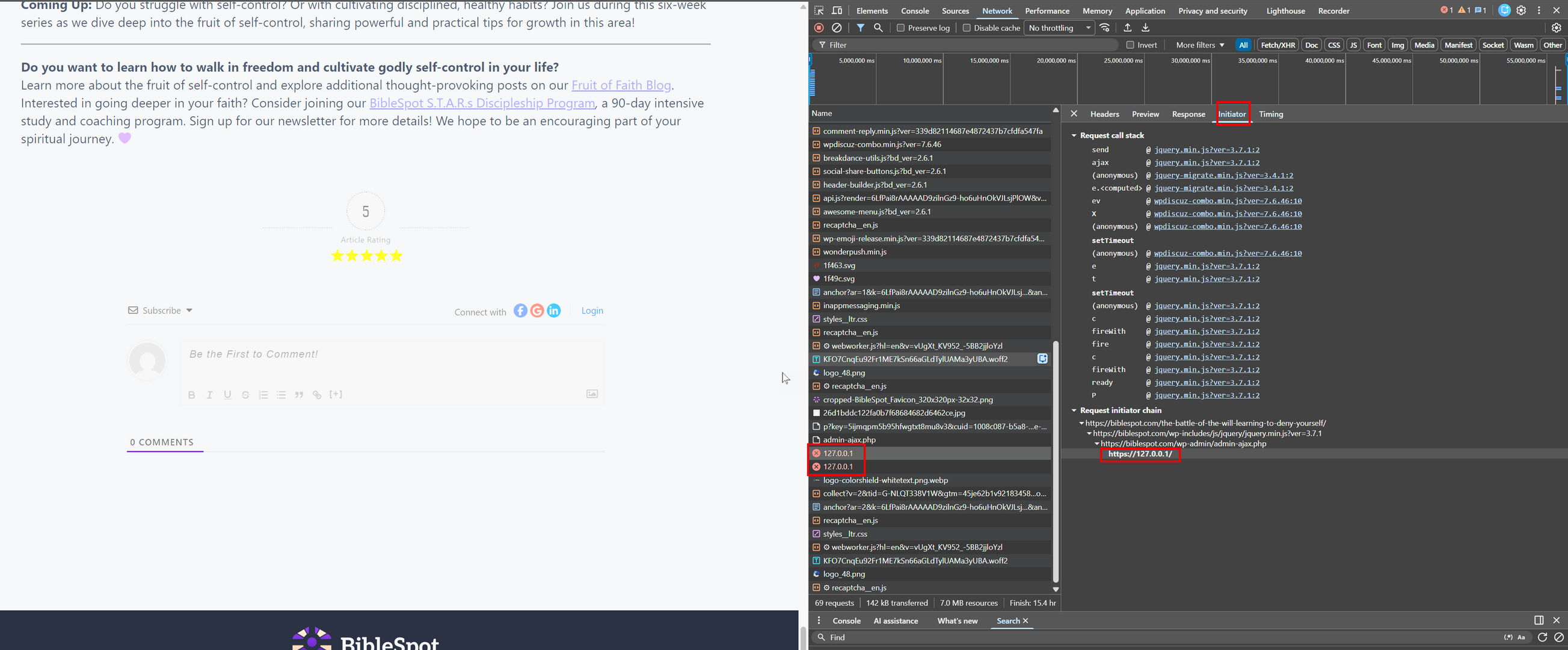
I ran a lengthy session with the Hostinger AI troubleshooter, Kodee. She had me use the browser's DevTools Network to see what was happening. Somehow, it is calling the request from my local server URL instead of my webpage.
Rochelle — if Origin is missing and the initiator is just jquery.min.js, that usually means some inline script/plugin code is calling$.ajax("https://127.0.0.1/") (jQuery is only the transport, not the source).
Rochelle — that pins it towpDiscuz’s JS bundle, so the127.0.0.1URL is beingfed into wpDiscuz as its AJAX/API endpoint(it doesn’t originate from jQuery).
Next steps (one path at a time):
Find the localized wpDiscuz config on the page: View source → search forwpdiscuz/wpcd/ajaxurl/admin-ajax.phpand paste the JS object near it (it should contain the URL wpDiscuz uses).
Clear all caches: purgeLiteSpeed Cache+ any minify/combination cache, then hard refresh (Ctrl/Cmd+Shift+R). Combined scripts can keep old endpoints.
If it still uses127.0.0.1, the endpoint is being altered by a URL filter or config mismatch—most commonly:
WP_HOME/WP_SITEURLinwp-config.php
home/siteurlinwp_options
a plugin filteringhome_url()/site_url()(MU-plugins are prime suspects)
If you paste the wpDiscuz config object from page source, I’ll tell you exactly which WordPress value is wrong (and where to correct it).
I'm not sure exactly what she is asking for in step 1, and I was wondering if you or someone with more coding/development experience than I have (which is none) could help me figure out what the JS object is or how to find it? I have been reviewing my files and databases for any instances of 127.0.0.1 and haven't found anything so far that would be misrouting the URL to the local host instead of my website. Any light you can shed on this issue is greatly appreciated! Including my DevTools screenshot for you.
There are some hardcoded parts of the wpDiscuz plugin on your website, so we cannot properly check the problem on your live site. Please create a development/staging copy of your website on a subdomain and send the admin login details to info[at]gvectors.com so we can investigate the issue.
You can use the Duplicator plugin to create the staging site.
The issue with commenting might be related to the membership plugin you are using, since the admin is able to post comments. However, as I already mentioned, it is too difficult to perform proper testing on the live website. You can try deactivating the membership plugin and check if the issue still exists.
@asti Hello again! Thank you for trying to troubleshoot my website. I was actually doing some more troubleshooting today on a separate issue and was able to determine (with Hostinger AI Kodee's help) that 2 of my plugins were conflicting and getting in the way of WP Discuz working effectively — Bit Integrations and AIOS. When I deactivated them, it worked like a champ! I don't think I need Bit Integrations any longer. And I completely uninstalled the security app and will check the security settings one by one when I reinstall to ensure it isn't interfering with commenting. Thanks for your help! You can close out this ticket! 🙂