The effects of alcohol on
sustanon 250 leucine for – real weight loss & bodybuilding benefits?
[Solved] The plugin is not displayed on the page.
✦
✦
✦
AI is analyzing the discussion...
Translate
▼
English
Spanish
French
German
Italian
Portuguese
Russian
Chinese
Japanese
Korean
Arabic
Hindi
Dutch
Polish
Turkish
Vietnamese
Thai
Swedish
Danish
Finnish
Norwegian
Czech
Hungarian
Romanian
Greek
Hebrew
Indonesian
Malay
Ukrainian
Bulgarian
Croatian
Slovak
Slovenian
Serbian
Lithuanian
Latvian
Estonian
Show original
Translating...
Jun 26, 2020 7:10 pm
(@cytrynka)
Active Member
Hi.
Support
Translate
▼
English
Spanish
French
German
Italian
Portuguese
Russian
Chinese
Japanese
Korean
Arabic
Hindi
Dutch
Polish
Turkish
Vietnamese
Thai
Swedish
Danish
Finnish
Norwegian
Czech
Hungarian
Romanian
Greek
Hebrew
Indonesian
Malay
Ukrainian
Bulgarian
Croatian
Slovak
Slovenian
Serbian
Lithuanian
Latvian
Estonian
Show original
Translating...
Jun 29, 2020 1:16 pm
(@asti)
Illustrious Member
Hi @cytrynka ,
Please check each point mentioned in this doc and leave some feedback for each one: https://wpdiscuz.com/docs/wpdiscuz-7/getting-started/missing-comment-form/
(@cytrynka)
Active Member
Posts: 5
Jun 29, 2020 2:17 pm
Translate
▼
English
Spanish
French
German
Italian
Portuguese
Russian
Chinese
Japanese
Korean
Arabic
Hindi
Dutch
Polish
Turkish
Vietnamese
Thai
Swedish
Danish
Finnish
Norwegian
Czech
Hungarian
Romanian
Greek
Hebrew
Indonesian
Malay
Ukrainian
Bulgarian
Croatian
Slovak
Slovenian
Serbian
Lithuanian
Latvian
Estonian
Show original
Translating...
@asti Thank you for the hint. I did everything right according to the instructions. Unfortunately, still not working. As I mentioned, I do not know WordPress.The site was created a long time ago by someone else. . However, I will have to opt out of this plugin and uninstall it from my site, because I will not do tips 5 and 6 myself.
(@asti)
Illustrious Member
Posts: 8365
Jun 29, 2020 4:03 pm
Translate
▼
English
Spanish
French
German
Italian
Portuguese
Russian
Chinese
Japanese
Korean
Arabic
Hindi
Dutch
Polish
Turkish
Vietnamese
Thai
Swedish
Danish
Finnish
Norwegian
Czech
Hungarian
Romanian
Greek
Hebrew
Indonesian
Malay
Ukrainian
Bulgarian
Croatian
Slovak
Slovenian
Serbian
Lithuanian
Latvian
Estonian
Show original
Translating...
@cytrynka ,
Please send the admin login details to info[at]gvectors.com email address. I'll aks the developers to check the issue for you.
(@cytrynka)
Active Member
Posts: 5
Jun 29, 2020 4:36 pm
Translate
▼
English
Spanish
French
German
Italian
Portuguese
Russian
Chinese
Japanese
Korean
Arabic
Hindi
Dutch
Polish
Turkish
Vietnamese
Thai
Swedish
Danish
Finnish
Norwegian
Czech
Hungarian
Romanian
Greek
Hebrew
Indonesian
Malay
Ukrainian
Bulgarian
Croatian
Slovak
Slovenian
Serbian
Lithuanian
Latvian
Estonian
Show original
Translating...
@asti Thank you. I sent an email. 🙂
(@asti)
Illustrious Member
Posts: 8365
Jun 29, 2020 4:37 pm
Translate
▼
English
Spanish
French
German
Italian
Portuguese
Russian
Chinese
Japanese
Korean
Arabic
Hindi
Dutch
Polish
Turkish
Vietnamese
Thai
Swedish
Danish
Finnish
Norwegian
Czech
Hungarian
Romanian
Greek
Hebrew
Indonesian
Malay
Ukrainian
Bulgarian
Croatian
Slovak
Slovenian
Serbian
Lithuanian
Latvian
Estonian
Show original
Translating...
@cytrynka ,
please leave the email subject here, to allow us easily find it.
(@cytrynka)
Active Member
Posts: 5
Jun 29, 2020 4:39 pm
Translate
▼
English
Spanish
French
German
Italian
Portuguese
Russian
Chinese
Japanese
Korean
Arabic
Hindi
Dutch
Polish
Turkish
Vietnamese
Thai
Swedish
Danish
Finnish
Norwegian
Czech
Hungarian
Romanian
Greek
Hebrew
Indonesian
Malay
Ukrainian
Bulgarian
Croatian
Slovak
Slovenian
Serbian
Lithuanian
Latvian
Estonian
Show original
Translating...
@asti Email subject: ,,The plugin is not displayed on the page '' at the request of ASTI
(@asti)
Illustrious Member
Posts: 8365
Jun 29, 2020 5:36 pm
Translate
▼
English
Spanish
French
German
Italian
Portuguese
Russian
Chinese
Japanese
Korean
Arabic
Hindi
Dutch
Polish
Turkish
Vietnamese
Thai
Swedish
Danish
Finnish
Norwegian
Czech
Hungarian
Romanian
Greek
Hebrew
Indonesian
Malay
Ukrainian
Bulgarian
Croatian
Slovak
Slovenian
Serbian
Lithuanian
Latvian
Estonian
Show original
Translating...
@cytrynka ,
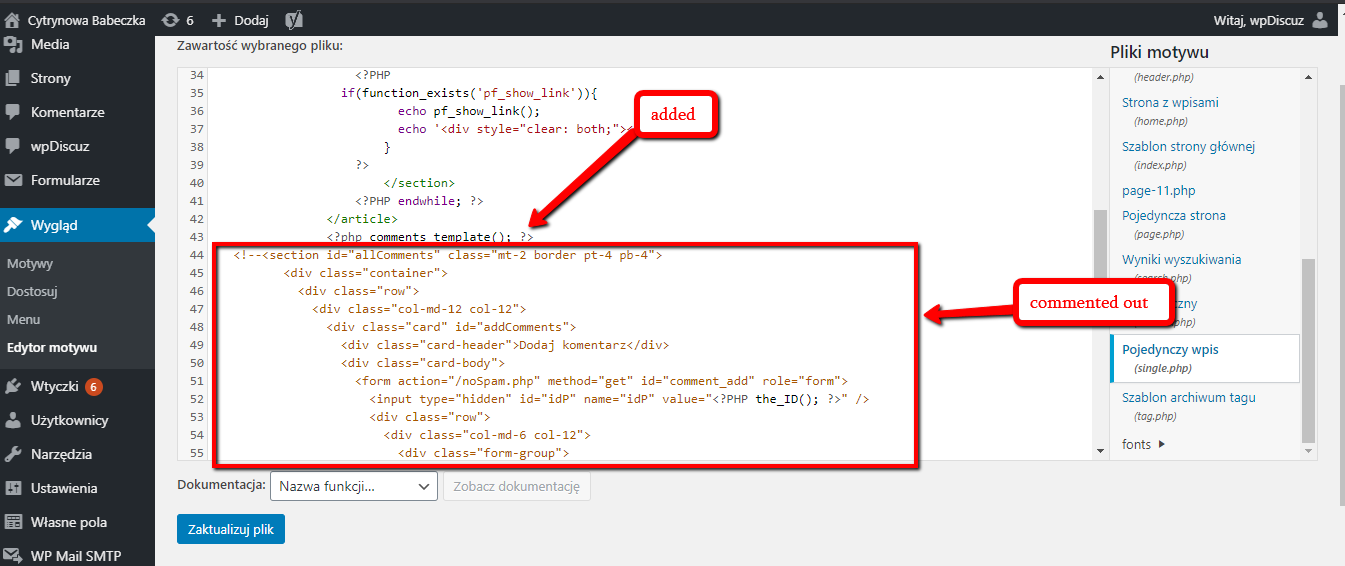
The issue comes from the active theme. It doesn't use the core (native) Wordpress comments_template() function, thus the wpDiscuz can't be loaded.
The issue is fixed by our developers. The developers have commented out the lines from 44 to 87. Then they've added the <?php comments_template(); ?> to call the comment form.
This is done for the post type in the single.php file.
See how it looks now on the post types:
https://cytrynowababeczka.pl/domowe/testowo-07/
If you want to enable it for other post types just do as I described before.
(@cytrynka)
Active Member
Posts: 5
Jun 29, 2020 5:41 pm
Translate
▼
English
Spanish
French
German
Italian
Portuguese
Russian
Chinese
Japanese
Korean
Arabic
Hindi
Dutch
Polish
Turkish
Vietnamese
Thai
Swedish
Danish
Finnish
Norwegian
Czech
Hungarian
Romanian
Greek
Hebrew
Indonesian
Malay
Ukrainian
Bulgarian
Croatian
Slovak
Slovenian
Serbian
Lithuanian
Latvian
Estonian
Show original
Translating...
@asti Thank you very much for your help. You are cool 🙂
Super Globals
Options and Features