The effects of alcohol on
sustanon 250 leucine for – real weight loss & bodybuilding benefits?
[Solved] reCaptcha validation fails. Error code connection failed
✦
✦
✦
AI is analyzing the discussion...
(@dima)
Posts: 9
Active Member
Translate
▼
English
Spanish
French
German
Italian
Portuguese
Russian
Chinese
Japanese
Korean
Arabic
Hindi
Dutch
Polish
Turkish
Vietnamese
Thai
Swedish
Danish
Finnish
Norwegian
Czech
Hungarian
Romanian
Greek
Hebrew
Indonesian
Malay
Ukrainian
Bulgarian
Croatian
Slovak
Slovenian
Serbian
Lithuanian
Latvian
Estonian
Show original
Translating...
[#719]
Posted : 19/08/2020 8:52 pm
(@tomson)
Posts: 517
Honorable Member Support
Translate
▼
English
Spanish
French
German
Italian
Portuguese
Russian
Chinese
Japanese
Korean
Arabic
Hindi
Dutch
Polish
Turkish
Vietnamese
Thai
Swedish
Danish
Finnish
Norwegian
Czech
Hungarian
Romanian
Greek
Hebrew
Indonesian
Malay
Ukrainian
Bulgarian
Croatian
Slovak
Slovenian
Serbian
Lithuanian
Latvian
Estonian
Show original
Translating...
Hi @dima ,
This kind of issues come from incorrect reCAPTCHA configuration. I'd recommend delete the API keys and create new one. Make sure you're creating API Keys for reCAPTCHA version 2 and "I'm not a robot" checkbox. Then insert the new keys in according fields. Don't forget to delete all caches and Autoptimizer cache before checking.
If the issue is still not fixed please read this FAQ topic: https://wpdiscuz.com/community/f-a-q/recaptcha-validation-fails-error-code-invalid-json-2/
Posted : 19/08/2020 8:59 pm
(@dima)
Posts: 9
Active Member
Translate
▼
English
Spanish
French
German
Italian
Portuguese
Russian
Chinese
Japanese
Korean
Arabic
Hindi
Dutch
Polish
Turkish
Vietnamese
Thai
Swedish
Danish
Finnish
Norwegian
Czech
Hungarian
Romanian
Greek
Hebrew
Indonesian
Malay
Ukrainian
Bulgarian
Croatian
Slovak
Slovenian
Serbian
Lithuanian
Latvian
Estonian
Show original
Translating...
Posted : 19/08/2020 9:11 pm
(@dima)
Posts: 9
Active Member
Translate
▼
English
Spanish
French
German
Italian
Portuguese
Russian
Chinese
Japanese
Korean
Arabic
Hindi
Dutch
Polish
Turkish
Vietnamese
Thai
Swedish
Danish
Finnish
Norwegian
Czech
Hungarian
Romanian
Greek
Hebrew
Indonesian
Malay
Ukrainian
Bulgarian
Croatian
Slovak
Slovenian
Serbian
Lithuanian
Latvian
Estonian
Show original
Translating...
@tomson . Tried everything that is advised on the forum.
Posted : 19/08/2020 9:14 pm
(@tomson)
Posts: 517
Honorable Member Support
Translate
▼
English
Spanish
French
German
Italian
Portuguese
Russian
Chinese
Japanese
Korean
Arabic
Hindi
Dutch
Polish
Turkish
Vietnamese
Thai
Swedish
Danish
Finnish
Norwegian
Czech
Hungarian
Romanian
Greek
Hebrew
Indonesian
Malay
Ukrainian
Bulgarian
Croatian
Slovak
Slovenian
Serbian
Lithuanian
Latvian
Estonian
Show original
Translating...
@dima ,
Please let me know all what have you done one by one.
Posted : 19/08/2020 9:14 pm
(@tomson)
Posts: 517
Honorable Member Support
Translate
▼
English
Spanish
French
German
Italian
Portuguese
Russian
Chinese
Japanese
Korean
Arabic
Hindi
Dutch
Polish
Turkish
Vietnamese
Thai
Swedish
Danish
Finnish
Norwegian
Czech
Hungarian
Romanian
Greek
Hebrew
Indonesian
Malay
Ukrainian
Bulgarian
Croatian
Slovak
Slovenian
Serbian
Lithuanian
Latvian
Estonian
Show original
Translating...
@dima ,
I see it works fine.
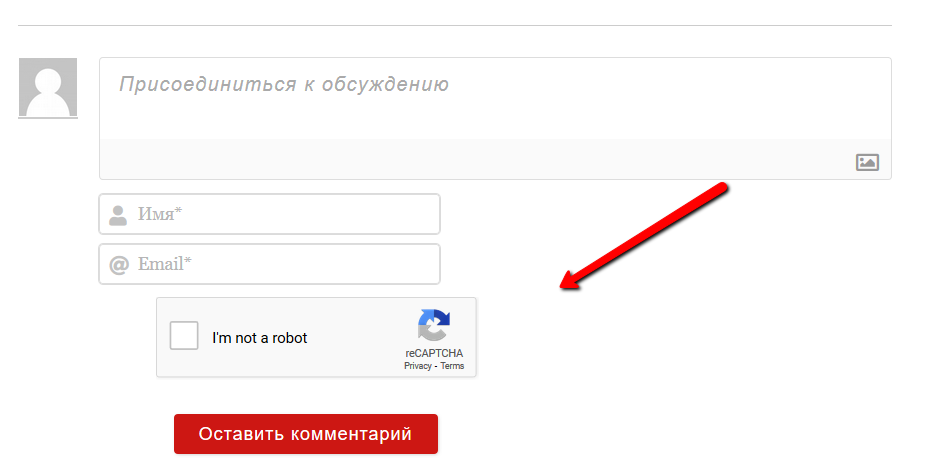
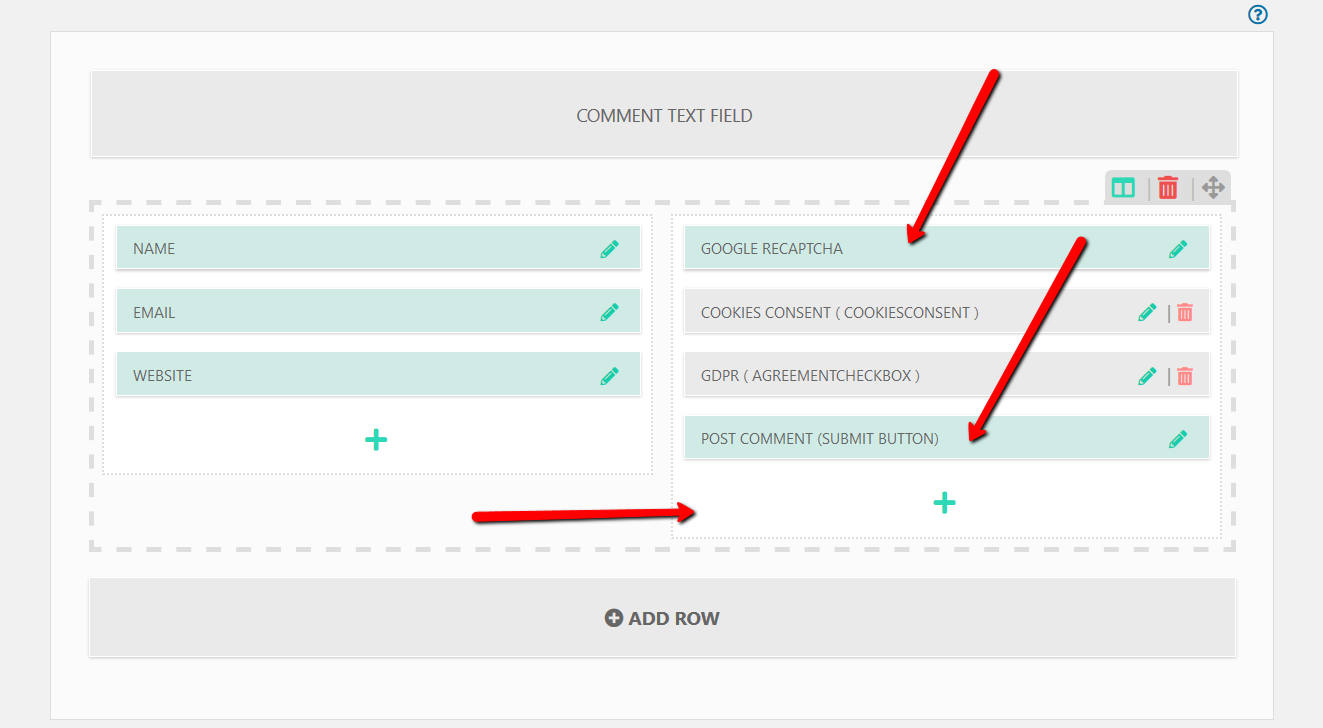
But you've changed the layout. Please go to Dashboard > wpDiscuz > Forms admin page, edit the comment form and move the reCAPTCHA and submit button to the right column:
Posted : 19/08/2020 9:22 pm
(@dima)
Posts: 9
Active Member
Translate
▼
English
Spanish
French
German
Italian
Portuguese
Russian
Chinese
Japanese
Korean
Arabic
Hindi
Dutch
Polish
Turkish
Vietnamese
Thai
Swedish
Danish
Finnish
Norwegian
Czech
Hungarian
Romanian
Greek
Hebrew
Indonesian
Malay
Ukrainian
Bulgarian
Croatian
Slovak
Slovenian
Serbian
Lithuanian
Latvian
Estonian
Show original
Translating...
@tomson ,
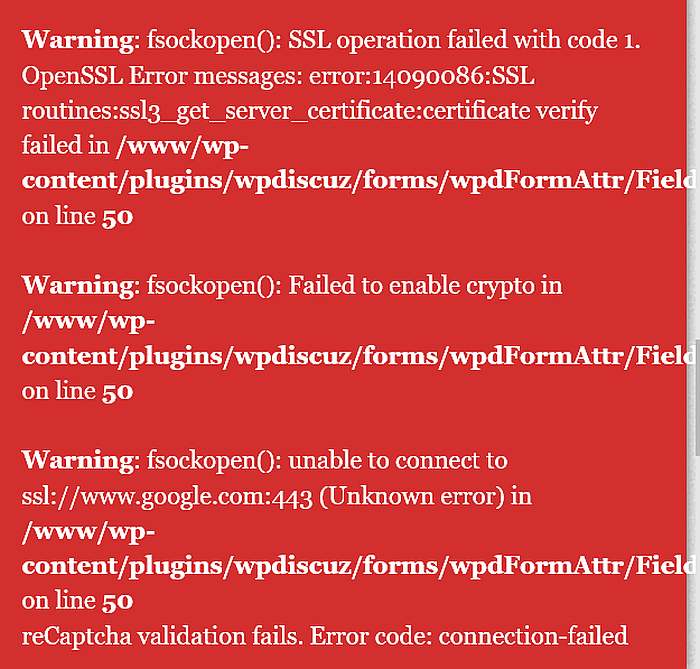
If I turn on Request Method Auto and CurlPost, i see - "reCaptcha validation fails. Error code connection failed".
If a SockedPost and Post, an error like this is issued
Posted : 19/08/2020 9:24 pm
(@tomson)
Posts: 517
Honorable Member Support
Translate
▼
English
Spanish
French
German
Italian
Portuguese
Russian
Chinese
Japanese
Korean
Arabic
Hindi
Dutch
Polish
Turkish
Vietnamese
Thai
Swedish
Danish
Finnish
Norwegian
Czech
Hungarian
Romanian
Greek
Hebrew
Indonesian
Malay
Ukrainian
Bulgarian
Croatian
Slovak
Slovenian
Serbian
Lithuanian
Latvian
Estonian
Show original
Translating...
Posted : 19/08/2020 9:27 pm
(@dima)
Posts: 9
Active Member
Translate
▼
English
Spanish
French
German
Italian
Portuguese
Russian
Chinese
Japanese
Korean
Arabic
Hindi
Dutch
Polish
Turkish
Vietnamese
Thai
Swedish
Danish
Finnish
Norwegian
Czech
Hungarian
Romanian
Greek
Hebrew
Indonesian
Malay
Ukrainian
Bulgarian
Croatian
Slovak
Slovenian
Serbian
Lithuanian
Latvian
Estonian
Show original
Translating...
@tomson ,
In Auto - reCaptcha validation fails. Error code connection failed. What to do?
Posted : 19/08/2020 9:32 pm
(@dima)
Posts: 9
Active Member
Translate
▼
English
Spanish
French
German
Italian
Portuguese
Russian
Chinese
Japanese
Korean
Arabic
Hindi
Dutch
Polish
Turkish
Vietnamese
Thai
Swedish
Danish
Finnish
Norwegian
Czech
Hungarian
Romanian
Greek
Hebrew
Indonesian
Malay
Ukrainian
Bulgarian
Croatian
Slovak
Slovenian
Serbian
Lithuanian
Latvian
Estonian
Show original
Translating...
@tomson ,
No, it doesn't matter "reCaptcha validation fails. Error code connection failed."
Posted : 19/08/2020 9:48 pm
(@asti)
Posts: 8284
Illustrious Member Support
Translate
▼
English
Spanish
French
German
Italian
Portuguese
Russian
Chinese
Japanese
Korean
Arabic
Hindi
Dutch
Polish
Turkish
Vietnamese
Thai
Swedish
Danish
Finnish
Norwegian
Czech
Hungarian
Romanian
Greek
Hebrew
Indonesian
Malay
Ukrainian
Bulgarian
Croatian
Slovak
Slovenian
Serbian
Lithuanian
Latvian
Estonian
Show original
Translating...
@dima ,
Could you please send the admin login details to info[at]gvectors.com email address? I'll ask the developers to check the issue for you.
In case you want to say thank you! 🙂 We'd really appreciate if you leave a good review on the plugin page. This is the best way to say thank you to this project and the support team.
Posted : 20/08/2020 1:30 pm
(@dima)
Posts: 9
Active Member
Translate
▼
English
Spanish
French
German
Italian
Portuguese
Russian
Chinese
Japanese
Korean
Arabic
Hindi
Dutch
Polish
Turkish
Vietnamese
Thai
Swedish
Danish
Finnish
Norwegian
Czech
Hungarian
Romanian
Greek
Hebrew
Indonesian
Malay
Ukrainian
Bulgarian
Croatian
Slovak
Slovenian
Serbian
Lithuanian
Latvian
Estonian
Show original
Translating...
Hello, @asti
I send details.
Posted : 20/08/2020 6:52 pm
(@asti)
Posts: 8284
Illustrious Member Support
Translate
▼
English
Spanish
French
German
Italian
Portuguese
Russian
Chinese
Japanese
Korean
Arabic
Hindi
Dutch
Polish
Turkish
Vietnamese
Thai
Swedish
Danish
Finnish
Norwegian
Czech
Hungarian
Romanian
Greek
Hebrew
Indonesian
Malay
Ukrainian
Bulgarian
Croatian
Slovak
Slovenian
Serbian
Lithuanian
Latvian
Estonian
Show original
Translating...
@dima ,
We see you've removed the keys. Please generate new keys and put those keys in according fields and let us know. We'll continue checking.
In case you want to say thank you! 🙂 We'd really appreciate if you leave a good review on the plugin page. This is the best way to say thank you to this project and the support team.
Posted : 21/08/2020 11:54 am
(@dima)
Posts: 9
Active Member
Translate
▼
English
Spanish
French
German
Italian
Portuguese
Russian
Chinese
Japanese
Korean
Arabic
Hindi
Dutch
Polish
Turkish
Vietnamese
Thai
Swedish
Danish
Finnish
Norwegian
Czech
Hungarian
Romanian
Greek
Hebrew
Indonesian
Malay
Ukrainian
Bulgarian
Croatian
Slovak
Slovenian
Serbian
Lithuanian
Latvian
Estonian
Show original
Translating...
Hi @asti ,
I generate new keys and added them.
Posted : 21/08/2020 1:02 pm
(@asti)
Posts: 8284
Illustrious Member Support
Translate
▼
English
Spanish
French
German
Italian
Portuguese
Russian
Chinese
Japanese
Korean
Arabic
Hindi
Dutch
Polish
Turkish
Vietnamese
Thai
Swedish
Danish
Finnish
Norwegian
Czech
Hungarian
Romanian
Greek
Hebrew
Indonesian
Malay
Ukrainian
Bulgarian
Croatian
Slovak
Slovenian
Serbian
Lithuanian
Latvian
Estonian
Show original
Translating...
ok @dima , thank you,
we'll check and back to you asap.
In case you want to say thank you! 🙂 We'd really appreciate if you leave a good review on the plugin page. This is the best way to say thank you to this project and the support team.
Posted : 21/08/2020 1:04 pm
Super Globals
Options and Features