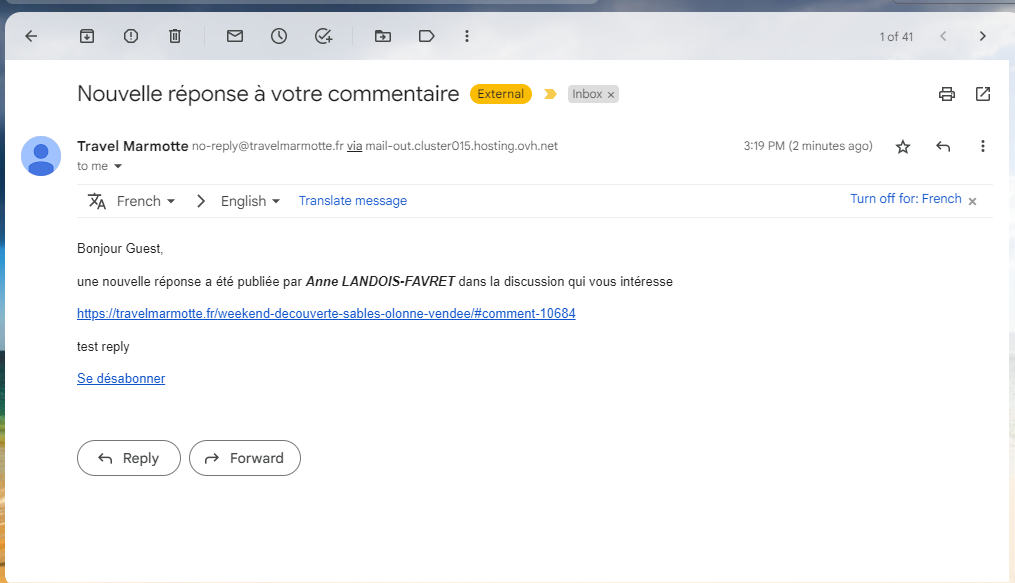
Hello,
I have a problem with the notification that is normally sent by email when someone replies to our comment.
When I do a test, I write a comment (I am in private browsing so as not to be identified as the owner of the site), I click on the bell to say that I want to be informed of the replies to my comment, I receive the email asking me to confirm my comment, it's ok.
As the owner of the site, I receive the email to approve the comment, it's ok here too.
Then, as the owner of the site, I make a response to this test commenter.
But, this test commentator never receives the email to say that there is a response to his comment.
I went to see in the options, in "subscription and follow-up of the user", and everything is checked.
A friend on his site has the same problem.
I can't find why, writing a comment and activating the bell before sending the comment, and the option is indeed activated, it does not work...
I am talking about the comment follow-up with the bell, not the drop-down menu which offers several types of follow-up, there, it works well. But visitors to my site do not necessarily have the reflex to go to this drop-down menu, whereas the bell is much simpler.
What is strange is that it worked fine on my site and my friend's site. We saw this a few weeks ago because I had made a comment on his site and was surprised that he had not responded to my comment. When I went to his site, he had responded to my comment.
Thank you in advance for studying this case.
Cordially,
Alf2404
For further support please approve the testing comment made by us: https://travelmarmotte.fr/charroux-ancienne-place-forte-allier/#comment-10679
In case you want to say thank you! 🙂
We'd really appreciate if you leave a good review on the plugin page.
This is the best way to say thank you to this project and the support team.
@asti It's approved!
Now please leave a reply under the test comment so we can check it.
In case you want to say thank you! 🙂
We'd really appreciate if you leave a good review on the plugin page.
This is the best way to say thank you to this project and the support team.
The response to the test comment has been made!
I've already asked the developers to check the issue. Please wait a bit. I'll update the topic once I get a response from them.
In case you want to say thank you! 🙂
We'd really appreciate if you leave a good review on the plugin page.
This is the best way to say thank you to this project and the support team.
@asti Yes, thank you, I'm waiting! 😉
We don't find such an issue on our test websites. This is something specific on your website. Could you please send the admin login details to info[at]gvectors.com email address? I'll ask the developers to check the issue.
In case you want to say thank you! 🙂
We'd really appreciate if you leave a good review on the plugin page.
This is the best way to say thank you to this project and the support team.
@asti It's send!
Thank you @alf2404,
The developers are going to check the issue. I'll update this topic once I have some news for you.
In case you want to say thank you! 🙂
We'd really appreciate if you leave a good review on the plugin page.
This is the best way to say thank you to this project and the support team.
Dear @alf2404,
We've received the reply notification email.
Video: https://www.screencast.com/t/PPxOB59CU
I guess maybe the users click on the notification bell while it's unchecking the subscription: https://www.screencast.com/t/cQiVoMpKnhb
In your case the 'Keep checked the "Notify of new replies to this comment" option by default' option is enabled, so the users don't have to click in to subscribe.
In case you want to say thank you! 🙂
We'd really appreciate if you leave a good review on the plugin page.
This is the best way to say thank you to this project and the support team.
@asti Thanks for your feedback. I also tested on my side with another mailbox and it works!
Thanks to you and to the developers for this manipulation, I will inform my friend who has the same concern.
A very good day to all of you! ^^