The effects of alcohol on sustanon 250 leucine for – real weight loss & bodybuilding benefits?
Search
Close
AI Search
Classic Search
 Search Phrase:
 Search Type:
Advanced search options
 Search in Forums:
 Search in date period:

 Sort Search Results by:

AI Assistant
Icons displaying tw...
 
Notifications
Clear all

Icons displaying twice and another icon not clickable

11 Posts
2 Users
0 Reactions
5,934 Views
(@lea-oh)
Posts: 5
Active Member
Topic starter
Translate
English
Spanish
French
German
Italian
Portuguese
Russian
Chinese
Japanese
Korean
Arabic
Hindi
Dutch
Polish
Turkish
Vietnamese
Thai
Swedish
Danish
Finnish
Norwegian
Czech
Hungarian
Romanian
Greek
Hebrew
Indonesian
Malay
Ukrainian
Bulgarian
Croatian
Slovak
Slovenian
Serbian
Lithuanian
Latvian
Estonian
 
[#1995]

Hi, 

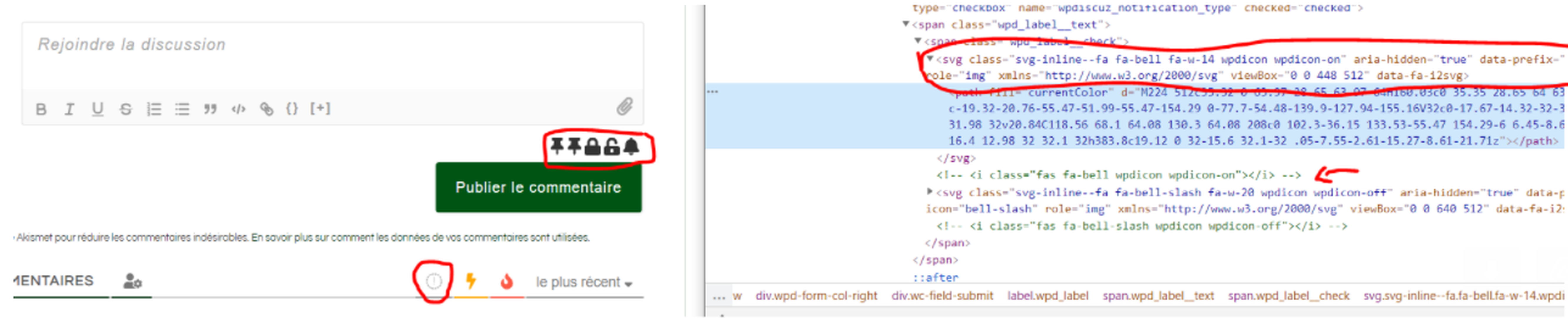
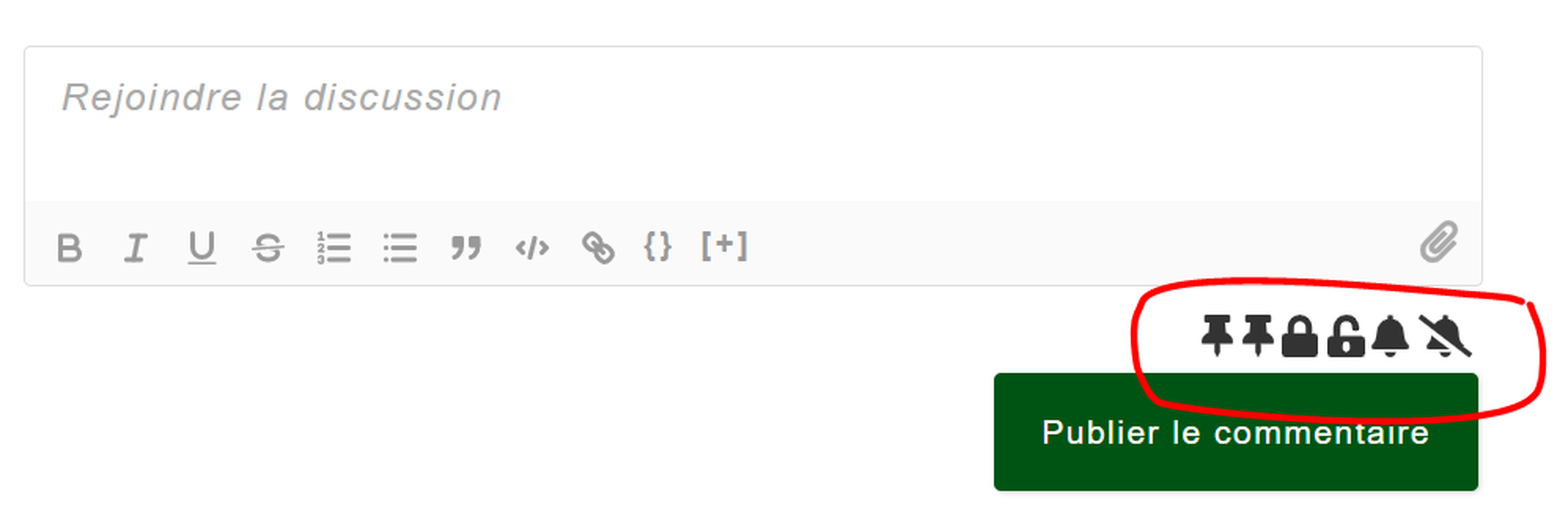
I have an issue where the icons to pin, close or notify are displaying twice. (See screenshot).

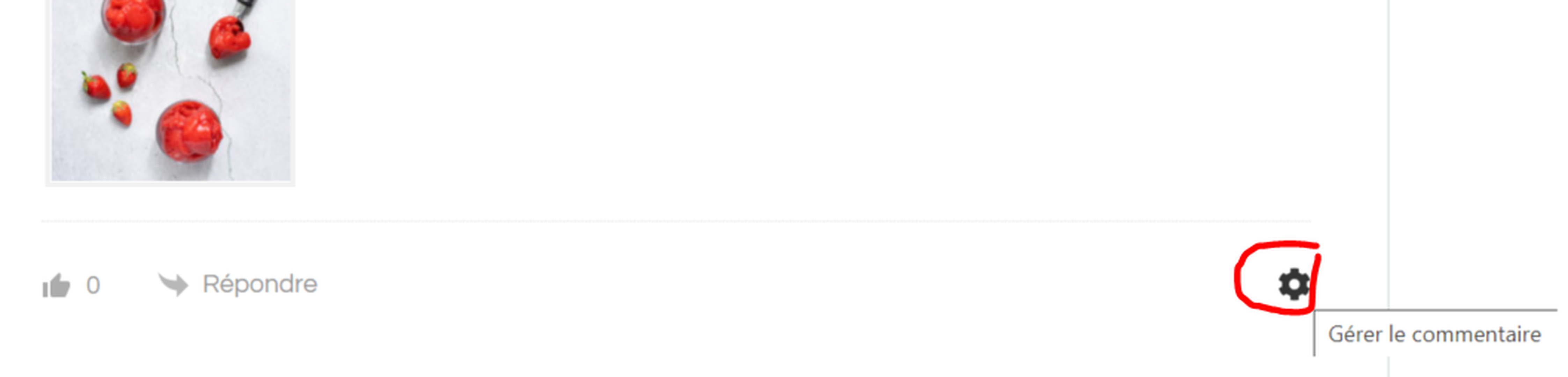
The other icon to manage the comment is displaying correctly but not clickable. 


issue icons WP discuz


issue icon not clickable WP discuz


The website is in maintenance mode but I can give you access with an IP address. 

Any idea what's causing this issue?


Thanks

Léa


Posted : 25/04/2021 6:12 pm
Topic Tags
Asti
 Asti
(@asti)
Posts: 8259
Illustrious Member Support
Translate
English
Spanish
French
German
Italian
Portuguese
Russian
Chinese
Japanese
Korean
Arabic
Hindi
Dutch
Polish
Turkish
Vietnamese
Thai
Swedish
Danish
Finnish
Norwegian
Czech
Hungarian
Romanian
Greek
Hebrew
Indonesian
Malay
Ukrainian
Bulgarian
Croatian
Slovak
Slovenian
Serbian
Lithuanian
Latvian
Estonian
 

@lea-oh,

Could you please leave some example URL? 


In case you want to say thank you! 🙂
We'd really appreciate if you leave a good review on the plugin page.
This is the best way to say thank you to this project and the support team.

 
Posted : 26/04/2021 11:24 am
(@lea-oh)
Posts: 5
Active Member
Topic starter
Translate
English
Spanish
French
German
Italian
Portuguese
Russian
Chinese
Japanese
Korean
Arabic
Hindi
Dutch
Polish
Turkish
Vietnamese
Thai
Swedish
Danish
Finnish
Norwegian
Czech
Hungarian
Romanian
Greek
Hebrew
Indonesian
Malay
Ukrainian
Bulgarian
Croatian
Slovak
Slovenian
Serbian
Lithuanian
Latvian
Estonian
 

@asti my website is in maintenance mode until next week but I can give you access with an IP address. 

It looks like it's using SVG and Font awesome is disabled when inspecting the elements. 

image


Posted : 26/04/2021 7:52 pm
Asti
 Asti
(@asti)
Posts: 8259
Illustrious Member Support
Translate
English
Spanish
French
German
Italian
Portuguese
Russian
Chinese
Japanese
Korean
Arabic
Hindi
Dutch
Polish
Turkish
Vietnamese
Thai
Swedish
Danish
Finnish
Norwegian
Czech
Hungarian
Romanian
Greek
Hebrew
Indonesian
Malay
Ukrainian
Bulgarian
Croatian
Slovak
Slovenian
Serbian
Lithuanian
Latvian
Estonian
 

@lea-oh,

One of the active plugins/theme replaces the Font Awesome icons with SVG. You should deactivate the plugins/theme one by one and check after each deactivation to find a problem maker. 


In case you want to say thank you! 🙂
We'd really appreciate if you leave a good review on the plugin page.
This is the best way to say thank you to this project and the support team.

 
Posted : 27/04/2021 1:47 pm
(@lea-oh)
Posts: 5
Active Member
Topic starter
Translate
English
Spanish
French
German
Italian
Portuguese
Russian
Chinese
Japanese
Korean
Arabic
Hindi
Dutch
Polish
Turkish
Vietnamese
Thai
Swedish
Danish
Finnish
Norwegian
Czech
Hungarian
Romanian
Greek
Hebrew
Indonesian
Malay
Ukrainian
Bulgarian
Croatian
Slovak
Slovenian
Serbian
Lithuanian
Latvian
Estonian
 

Hi @asti

Thanks for your feedback. I've tried deactivating one by one, including the theme. 

Cleared cache, refreshed the page and also tried in incognito mode 

But couldn't find which one was causing this as the issue was still present. 


Posted : 27/04/2021 10:25 pm
Asti
 Asti
(@asti)
Posts: 8259
Illustrious Member Support
Translate
English
Spanish
French
German
Italian
Portuguese
Russian
Chinese
Japanese
Korean
Arabic
Hindi
Dutch
Polish
Turkish
Vietnamese
Thai
Swedish
Danish
Finnish
Norwegian
Czech
Hungarian
Romanian
Greek
Hebrew
Indonesian
Malay
Ukrainian
Bulgarian
Croatian
Slovak
Slovenian
Serbian
Lithuanian
Latvian
Estonian
 

@lea-oh,

Could you please send the admin login details? I'll ask the developers to check the issue for you? 


In case you want to say thank you! 🙂
We'd really appreciate if you leave a good review on the plugin page.
This is the best way to say thank you to this project and the support team.

 
Posted : 28/04/2021 11:33 am
(@lea-oh)
Posts: 5
Active Member
Topic starter
Translate
English
Spanish
French
German
Italian
Portuguese
Russian
Chinese
Japanese
Korean
Arabic
Hindi
Dutch
Polish
Turkish
Vietnamese
Thai
Swedish
Danish
Finnish
Norwegian
Czech
Hungarian
Romanian
Greek
Hebrew
Indonesian
Malay
Ukrainian
Bulgarian
Croatian
Slovak
Slovenian
Serbian
Lithuanian
Latvian
Estonian
 

@asti it seems that I'm not allowed to write a private message. 

Can you please let me know where I can send the login details? 

Thanks


Posted : 28/04/2021 12:12 pm
Asti
 Asti
(@asti)
Posts: 8259
Illustrious Member Support
Translate
English
Spanish
French
German
Italian
Portuguese
Russian
Chinese
Japanese
Korean
Arabic
Hindi
Dutch
Polish
Turkish
Vietnamese
Thai
Swedish
Danish
Finnish
Norwegian
Czech
Hungarian
Romanian
Greek
Hebrew
Indonesian
Malay
Ukrainian
Bulgarian
Croatian
Slovak
Slovenian
Serbian
Lithuanian
Latvian
Estonian
 

@lea-oh,

You can send it to info[at]gvectors.com email address. 


In case you want to say thank you! 🙂
We'd really appreciate if you leave a good review on the plugin page.
This is the best way to say thank you to this project and the support team.
 
Posted : 28/04/2021 12:15 pm
Asti
 Asti
(@asti)
Posts: 8259
Illustrious Member Support
Translate
English
Spanish
French
German
Italian
Portuguese
Russian
Chinese
Japanese
Korean
Arabic
Hindi
Dutch
Polish
Turkish
Vietnamese
Thai
Swedish
Danish
Finnish
Norwegian
Czech
Hungarian
Romanian
Greek
Hebrew
Indonesian
Malay
Ukrainian
Bulgarian
Croatian
Slovak
Slovenian
Serbian
Lithuanian
Latvian
Estonian
 

@lea-oh,

The following there plugins and theme has the JS files that replaces the Font awesome to SVG. If you at once deactivate the plugins and switch to some other theme you'll not see the issue anymore. 

  • BlossomThemes Email Newsletter
  • BlossomThemes Toolkit
  • Delicious Recipes
 
Please contact the plugins support and ask them to remove the JS file that replaces the Font awesome to SVG.

In case you want to say thank you! 🙂
We'd really appreciate if you leave a good review on the plugin page.
This is the best way to say thank you to this project and the support team.
 
Posted : 28/04/2021 1:17 pm
(@lea-oh)
Posts: 5
Active Member
Topic starter
Translate
English
Spanish
French
German
Italian
Portuguese
Russian
Chinese
Japanese
Korean
Arabic
Hindi
Dutch
Polish
Turkish
Vietnamese
Thai
Swedish
Danish
Finnish
Norwegian
Czech
Hungarian
Romanian
Greek
Hebrew
Indonesian
Malay
Ukrainian
Bulgarian
Croatian
Slovak
Slovenian
Serbian
Lithuanian
Latvian
Estonian
 

@asti thanks for taking a look. I've contacted the Support team and will keep you posted. The SVG icons are needed for the plugins mentioned above so I'm wondering if there isn't a workaround not to replace Font Awesome to SVG specifically for wpdiscuz plugin. 

Thanks


Posted : 28/04/2021 3:23 pm
Asti
 Asti
(@asti)
Posts: 8259
Illustrious Member Support
Translate
English
Spanish
French
German
Italian
Portuguese
Russian
Chinese
Japanese
Korean
Arabic
Hindi
Dutch
Polish
Turkish
Vietnamese
Thai
Swedish
Danish
Finnish
Norwegian
Czech
Hungarian
Romanian
Greek
Hebrew
Indonesian
Malay
Ukrainian
Bulgarian
Croatian
Slovak
Slovenian
Serbian
Lithuanian
Latvian
Estonian
 

 @lea-oh,

The workaround should be provided by the plugins/theme sides


In case you want to say thank you! 🙂
We'd really appreciate if you leave a good review on the plugin page.
This is the best way to say thank you to this project and the support team.

 
Posted : 28/04/2021 3:26 pm