


Appreciate the help fixing a bug! The quoted text for an inline comment question are displaying incorrectly at the bottom in the comment list. The highlighted area does not quote the original question correctly.
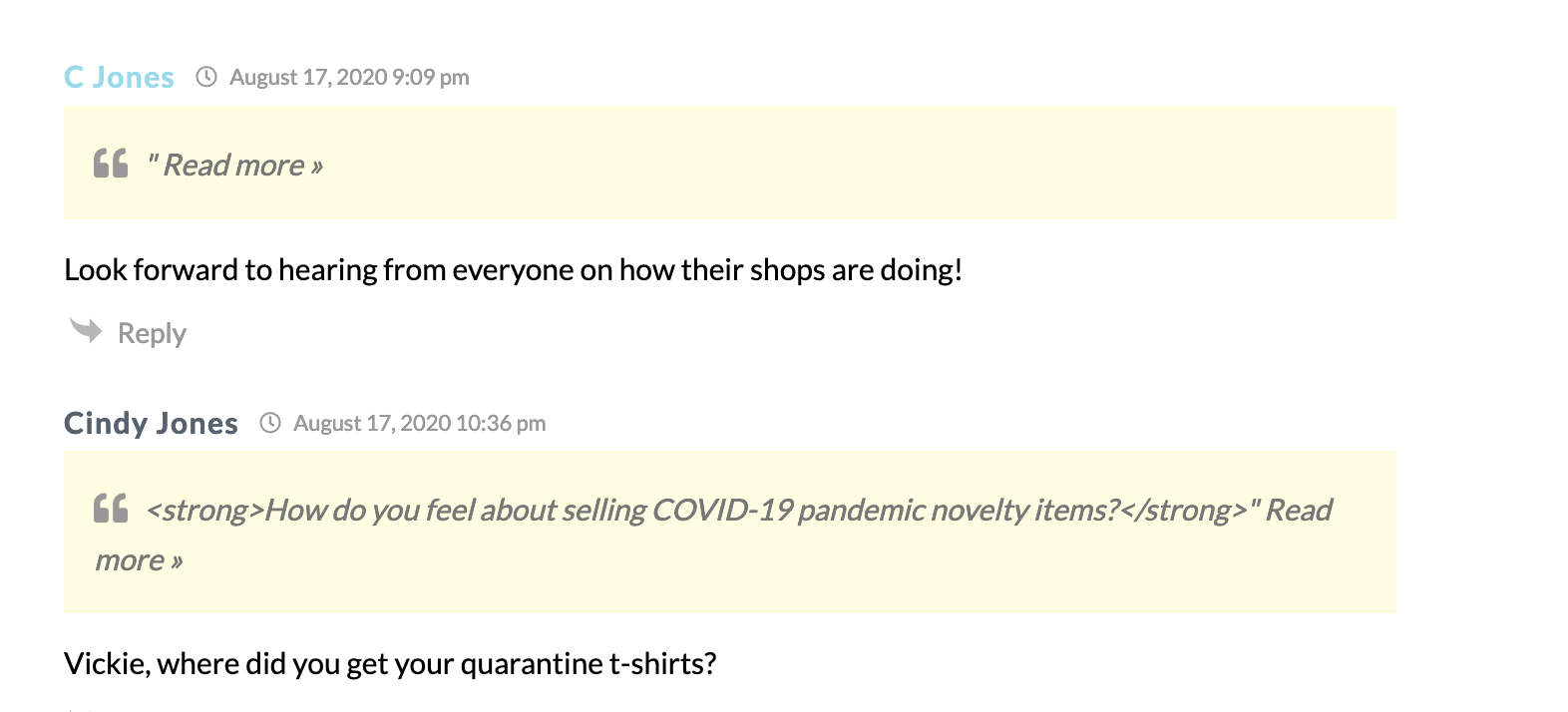
In the first instance, the comment code is:
[wpdiscuz-feedback id="pxgiq5ag6j" question="Please leave a comment here" opened="0"]We strive to provide a place here where gift shop professionals can come together, gain a sense of community, and exchange valuable insights from one another. Leave a comment! [/wpdiscuz-feedback]
but, in the comments list it quotes the question incorrectly as: "Read more
In the second instance, the comment code is:
[wpdiscuz-feedback id="1234q5ag6u" question="Please leave a comment here" opened="0"]How do you feel about selling COVID-19 pandemic novelty items?[/wpdiscuz-feedback]
but, in the comment list down below it quotes the question incorrectly as: How do you feel about selling COVID-19 pandemic novelty items?" Read more »
Thanks for help fixing this bugger
Hi @stanbrid,
Could you please send the admin login details to info[at]gvectors.com email address? I'll ask the developers to check the issue for you.
In case you want to say thank you! 🙂
We'd really appreciate if you leave a good review on the plugin page.
This is the best way to say thank you to this project and the support team.
Do you mean the wp-admin admin login? To access the website backend?
Yes, if it's possible, please send it to us. We haven't found such an issue on our test websites. This is something specific in your case.
In case you want to say thank you! 🙂
We'd really appreciate if you leave a good review on the plugin page.
This is the best way to say thank you to this project and the support team.
@asti Please provide info on providing the login privately?
Please use the info[at]gvectors.com email address.
In case you want to say thank you! 🙂
We'd really appreciate if you leave a good review on the plugin page.
This is the best way to say thank you to this project and the support team.
@asti Hi Asti, just created a login and sent the the email. Tks!
Thank you @stanbrid,
We've found the reason for the issue. It'll be fixed in the next update (no ETA).
In case you want to say thank you! 🙂
We'd really appreciate if you leave a good review on the plugin page.
This is the best way to say thank you to this project and the support team.


