The effects of alcohol on sustanon 250 leucine for – real weight loss & bodybuilding benefits?
Search
Close
AI Search
Classic Search
 Search Phrase:
 Search Type:
Advanced search options
 Search in Forums:
 Search in date period:

 Sort Search Results by:

AI Assistant
comment box does no...
 
Share:
Notifications
Clear all

comment box does not open

7 Posts
2 Users
0 Reactions
1,726 Views
Posts: 3
Topic starter
Translate
English
Spanish
French
German
Italian
Portuguese
Russian
Chinese
Japanese
Korean
Arabic
Hindi
Dutch
Polish
Turkish
Vietnamese
Thai
Swedish
Danish
Finnish
Norwegian
Czech
Hungarian
Romanian
Greek
Hebrew
Indonesian
Malay
Ukrainian
Bulgarian
Croatian
Slovak
Slovenian
Serbian
Lithuanian
Latvian
Estonian
(@ukthemeparkspy)
Active Member
Joined: 2 years ago
[#7504]

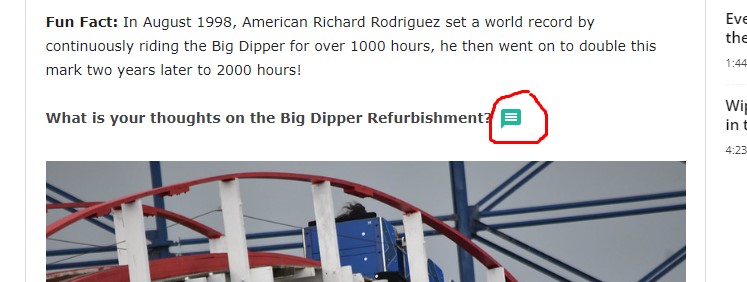
When clicking on the comment box nothing happens?

inline commenting

6 Replies
Asti
Posts: 8208
 Asti
Support
Translate
English
Spanish
French
German
Italian
Portuguese
Russian
Chinese
Japanese
Korean
Arabic
Hindi
Dutch
Polish
Turkish
Vietnamese
Thai
Swedish
Danish
Finnish
Norwegian
Czech
Hungarian
Romanian
Greek
Hebrew
Indonesian
Malay
Ukrainian
Bulgarian
Croatian
Slovak
Slovenian
Serbian
Lithuanian
Latvian
Estonian
(@asti)
Illustrious Member
Joined: 8 years ago

Hi @ukthemeparkspy,

Please share here the shortcode you've added for displaying the inline commenting button. 


Reply
Posts: 3
Topic starter
Translate
English
Spanish
French
German
Italian
Portuguese
Russian
Chinese
Japanese
Korean
Arabic
Hindi
Dutch
Polish
Turkish
Vietnamese
Thai
Swedish
Danish
Finnish
Norwegian
Czech
Hungarian
Romanian
Greek
Hebrew
Indonesian
Malay
Ukrainian
Bulgarian
Croatian
Slovak
Slovenian
Serbian
Lithuanian
Latvian
Estonian
(@ukthemeparkspy)
Active Member
Joined: 2 years ago

The shortcode is below...

[wpdiscuz-feedback id="wthov6fdd0" question="Please leave your feedback on this" opened="0"]What is your thoughts on the Big Dipper Refurbishment?[/wpdiscuz-feedback]


Reply
4 Replies
Asti
 Asti
Support
(@asti)
Joined: 8 years ago

Illustrious Member
Posts: 8208
Translate
English
Spanish
French
German
Italian
Portuguese
Russian
Chinese
Japanese
Korean
Arabic
Hindi
Dutch
Polish
Turkish
Vietnamese
Thai
Swedish
Danish
Finnish
Norwegian
Czech
Hungarian
Romanian
Greek
Hebrew
Indonesian
Malay
Ukrainian
Bulgarian
Croatian
Slovak
Slovenian
Serbian
Lithuanian
Latvian
Estonian

@ukthemeparkspy,

Please let us know, do you use the shortcode somewhere else with the same ID.  


Reply
(@ukthemeparkspy)
Joined: 2 years ago

Active Member
Posts: 3
Translate
English
Spanish
French
German
Italian
Portuguese
Russian
Chinese
Japanese
Korean
Arabic
Hindi
Dutch
Polish
Turkish
Vietnamese
Thai
Swedish
Danish
Finnish
Norwegian
Czech
Hungarian
Romanian
Greek
Hebrew
Indonesian
Malay
Ukrainian
Bulgarian
Croatian
Slovak
Slovenian
Serbian
Lithuanian
Latvian
Estonian

@asti No that is the only inline comment i have used on the whole website at the moment. Due to it not opening.


Reply
Asti
 Asti
Support
(@asti)
Joined: 8 years ago

Illustrious Member
Posts: 8208
Asti
Translate
English
Spanish
French
German
Italian
Portuguese
Russian
Chinese
Japanese
Korean
Arabic
Hindi
Dutch
Polish
Turkish
Vietnamese
Thai
Swedish
Danish
Finnish
Norwegian
Czech
Hungarian
Romanian
Greek
Hebrew
Indonesian
Malay
Ukrainian
Bulgarian
Croatian
Slovak
Slovenian
Serbian
Lithuanian
Latvian
Estonian

@ukthemeparkspy

We don't find such an issue on our test websites. 

Could you please send the admin login details to info[at]gvectors.com email address? I'll ask the developers to check the issue for you. 


Reply
Asti
 Asti
Support
(@asti)
Joined: 8 years ago

Illustrious Member
Posts: 8208
Asti
Translate
English
Spanish
French
German
Italian
Portuguese
Russian
Chinese
Japanese
Korean
Arabic
Hindi
Dutch
Polish
Turkish
Vietnamese
Thai
Swedish
Danish
Finnish
Norwegian
Czech
Hungarian
Romanian
Greek
Hebrew
Indonesian
Malay
Ukrainian
Bulgarian
Croatian
Slovak
Slovenian
Serbian
Lithuanian
Latvian
Estonian

@ukthemeparkspy,

Actually, one of the active plugins or the theme adds {display:none} for the inline commenting div via the js function.

Please watch this video to better understand what I mean: https://monosnap.com/file/enG3nICi2beQ7gdZzUYwgU5sVjvYjX

You can deactivate the plugins/theme one by one and check after each deactivation to find the problem maker.

Keep the cache plugin (if you have) deactivated during this testing process.

Don't forget to press Ctrl+F5(twice) on the frontend each time before checking.


Reply
Share: