The effects of alcohol on
sustanon 250 leucine for – real weight loss & bodybuilding benefits?
Error in the padding of coment form when Wordpress is configured without gravatar
✦
✦
✦
AI is analyzing the discussion...
(@igor)
Posts: 15
Eminent Member
Translate
▼
English
Spanish
French
German
Italian
Portuguese
Russian
Chinese
Japanese
Korean
Arabic
Hindi
Dutch
Polish
Turkish
Vietnamese
Thai
Swedish
Danish
Finnish
Norwegian
Czech
Hungarian
Romanian
Greek
Hebrew
Indonesian
Malay
Ukrainian
Bulgarian
Croatian
Slovak
Slovenian
Serbian
Lithuanian
Latvian
Estonian
Show original
Translating...
[#41]
Hy guys!
First of all, I want to congratulate you for the excellent work with WPdiscuz.
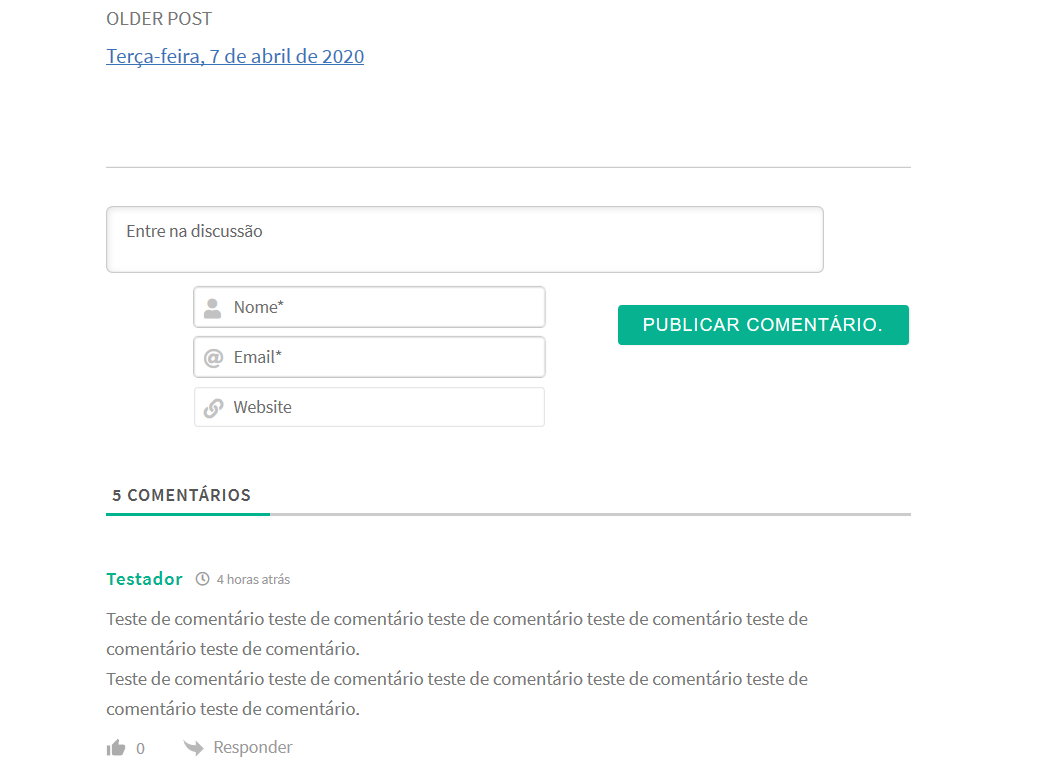
Wel... I use my blog configured without Gravatar. And when I installed WPdicuz 7 beta 8, the left padding of the comment form is showing up with an error.
Please, see the image above that a uploaded.
Thanks in advance.
Posted : 09/04/2020 11:39 pm
(@igor)
Posts: 15
Eminent Member
Translate
▼
English
Spanish
French
German
Italian
Portuguese
Russian
Chinese
Japanese
Korean
Arabic
Hindi
Dutch
Polish
Turkish
Vietnamese
Thai
Swedish
Danish
Finnish
Norwegian
Czech
Hungarian
Romanian
Greek
Hebrew
Indonesian
Malay
Ukrainian
Bulgarian
Croatian
Slovak
Slovenian
Serbian
Lithuanian
Latvian
Estonian
Show original
Translating...
I solved the problem with the following CSS code:
#wpdcom .wpd-form-foot {
#wpdcom.wpdiscuz_unauth .wc-field-submit {
Posted : 10/04/2020 12:33 am
(@tomson)
Posts: 519
Honorable Member Support
Translate
▼
English
Spanish
French
German
Italian
Portuguese
Russian
Chinese
Japanese
Korean
Arabic
Hindi
Dutch
Polish
Turkish
Vietnamese
Thai
Swedish
Danish
Finnish
Norwegian
Czech
Hungarian
Romanian
Greek
Hebrew
Indonesian
Malay
Ukrainian
Bulgarian
Croatian
Slovak
Slovenian
Serbian
Lithuanian
Latvian
Estonian
Show original
Translating...
@igor ,
Thank you for the bug report. This is only related to simple text editor. If you switch the comment editor to Rich Editor you'll not see such issue.
Please don't forget to remove the custom CSS you've added to solve this issue on next version update. Your CSS may conflict with the core fix CSS.
One Question
Please let me know why you've switched to a simple text editor for Desktops(PC)? You have an option to only enable it for Mobile. The doc: https://wpdiscuz.com/docs/wpdiscuz-7/plugin-settings/comment-form/#load-rich-editor
Posted : 10/04/2020 12:57 pm
(@igor)
Posts: 15
Eminent Member
Translate
▼
English
Spanish
French
German
Italian
Portuguese
Russian
Chinese
Japanese
Korean
Arabic
Hindi
Dutch
Polish
Turkish
Vietnamese
Thai
Swedish
Danish
Finnish
Norwegian
Czech
Hungarian
Romanian
Greek
Hebrew
Indonesian
Malay
Ukrainian
Bulgarian
Croatian
Slovak
Slovenian
Serbian
Lithuanian
Latvian
Estonian
Show original
Translating...
@tomson
Thank you for answering my topic.
I don't want to make the rich editor available to guests or other users.
In my experience in making the rich editor available in Wordpress's standard comment system (this for example https://wordpress.org/plugins/tinymce-comment-field/ ), most users don't know how to use it and that even disturbs them.
Posted : 10/04/2020 11:30 pm
(@tomson)
Posts: 519
Honorable Member Support
Translate
▼
English
Spanish
French
German
Italian
Portuguese
Russian
Chinese
Japanese
Korean
Arabic
Hindi
Dutch
Polish
Turkish
Vietnamese
Thai
Swedish
Danish
Finnish
Norwegian
Czech
Hungarian
Romanian
Greek
Hebrew
Indonesian
Malay
Ukrainian
Bulgarian
Croatian
Slovak
Slovenian
Serbian
Lithuanian
Latvian
Estonian
Show original
Translating...
@igor ,
wpDiscuz built-in rich editor is a nice and very easy editor, it's not TinyMCE big editor. Here is the screenshot:
Posted : 12/04/2020 6:43 pm
Super Globals
Options and Features