Are you sure the "Comment must be manually approved" checkbox is checked in the "Before a comment appears" section? It's located in the Dashboard > Settings > Discussion admin page.
In case you want to say thank you! 🙂 We'd really appreciate if you leave a good review on the plugin page. This is the best way to say thank you to this project and the support team.
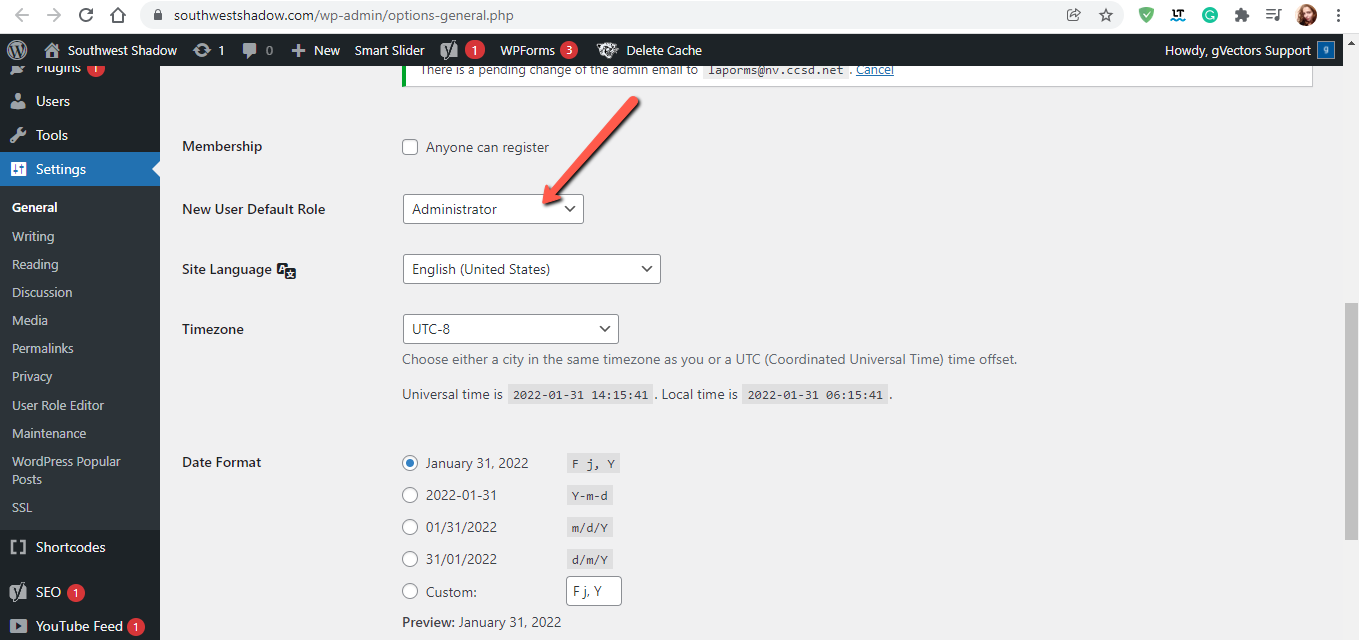
You have a major issue with your website. You've wrong configured the new user default role option.
Please navigate to Dashboard > Settings > General admin page and change the value of the "New User Default Role" option.
In case you want to say thank you! 🙂 We'd really appreciate if you leave a good review on the plugin page. This is the best way to say thank you to this project and the support team.
Don't forget to edit the users and change their user roles.
In case you want to say thank you! 🙂 We'd really appreciate if you leave a good review on the plugin page. This is the best way to say thank you to this project and the support team.
The value of the "New User Default Role" option is already changed by me, however, you can also change it as you like.
In case you want to say thank you! 🙂 We'd really appreciate if you leave a good review on the plugin page. This is the best way to say thank you to this project and the support team.
In case you want to say thank you! 🙂 We'd really appreciate if you leave a good review on the plugin page. This is the best way to say thank you to this project and the support team.
The value of the "New User Default Role" option is already changed by me, however, you can also change it as you like.
Please read attentively my post
In case you want to say thank you! 🙂 We'd really appreciate if you leave a good review on the plugin page. This is the best way to say thank you to this project and the support team.
@asti by using the Google login, is it always going to add them as a role on the site? I'd just like them to be able to use it as a verification tool, not necessarily as a way to be added as a user of any kind.
by using the Google login, is it always going to add them as a role on the site?
Sure it's registration by social network.
I'd just like them to be able to use it as a verification tool, not necessarily as a way to be added as a user of any kind.
I'm really sorry, but there is no way to separate the social network registration from the general one.
In case you want to say thank you! 🙂 We'd really appreciate if you leave a good review on the plugin page. This is the best way to say thank you to this project and the support team.