


The effects of alcohol on sustanon 250 leucine for – real weight loss & bodybuilding benefits?
Search
Close
AI Search
Classic Search
 Search Phrase:
 Search Type:
Advanced search options
 Search in Forums:
 Search in date period:

 Sort Search Results by:

AI Assistant
Aggregate rating sc...
 
Notifications
Clear all

Aggregate rating scheme conflict with Yoast

6 Posts
2 Users
1 Reactions
6,317 Views
(@the_elephant1979)
Posts: 26
Eminent Member
Topic starter
Translate
English
Spanish
French
German
Italian
Portuguese
Russian
Chinese
Japanese
Korean
Arabic
Hindi
Dutch
Polish
Turkish
Vietnamese
Thai
Swedish
Danish
Finnish
Norwegian
Czech
Hungarian
Romanian
Greek
Hebrew
Indonesian
Malay
Ukrainian
Bulgarian
Croatian
Slovak
Slovenian
Serbian
Lithuanian
Latvian
Estonian
 
[#1028]

Hi,

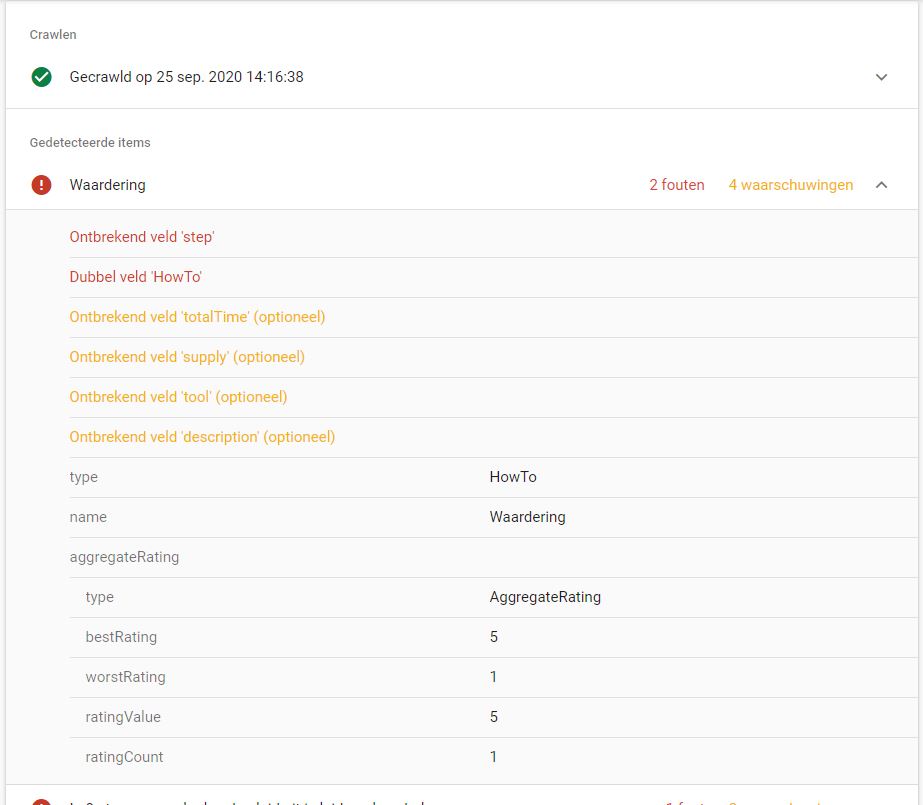
I would like to use the 'How-To' code in .htaccess (succesfully implementedthat part) so that the ratings on my How-To's will show-up in Google search result page. However when i add that code and test it in Search Console i get besides warnings also FAULTS (in RED!).

This is probably due to Yoast. I am also using Yoast to setup nicely aligned How-To's. That works like a charm. However with Yoast i am not able to let people rate my how-to's, so there is a conflict between wp-discuz and Yoast (as they use the same double field 'How-to').

Please also check the attachement.

Regards,

Jack Hiddes

Search console


Posted : 25/09/2020 4:40 pm
Asti
 Asti
(@asti)
Posts: 8267
Illustrious Member Support
Translate
English
Spanish
French
German
Italian
Portuguese
Russian
Chinese
Japanese
Korean
Arabic
Hindi
Dutch
Polish
Turkish
Vietnamese
Thai
Swedish
Danish
Finnish
Norwegian
Czech
Hungarian
Romanian
Greek
Hebrew
Indonesian
Malay
Ukrainian
Bulgarian
Croatian
Slovak
Slovenian
Serbian
Lithuanian
Latvian
Estonian
 

@the_elephant1979,

If it's an article rating you can simply change the "Post Rating Title". The option is located in the comment form settings. Just edit the comment form in the Dashboard > wpDiscuz > Forms admin page. 

Otherwise, just change the title using the hook provided in this FAQ: 

https://wpdiscuz.com/community/f-a-q/post-rating-using-aggregate-rating-schema/#post-959


In case you want to say thank you! 🙂
We'd really appreciate if you leave a good review on the plugin page.
This is the best way to say thank you to this project and the support team.

 
Posted : 26/09/2020 12:53 pm
(@the_elephant1979)
Posts: 26
Eminent Member
Topic starter
Translate
English
Spanish
French
German
Italian
Portuguese
Russian
Chinese
Japanese
Korean
Arabic
Hindi
Dutch
Polish
Turkish
Vietnamese
Thai
Swedish
Danish
Finnish
Norwegian
Czech
Hungarian
Romanian
Greek
Hebrew
Indonesian
Malay
Ukrainian
Bulgarian
Croatian
Slovak
Slovenian
Serbian
Lithuanian
Latvian
Estonian
 

Thanks for the reply @asti

I am using the Yoast plugin for writing my blogs as a 'HowTo' blog.

Now when I use your hook as described I am getting those error messages as Google is seeing duplicate structured data. ( Because using Yoast 'HowTo' and using WPDiscuz hook 'HowTo').

Do you understand the conflict?

For the How-To post type use this code:

add_filter('wpdiscuz_rating_schema', function ( $rating_schema, $key, $postid ){
    $my_rating_schema = 'HowTo';
    $rating_schema = str_replace(__('Article Rating', 'wpdiscuz'), $my_rating_schema . ' Rating', $rating_schema);
    return preg_replace( '|schema\.org\/Product|i', 'schema.org/' . sanitize_text_field($my_rating_schema) , $rating_schema);
},11, 3);

 
Posted : 27/09/2020 1:12 am
Asti
 Asti
(@asti)
Posts: 8267
Illustrious Member Support
Translate
English
Spanish
French
German
Italian
Portuguese
Russian
Chinese
Japanese
Korean
Arabic
Hindi
Dutch
Polish
Turkish
Vietnamese
Thai
Swedish
Danish
Finnish
Norwegian
Czech
Hungarian
Romanian
Greek
Hebrew
Indonesian
Malay
Ukrainian
Bulgarian
Croatian
Slovak
Slovenian
Serbian
Lithuanian
Latvian
Estonian
 

@the_elephant1979,

Please navigate to Dashboard > wpDiscuz > Settings > Article and Comment Rating admin page, disable the "Aggregate Rating Schema". More info here: https://wpdiscuz.com/docs/wpdiscuz-7/plugin-settings/article-and-comment-rating/#enable-aggregate-rating-schema


In case you want to say thank you! 🙂
We'd really appreciate if you leave a good review on the plugin page.
This is the best way to say thank you to this project and the support team.

 
Posted : 28/09/2020 11:58 am
(@the_elephant1979)
Posts: 26
Eminent Member
Topic starter
Translate
English
Spanish
French
German
Italian
Portuguese
Russian
Chinese
Japanese
Korean
Arabic
Hindi
Dutch
Polish
Turkish
Vietnamese
Thai
Swedish
Danish
Finnish
Norwegian
Czech
Hungarian
Romanian
Greek
Hebrew
Indonesian
Malay
Ukrainian
Bulgarian
Croatian
Slovak
Slovenian
Serbian
Lithuanian
Latvian
Estonian
 

@asti

I do not understand. Here is mentioned that when using the hook for "How-To" i should ENABLE the aggregate rating scheme, instead of disable.

However, if your articles are Books, Courses, Events, How-to's, Local businesses, Movies, Products, Recipes, Software App's, you can put the corresponding hook code mentioned below, into your active WordPress theme functions.php file, then enable the "Aggregate Rating Schema" option in Dashboard > wpDiscuz > Settings > Article and Comment Rating Tab.

So, according to your comment setup should be as following:

1) Disable the WPDiscuz aggregate rating scheme.
2) Put the "How-To"-hook code in functions.php (from the active theme).

Now the STAR-rating for the How-to should become available in Google, is that correct?


Posted : 28/09/2020 1:25 pm
Asti
 Asti
(@asti)
Posts: 8267
Illustrious Member Support
Translate
English
Spanish
French
German
Italian
Portuguese
Russian
Chinese
Japanese
Korean
Arabic
Hindi
Dutch
Polish
Turkish
Vietnamese
Thai
Swedish
Danish
Finnish
Norwegian
Czech
Hungarian
Romanian
Greek
Hebrew
Indonesian
Malay
Ukrainian
Bulgarian
Croatian
Slovak
Slovenian
Serbian
Lithuanian
Latvian
Estonian
 

@the_elephant1979,

As far as we know by default the rating for the "HowTo" type doesn't exist. More info here: https://schema.org/HowTo.

The solution provided in the post is just an example if you got some errors, you'll need to make some custumizations and change the code to make it work or disable it. 


In case you want to say thank you! 🙂
We'd really appreciate if you leave a good review on the plugin page.
This is the best way to say thank you to this project and the support team.

 
Posted : 29/09/2020 2:07 pm