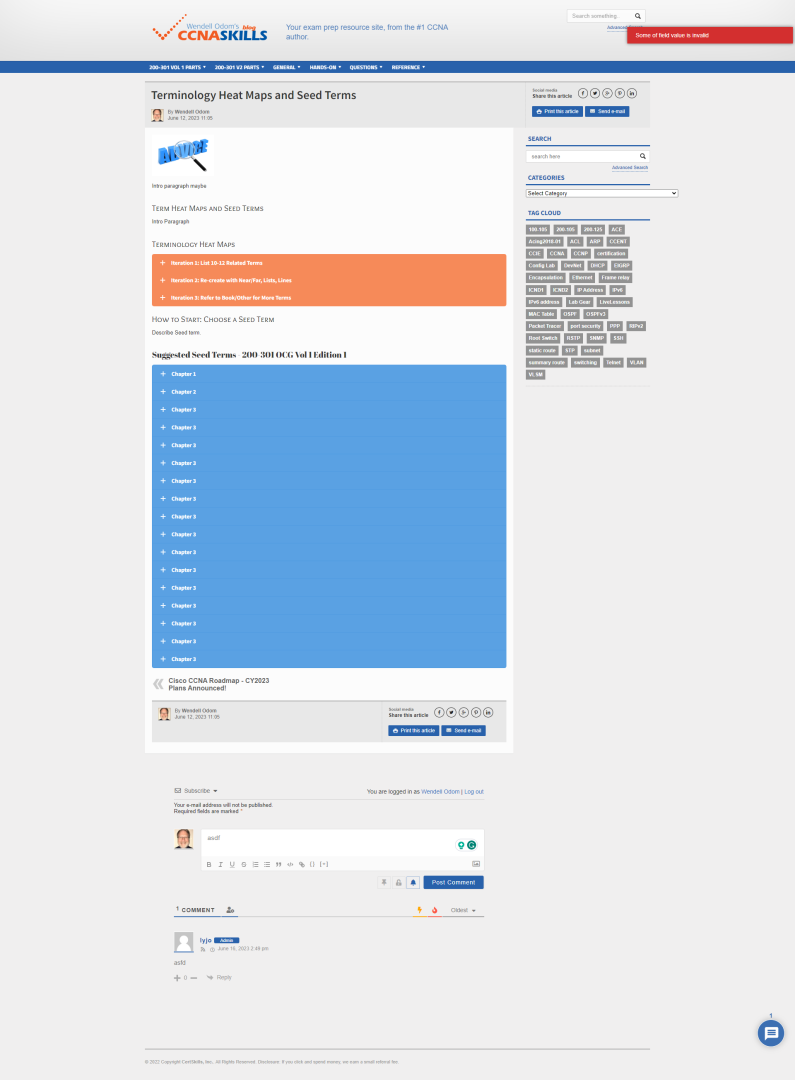
At the top of the comments section, there is a message that reads ...
"You are logged in as xyzUserName | Log out"
This message is always there along with the username regardless of whether anyone is actually logged in or not. I've cleared all cookies and storage but this messaging doesn't change.
I have both wpDiscuz - Comments and wpDiscuz - Subscription add-ons installed.
I have deactivated the cache and manually cleared the files. This didn't solve the problem so I did some debugging within the discuz plugin...
On line 10 of page [.../wpdiscuz/themes/default/comment-form.php] $currentUser ($wpdiscuz->helper->getCurrentUser()) is being loaded. This is the same user that is used in the wpd-auth block beginning on line 162 and generating the 'Log out' messaging. The getCurrentUser() method is returning the post author, not the active user. I would assume this should be the active user.
We don't find such an issue on our test websites. Could you please send the admin login details to info[at]gvectors.com email address? I'll ask the developers to check the issue for you.
@asti I have reached out to the info[at]gvectors.com team via email.
Also, in addition to the above issue. We are also getting 'fault' and 'Some of field value is invalid' when attempting to post a new comment to an existing post.
Please deactivate the Password Protected plugin, delete all caches and check again.
Also, in addition to the above issue. We are also getting 'fault' and 'Some of field value is invalid' when attempting to post a new comment to an existing post.
@asti See attached screen capture. The steps to reproduce were to add text to the comment field and click 'Post Comment'. I then receive the red 'Som of field value is invalid' notification.
See also that I am not logged in but the comment block still has me logged in as 'Wendell Odom'
@asti Anyone, it seems. Without logging in I can generate the 'loggin' issue. The red notification also appears when I'm not logged in. Additionally, it can appear with the lyjo account when logged in. This user is one of the administrators.
The screenshot was captured without anyone being logged in.
@asti The issues don't appear to be related to the cache or the password protection. Has your team been able to review the issue with the 'You are logged in as {user} | Log out' messaging? This is consistent no matter what is happening with the site. The plugin is always displaying the author, not the logged in user. As I suggested earlier, according to the plugin code it is grabbing the author not the authenticated user. Interestingly, when I am able to successfully post a comment, the plugin picks up the correct authenticated user while still displaying the incorrect messaging 'You are logged in as Wendell Odom"
This other 'notification' issue doesn't appear to be related to cache or the site's password protection but the behavior is very inconsistent. Many times I don't get an error but other times, I do.
@asti I have reforwarded the login credentials to info[at]gvectors.com. The provided user has admin privileges. Yes, you may deactivate any of the plugins as necessary. Thank you.
@asti I have deleted all cache and have done what you have suggested. Both issues still exist.
The 'You are logged in as [username]' persists at the top of the comments area. This message appears to be linked to the post's author not the authenticated user.
When posting a comment I get one of two notification errors - 'Some of field value is invalid', or 'fault'. The first error message appears to be related to whether the user is logged in or not. The second, ('fault') message is hard to pin down.
@asti The cache system is and continues to be disabled. You also have the ability to enable/disable any installed plugin cache. I'm not aware of any other caching system that could be interfering with your plugin. Please provide further information, if possible.
Currently, when you visit any post and scroll to the comment section you'll see a number directly above the 'subscribe' section of the comment form. This output value is the 'CurrentUser()->id' value (/wp-content/plugins/wpdiscuz/themes/default/comment-form.php, added line #13). This value always corresponds with the author's id, never does it match the logged-in user. It does change as you navigate through different posts with different authors. This doesn't appear to be related to cache.
The main issue you described in the main post is fixed. The changes will be included in the next version of the wpDiscuz plugin.
Currently, when you visit any post and scroll to the comment section you'll see a number directly above the 'subscribe' section of the comment form. This output value is the 'CurrentUser()->id' value (/wp-content/plugins/wpdiscuz/themes/default/comment-form.php, added line #13).
@asti Yes, I was trying to give you more debugging details on my end. I added the output on line 13, as described above. This detail will show how the Discuz CurrentUser() method is actually retrieving the post's author, not the authenticated user.