The effects of alcohol on
sustanon 250 leucine for – real weight loss & bodybuilding benefits?
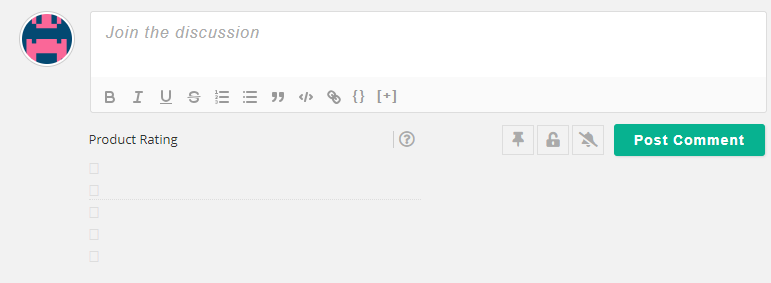
Issue [Solved] Star Rating Icons Not showing on Frontend
✦ Summarize Topic
✦
✦
✦
AI is analyzing the discussion...
(@jamesr)
Posts: 2
New Member
Translate
▼
English
Spanish
French
German
Italian
Portuguese
Russian
Chinese
Japanese
Korean
Arabic
Hindi
Dutch
Polish
Turkish
Vietnamese
Thai
Swedish
Danish
Finnish
Norwegian
Czech
Hungarian
Romanian
Greek
Hebrew
Indonesian
Malay
Ukrainian
Bulgarian
Croatian
Slovak
Slovenian
Serbian
Lithuanian
Latvian
Estonian
Show original
Translating...
[#11090]
Hi, apologies if this has been posted/resolved already but I'm having trouble displaying the star rating option on the front end. The icons only appear as blank squares and they are stacked instead of inline. I'm using Elementor and the comment widget to show the form.
Thanks
This topic was modified 5 months ago by
Asti
Posted : 07/11/2025 10:14 pm
(@asti)
Posts: 8284
Illustrious Member Support
Translate
▼
English
Spanish
French
German
Italian
Portuguese
Russian
Chinese
Japanese
Korean
Arabic
Hindi
Dutch
Polish
Turkish
Vietnamese
Thai
Swedish
Danish
Finnish
Norwegian
Czech
Hungarian
Romanian
Greek
Hebrew
Indonesian
Malay
Ukrainian
Bulgarian
Croatian
Slovak
Slovenian
Serbian
Lithuanian
Latvian
Estonian
Show original
Translating...
Hi,
Please use this CSS code:
#wpdcom label.fas.fa-star.full {
      font-family: "Font Awesome 5 Free";
}

#wpdcom .wpd-form-col-full .wpdiscuz-item .wpdiscuz-rating {
    display: flex;
}
Insert the code in the "Custom CSS code" textarea, located in the Dashboard > wpDiscuz > Settings > Styles & Colors admin page.
In case you want to say thank you! 🙂 We'd really appreciate if you leave a good review on the plugin page. This is the best way to say thank you to this project and the support team.
Posted : 08/11/2025 1:37 pm
(@jamesr)
Posts: 2
New Member
Translate
▼
English
Spanish
French
German
Italian
Portuguese
Russian
Chinese
Japanese
Korean
Arabic
Hindi
Dutch
Polish
Turkish
Vietnamese
Thai
Swedish
Danish
Finnish
Norwegian
Czech
Hungarian
Romanian
Greek
Hebrew
Indonesian
Malay
Ukrainian
Bulgarian
Croatian
Slovak
Slovenian
Serbian
Lithuanian
Latvian
Estonian
Show original
Translating...
@asti Thanks a lot! now working
Cheers for your help
Posted : 10/11/2025 2:33 pm
Super Globals
Options and Features