The effects of alcohol on sustanon 250 leucine for – real weight loss & bodybuilding benefits?
Search
Close
AI Search
Classic Search
 Search Phrase:
 Search Type:
Advanced search options
 Search in Forums:
 Search in date period:

 Sort Search Results by:

AI Assistant
remove edit a comme...
 
Share:
Notifications
Clear all

remove edit a comment

9 Posts
2 Users
0 Reactions
2,154 Views
Posts: 13
Topic starter
Translate
English
Spanish
French
German
Italian
Portuguese
Russian
Chinese
Japanese
Korean
Arabic
Hindi
Dutch
Polish
Turkish
Vietnamese
Thai
Swedish
Danish
Finnish
Norwegian
Czech
Hungarian
Romanian
Greek
Hebrew
Indonesian
Malay
Ukrainian
Bulgarian
Croatian
Slovak
Slovenian
Serbian
Lithuanian
Latvian
Estonian
(@sandrine19)
Active Member
Joined: 5 years ago
[#2013]
Hello
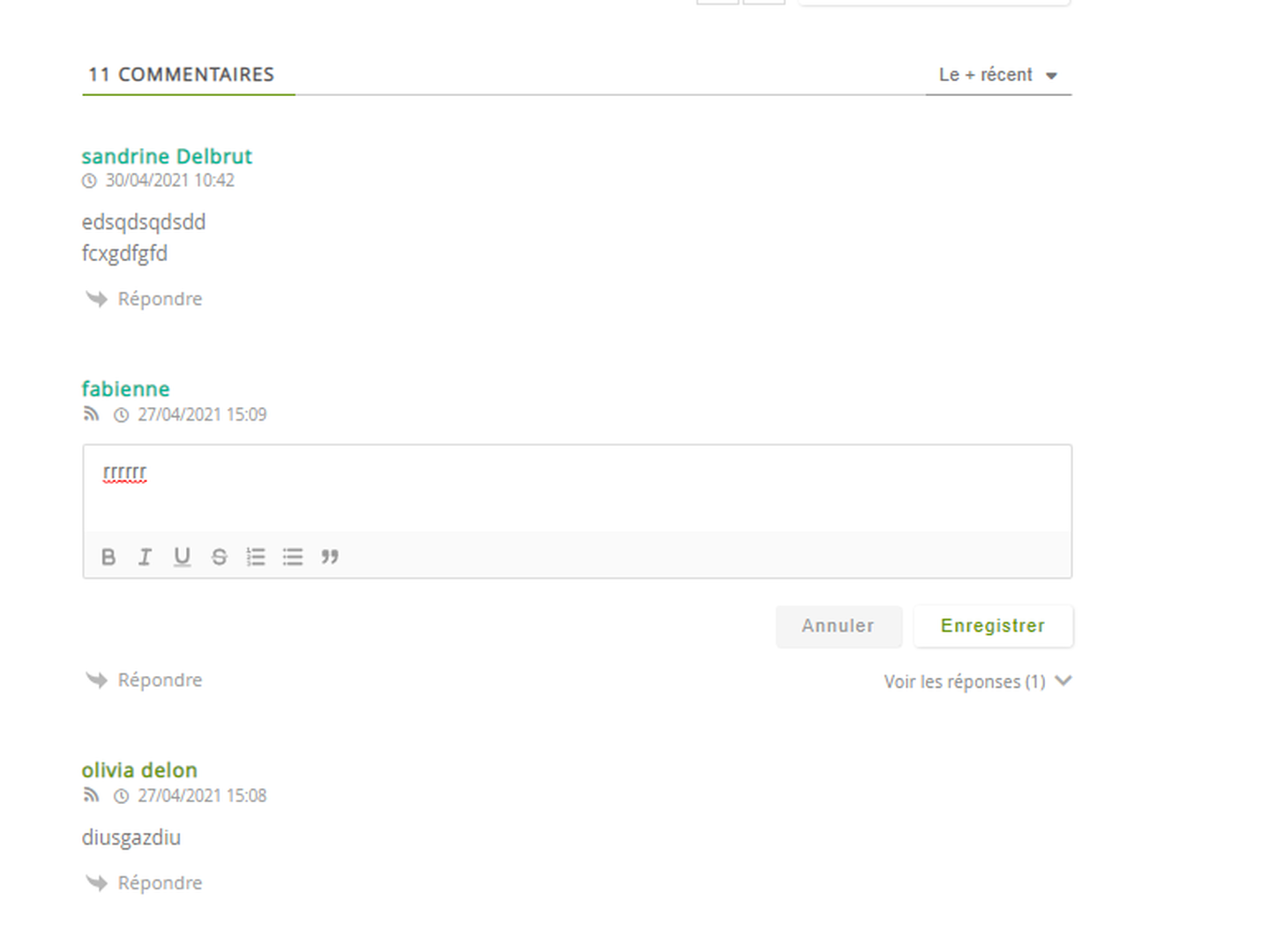
how I can remove the edit comment button. So that once the comment has been written, its author or another person cannot modify it.
thank you in advance

8 Replies
Asti
Posts: 8210
 Asti
Support
Translate
English
Spanish
French
German
Italian
Portuguese
Russian
Chinese
Japanese
Korean
Arabic
Hindi
Dutch
Polish
Turkish
Vietnamese
Thai
Swedish
Danish
Finnish
Norwegian
Czech
Hungarian
Romanian
Greek
Hebrew
Indonesian
Malay
Ukrainian
Bulgarian
Croatian
Slovak
Slovenian
Serbian
Lithuanian
Latvian
Estonian
(@asti)
Illustrious Member
Joined: 8 years ago

@sandrine19,

Please read this doc: https://wpdiscuz.com/docs/wpdiscuz-7/plugin-settings/comment-moderation/#display-comment-editing-information


Reply
7 Replies
(@sandrine19)
Joined: 5 years ago

Active Member
Posts: 13
Translate
English
Spanish
French
German
Italian
Portuguese
Russian
Chinese
Japanese
Korean
Arabic
Hindi
Dutch
Polish
Turkish
Vietnamese
Thai
Swedish
Danish
Finnish
Norwegian
Czech
Hungarian
Romanian
Greek
Hebrew
Indonesian
Malay
Ukrainian
Bulgarian
Croatian
Slovak
Slovenian
Serbian
Lithuanian
Latvian
Estonian

@asti

ok thanks for the answer but what I want is not to be able to modify the comment and even while reading your document I do not see how to do it. I tried my it still doesn't work. Maybe I don't know how to do it?

Reply
Asti
 Asti
Support
(@asti)
Joined: 8 years ago

Illustrious Member
Posts: 8210
Asti
Translate
English
Spanish
French
German
Italian
Portuguese
Russian
Chinese
Japanese
Korean
Arabic
Hindi
Dutch
Polish
Turkish
Vietnamese
Thai
Swedish
Danish
Finnish
Norwegian
Czech
Hungarian
Romanian
Greek
Hebrew
Indonesian
Malay
Ukrainian
Bulgarian
Croatian
Slovak
Slovenian
Serbian
Lithuanian
Latvian
Estonian

@sandrine19,

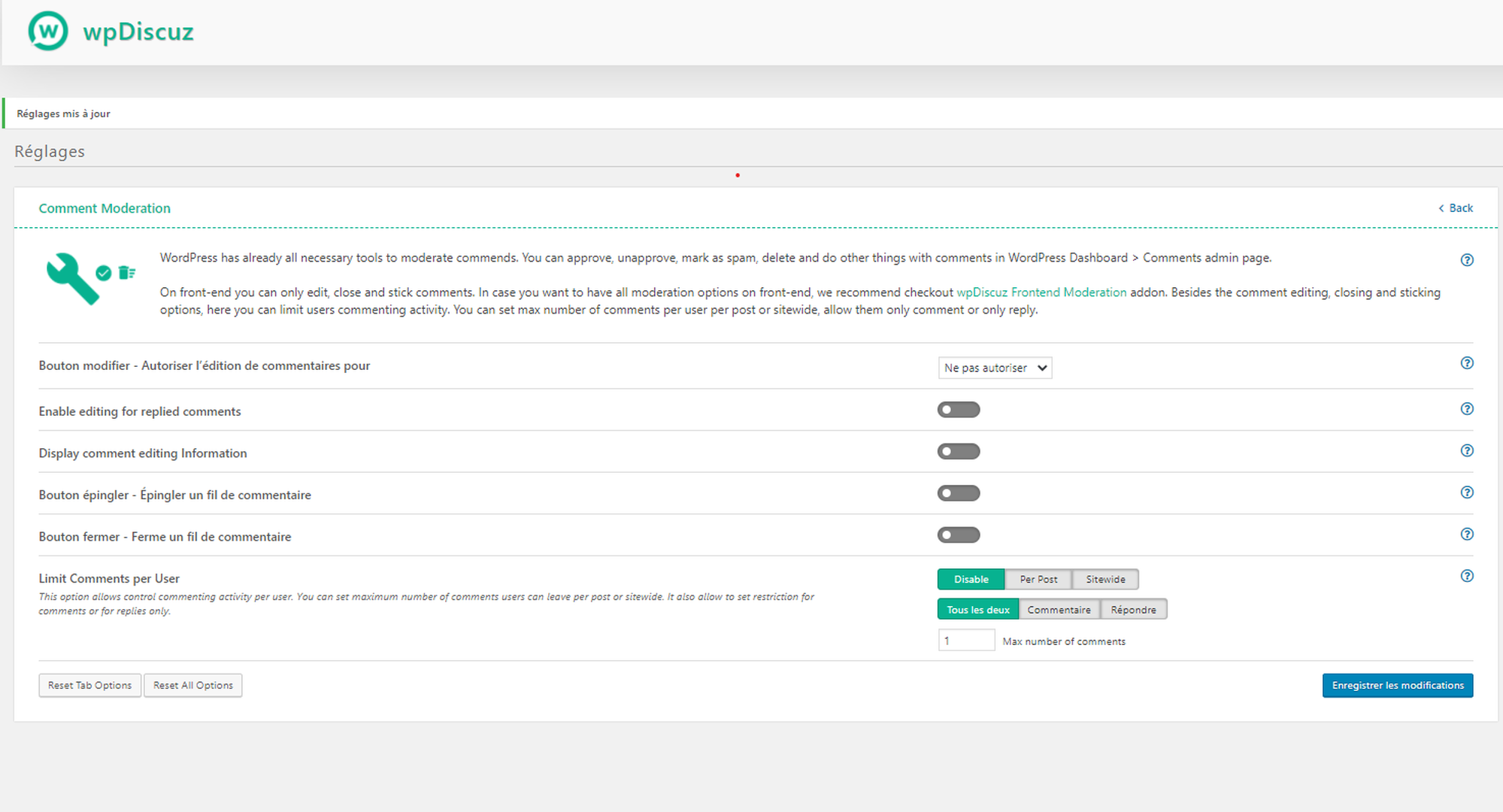
Set the "Do not allow" value for the "Edit Button - Allow comment editing for" option. 


Reply
(@sandrine19)
Joined: 5 years ago

Active Member
Posts: 13
Asti
Translate
English
Spanish
French
German
Italian
Portuguese
Russian
Chinese
Japanese
Korean
Arabic
Hindi
Dutch
Polish
Turkish
Vietnamese
Thai
Swedish
Danish
Finnish
Norwegian
Czech
Hungarian
Romanian
Greek
Hebrew
Indonesian
Malay
Ukrainian
Bulgarian
Croatian
Slovak
Slovenian
Serbian
Lithuanian
Latvian
Estonian

@asti

This is what I did but it does not work I put you screenshots
Annotation 2021 04 30 142213
Annotation 2021 04 30 142142
Annotation 2021 04 30 142213
Annotation 2021 04 30 142142
Annotation 2021 04 30 142213


Reply
Asti
 Asti
Support
(@asti)
Joined: 8 years ago

Illustrious Member
Posts: 8210
Asti
Asti
Translate
English
Spanish
French
German
Italian
Portuguese
Russian
Chinese
Japanese
Korean
Arabic
Hindi
Dutch
Polish
Turkish
Vietnamese
Thai
Swedish
Danish
Finnish
Norwegian
Czech
Hungarian
Romanian
Greek
Hebrew
Indonesian
Malay
Ukrainian
Bulgarian
Croatian
Slovak
Slovenian
Serbian
Lithuanian
Latvian
Estonian

@sandrine19,

Please delete all kind of caches (website, browser, CDN) before checking. 


Reply
(@sandrine19)
Joined: 5 years ago

Active Member
Posts: 13
Asti
Asti
Translate
English
Spanish
French
German
Italian
Portuguese
Russian
Chinese
Japanese
Korean
Arabic
Hindi
Dutch
Polish
Turkish
Vietnamese
Thai
Swedish
Danish
Finnish
Norwegian
Czech
Hungarian
Romanian
Greek
Hebrew
Indonesian
Malay
Ukrainian
Bulgarian
Croatian
Slovak
Slovenian
Serbian
Lithuanian
Latvian
Estonian

@asti

OK though I guess I have to install a special plugin to clear my cache. Because my intranet does not have an empty Cache.


Reply
(@sandrine19)
Joined: 5 years ago

Active Member
Posts: 13
Asti
Asti
Translate
English
Spanish
French
German
Italian
Portuguese
Russian
Chinese
Japanese
Korean
Arabic
Hindi
Dutch
Polish
Turkish
Vietnamese
Thai
Swedish
Danish
Finnish
Norwegian
Czech
Hungarian
Romanian
Greek
Hebrew
Indonesian
Malay
Ukrainian
Bulgarian
Croatian
Slovak
Slovenian
Serbian
Lithuanian
Latvian
Estonian

Hello I cleared my browser cache but it doesn't work. Do I need to install a WP super cache style plugin to properly empty my caches? thank you in advance


Reply
Asti
 Asti
Support
(@asti)
Joined: 8 years ago

Illustrious Member
Posts: 8210
Asti
Asti
Asti
Translate
English
Spanish
French
German
Italian
Portuguese
Russian
Chinese
Japanese
Korean
Arabic
Hindi
Dutch
Polish
Turkish
Vietnamese
Thai
Swedish
Danish
Finnish
Norwegian
Czech
Hungarian
Romanian
Greek
Hebrew
Indonesian
Malay
Ukrainian
Bulgarian
Croatian
Slovak
Slovenian
Serbian
Lithuanian
Latvian
Estonian

@sandrine19,

I'm sorry, but I don't familiar with the plugin. Try to deactivate the cache plugin and check again. 


Reply
Share: