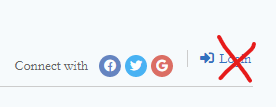
Hi guys, I've been looking around the forum and haven't found anything similar to my question.
I would like to know how I remove the option to login via the word press login panel, leaving only the option to login via social networks.
You should disable the "Show 'Login' link on comment form" option. It's located in the Dashboard > wpDiscuz > Settings > User Authorization and Profile Data admin page.
More info here: https://wpdiscuz.com/docs/wpdiscuz-7/plugin-settings/user-authorization-and-profile-data/#show-%E2%80%9Clogin%E2%80%9D-link-on-comment-form
In case you want to say thank you! 🙂
We'd really appreciate if you leave a good review on the plugin page.
This is the best way to say thank you to this project and the support team.
I need to start asking for more help, I've been trying to solve this myself for a week and I can't.
Thank you very much for the help, it worked and solved my problem.
Thanks for the help!