The effects of alcohol on
sustanon 250 leucine for – real weight loss & bodybuilding benefits?
Question [Solved] How do I remove the “please login to comment” text from displaying for logged in users?
✦
✦
✦
AI is analyzing the discussion...
Translate
▼
English
Spanish
French
German
Italian
Portuguese
Russian
Chinese
Japanese
Korean
Arabic
Hindi
Dutch
Polish
Turkish
Vietnamese
Thai
Swedish
Danish
Finnish
Norwegian
Czech
Hungarian
Romanian
Greek
Hebrew
Indonesian
Malay
Ukrainian
Bulgarian
Croatian
Slovak
Slovenian
Serbian
Lithuanian
Latvian
Estonian
Show original
Translating...
Jul 21, 2024 1:02 am
(@zanyp)
Active Member
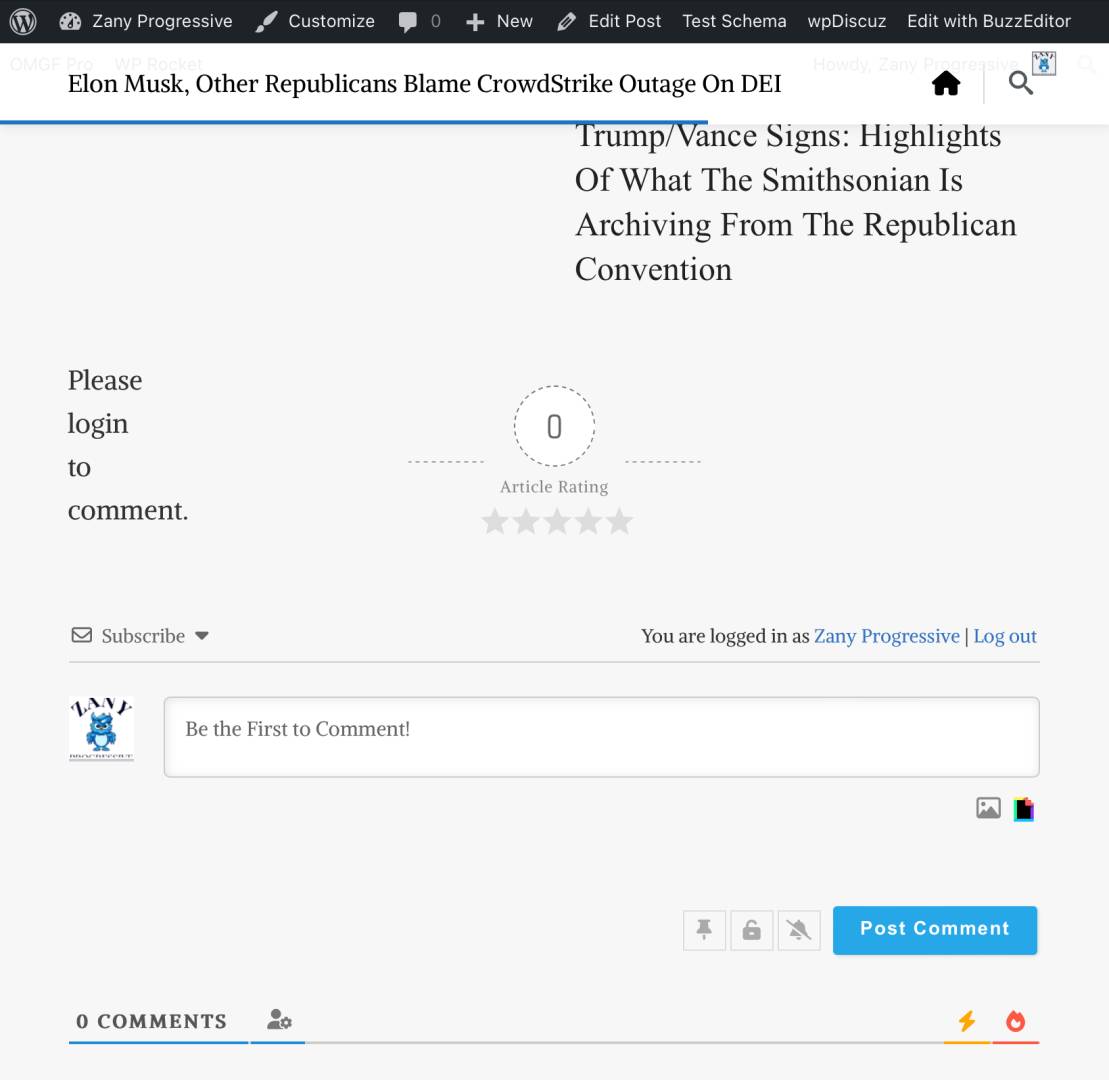
I'm not sure if this is because I'm an admin, or if all logged-in users see it, but even though my username and a logout link are showing above the comment form, there's still “Please login to comment” link (?) or text showing to the left. See screenshot for clarity. Is there a way to stop it from showing if the user is already logged in? Thank you!
Support
Translate
▼
English
Spanish
French
German
Italian
Portuguese
Russian
Chinese
Japanese
Korean
Arabic
Hindi
Dutch
Polish
Turkish
Vietnamese
Thai
Swedish
Danish
Finnish
Norwegian
Czech
Hungarian
Romanian
Greek
Hebrew
Indonesian
Malay
Ukrainian
Bulgarian
Croatian
Slovak
Slovenian
Serbian
Lithuanian
Latvian
Estonian
Show original
Translating...
Jul 22, 2024 2:24 pm
(@asti)
Illustrious Member
Hi,
Please use this CSS code, it should solve the issue:
.swpm-login-to-comment-msg {
    display: none;
}
Insert the code in the "Custom CSS code" textarea, located in the Dashboard > wpDiscuz > Settings > Styles & Colors admin page.
Don't forget to delete the caches before checking.
Super Globals
Options and Features