

The effects of alcohol on sustanon 250 leucine for – real weight loss & bodybuilding benefits?
AI Assistant
How to Enable wpDis...
 
Notifications
Clear all

[Solved] How to Enable wpDiscuz Only on Certain Posts or Pages

1 Posts
1 Users
0 Reactions
3 Views
Asti
 Asti
(@asti)
Illustrious Member Support
Joined: 9 years ago
Posts: 8327
Topic starter
Translate
English
Spanish
French
German
Italian
Portuguese
Russian
Chinese
Japanese
Korean
Arabic
Hindi
Dutch
Polish
Turkish
Vietnamese
Thai
Swedish
Danish
Finnish
Norwegian
Czech
Hungarian
Romanian
Greek
Hebrew
Indonesian
Malay
Ukrainian
Bulgarian
Croatian
Slovak
Slovenian
Serbian
Lithuanian
Latvian
Estonian
  [#11528]

Sometimes, you may want to display the wpDiscuz comment form only on specific posts or pages. For example, you might want to create a test page to check how wpDiscuz works before enabling it across your website.

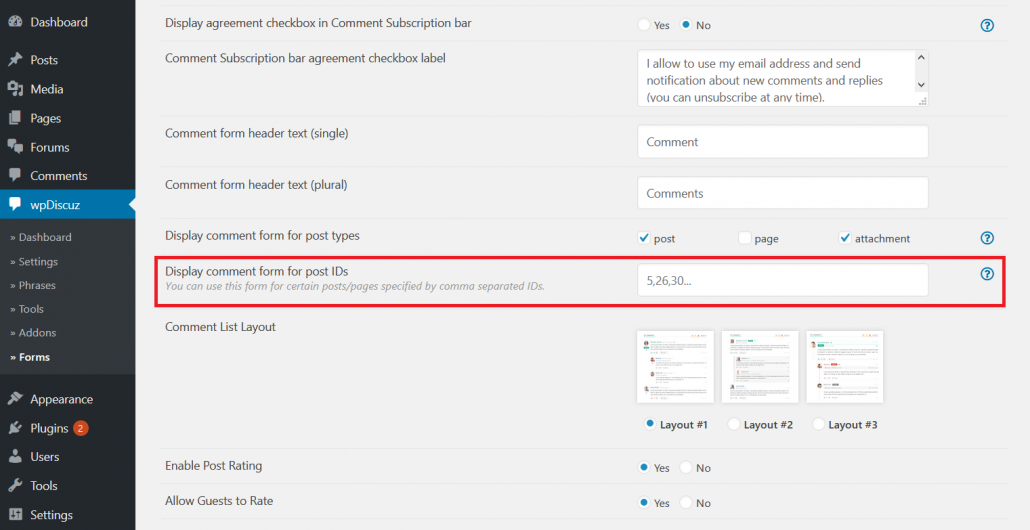
In this case, the best solution is to use the Display comment form for post IDs option.

To configure this option, follow these steps:

  1. Navigate to Dashboard > wpDiscuz > Forms.
  2. Edit the desired comment form (if you haven't made any changes before, this will be the default form).
  3. Enter the IDs of the posts or pages where you want to display the comment form in the Display comment form for post IDs field. Separate multiple IDs with commas.
  4. Save the changes and check the comment form on the frontend.


This topic was modified 1 hour ago 2 times by Asti

In case you want to say thank you! 🙂
We'd really appreciate if you leave a good review on the plugin page.
This is the best way to say thank you to this project and the support team.


Quote