The effects of alcohol on sustanon 250 leucine for – real weight loss & bodybuilding benefits?
AI Assistant
Major Bug | Comment...
 
Notifications
Clear all

Bug Major Bug | Comments Not Displaying After Updating to V7.6.47

23 Posts
5 Users
4 Reactions
650 Views
(@aerostar)
Posts: 144
Estimable Member
Topic starter
Translate
English
Spanish
French
German
Italian
Portuguese
Russian
Chinese
Japanese
Korean
Arabic
Hindi
Dutch
Polish
Turkish
Vietnamese
Thai
Swedish
Danish
Finnish
Norwegian
Czech
Hungarian
Romanian
Greek
Hebrew
Indonesian
Malay
Ukrainian
Bulgarian
Croatian
Slovak
Slovenian
Serbian
Lithuanian
Latvian
Estonian
 
[#11339]

Hello,

After updating your plugin to V7.6.47 (loaded with a massive amount of security fixes), we can't get our comments to display any longer. 

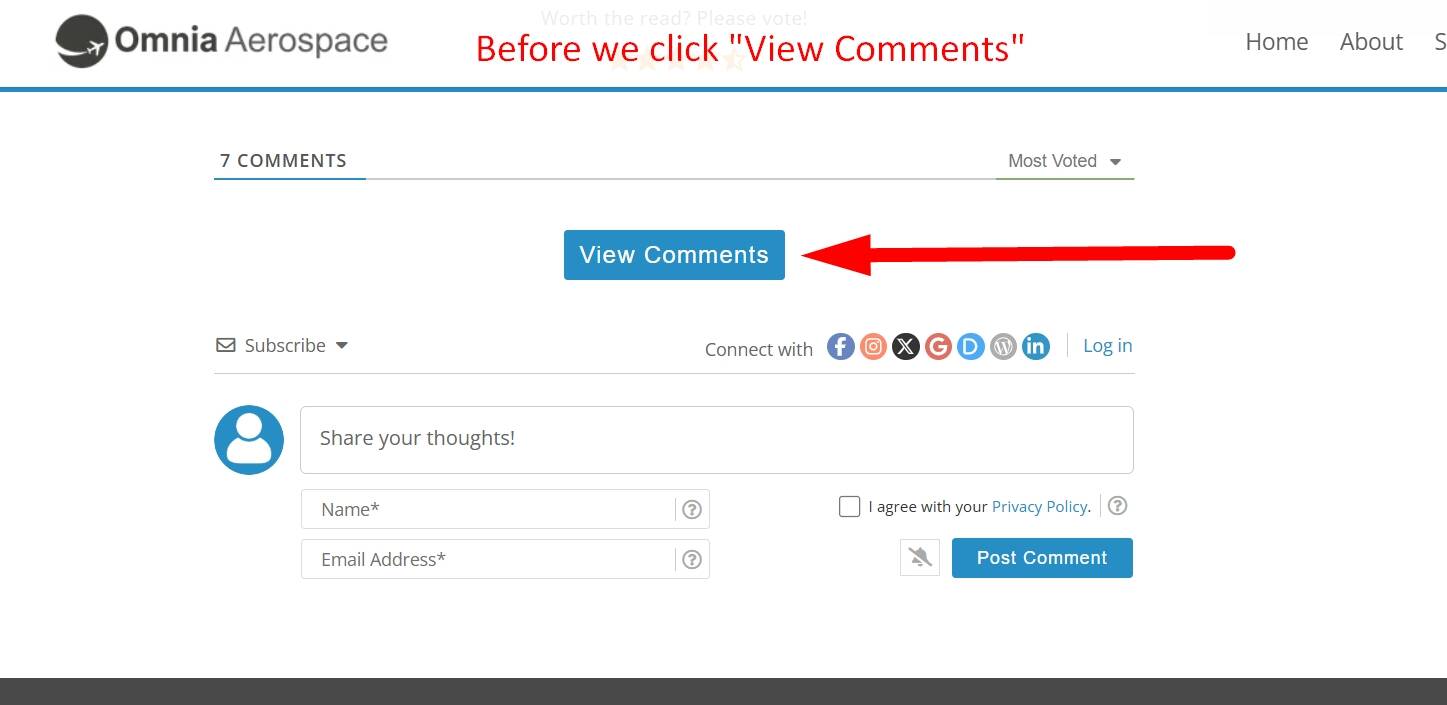
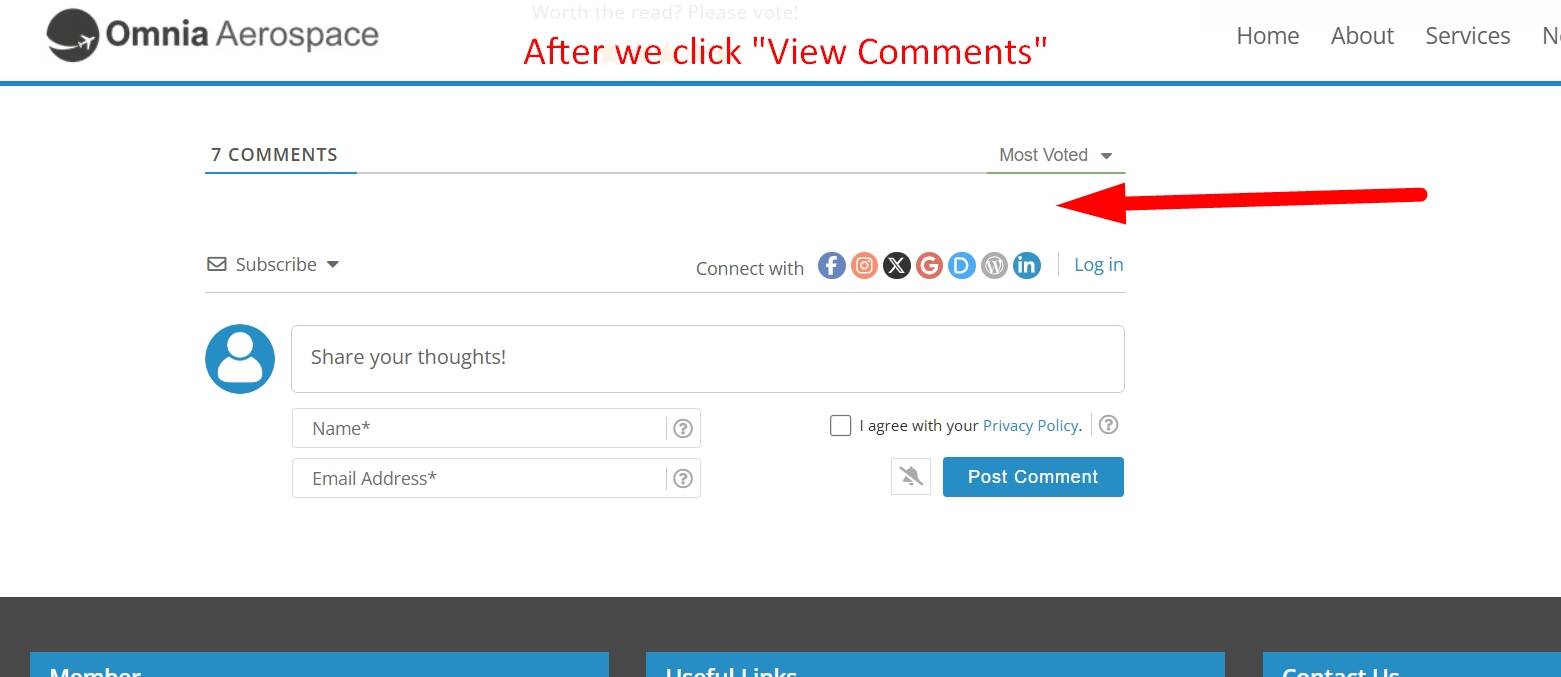
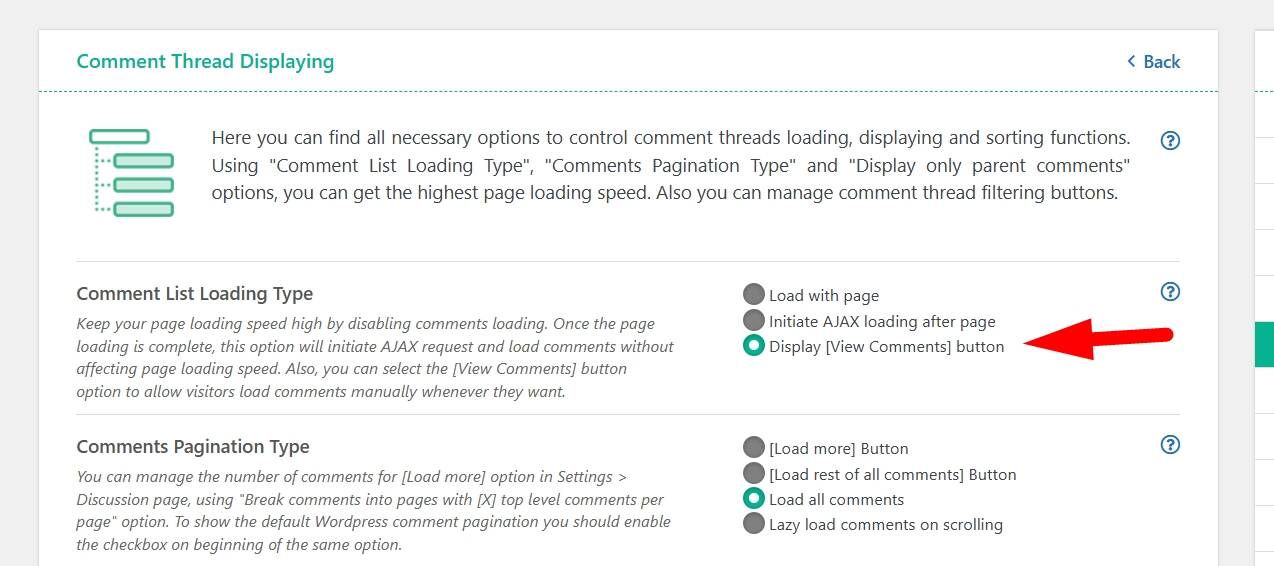
We're using the wpDiscuz setting, "Display [View Comments] button", when we click on "View Comments" nothing happens. Prior to the update, everything worked just fine. Yes, we cleared ALL cache layers after the update.

When logged in (backend), the comments display, but not when we're logged out. See below.

Fix appreciated.

screenshot wp discuz view comments
screenshot wp discuz before click
screenshot wp discuz after click

 
Posted : 12/03/2026 8:54 pm
Sea Odyssey reacted
(@aerostar)
Posts: 144
Estimable Member
Topic starter
Translate
English
Spanish
French
German
Italian
Portuguese
Russian
Chinese
Japanese
Korean
Arabic
Hindi
Dutch
Polish
Turkish
Vietnamese
Thai
Swedish
Danish
Finnish
Norwegian
Czech
Hungarian
Romanian
Greek
Hebrew
Indonesian
Malay
Ukrainian
Bulgarian
Croatian
Slovak
Slovenian
Serbian
Lithuanian
Latvian
Estonian
 

Update: I can confirm that when we downgrade your plugin to V7.6.46, everything works well. Again, fix appreciated.


Posted : 12/03/2026 9:06 pm
Asti
 Asti
(@asti)
Posts: 8284
Illustrious Member Support
Translate
English
Spanish
French
German
Italian
Portuguese
Russian
Chinese
Japanese
Korean
Arabic
Hindi
Dutch
Polish
Turkish
Vietnamese
Thai
Swedish
Danish
Finnish
Norwegian
Czech
Hungarian
Romanian
Greek
Hebrew
Indonesian
Malay
Ukrainian
Bulgarian
Croatian
Slovak
Slovenian
Serbian
Lithuanian
Latvian
Estonian
 

@aerostar

Please provide the direct URL where we can see the issue.

We see that you’ve also made some customizations. Please comment out the customizations and check again. The issue might be caused by the custom code you’ve added.


In case you want to say thank you! 🙂
We'd really appreciate if you leave a good review on the plugin page.
This is the best way to say thank you to this project and the support team.

 
Posted : 13/03/2026 12:24 pm
(@sea-odyssey)
Posts: 47
Trusted Member
Translate
English
Spanish
French
German
Italian
Portuguese
Russian
Chinese
Japanese
Korean
Arabic
Hindi
Dutch
Polish
Turkish
Vietnamese
Thai
Swedish
Danish
Finnish
Norwegian
Czech
Hungarian
Romanian
Greek
Hebrew
Indonesian
Malay
Ukrainian
Bulgarian
Croatian
Slovak
Slovenian
Serbian
Lithuanian
Latvian
Estonian
 

https://www.svseaodyssey.com/behind-breakwater/

Also comments disappeared after the update.


Posted : 13/03/2026 2:53 pm
(@aerostar)
Posts: 144
Estimable Member
Topic starter
Translate
English
Spanish
French
German
Italian
Portuguese
Russian
Chinese
Japanese
Korean
Arabic
Hindi
Dutch
Polish
Turkish
Vietnamese
Thai
Swedish
Danish
Finnish
Norwegian
Czech
Hungarian
Romanian
Greek
Hebrew
Indonesian
Malay
Ukrainian
Bulgarian
Croatian
Slovak
Slovenian
Serbian
Lithuanian
Latvian
Estonian
 

Posted by: @Anonymous

I was facing the same problem after updating to wpDiscuz 7.6.47, where comments were not displaying on the frontend even though they existed in the database and the comment count was correct.

After some testing, I found that the issue was related to caching/optimization. Here’s what fixed it for me:

  1. Cleared all caches (server cache, plugin cache, and CDN if used).

  2. Disabled my optimization plugin temporarily.

  3. Went to wpDiscuz → Settings → Comment Forms and re-saved the form.

  4. Also re-saved Settings → Discussion in WordPress.

After doing this, the comments started displaying normally again.

If anyone else is facing the same issue, try clearing all caches and re-saving the wpDiscuz settings/forms. That solved it in my case.

Hope this helps someone.

Hey @JanyLin,

You rock. Great answer. Thank you. It solved our issue. After so many years, I never thought your additional cache-clearing steps (namely, 3. and 4.) would actually help after updating wpDiscuz. Never did that before. I have incorporated them into our standard procedure for clearing cache when wpDiscuz is updated.

Hey @Asti,

Please take note and update your documentation to reflect @JanyLin's solution. Please be more specific when you advise your customers to "clear all cache."


Posted : 13/03/2026 5:03 pm
(@aerostar)
Posts: 144
Estimable Member
Topic starter
Translate
English
Spanish
French
German
Italian
Portuguese
Russian
Chinese
Japanese
Korean
Arabic
Hindi
Dutch
Polish
Turkish
Vietnamese
Thai
Swedish
Danish
Finnish
Norwegian
Czech
Hungarian
Romanian
Greek
Hebrew
Indonesian
Malay
Ukrainian
Bulgarian
Croatian
Slovak
Slovenian
Serbian
Lithuanian
Latvian
Estonian
 

Update: Issue is back. Currently performing additional troubleshooting steps. Stay tuned.


Posted : 13/03/2026 5:13 pm
(@sea-odyssey)
Posts: 47
Trusted Member
Translate
English
Spanish
French
German
Italian
Portuguese
Russian
Chinese
Japanese
Korean
Arabic
Hindi
Dutch
Polish
Turkish
Vietnamese
Thai
Swedish
Danish
Finnish
Norwegian
Czech
Hungarian
Romanian
Greek
Hebrew
Indonesian
Malay
Ukrainian
Bulgarian
Croatian
Slovak
Slovenian
Serbian
Lithuanian
Latvian
Estonian
 

@janylin @asti Thank you, but that did not work for me.


Posted : 13/03/2026 7:04 pm
(@aerostar)
Posts: 144
Estimable Member
Topic starter
Translate
English
Spanish
French
German
Italian
Portuguese
Russian
Chinese
Japanese
Korean
Arabic
Hindi
Dutch
Polish
Turkish
Vietnamese
Thai
Swedish
Danish
Finnish
Norwegian
Czech
Hungarian
Romanian
Greek
Hebrew
Indonesian
Malay
Ukrainian
Bulgarian
Croatian
Slovak
Slovenian
Serbian
Lithuanian
Latvian
Estonian
 

@Asti,

After conducting multiple tests, I can confirm that Version 7.6.47 of your plugin conflicts with our caching plugin, FlyingPress. Version 7.6.46 of your plugin did not.

It appears the issue is AJAX related. Clearing cache did not help (not even the solution suggested by @JanyLin).

So, my solution for now is to bypass caching of our Posts using the PHP code snippet provided below.

I highly recommend gVectors' developers look into this bug. It appears others have the same issue.

Thank you.

--------------------

Code Snippet for Bypassing Caching of Posts (FlyingPress Solution):

add_filter('flying_press_is_cacheable', function ($is_cacheable) {
if (is_single() && get_post_type() === 'post') {
return false;
}
return $is_cacheable;
});


Posted : 14/03/2026 2:47 am
(@sunmed)
Posts: 4
Active Member
Translate
English
Spanish
French
German
Italian
Portuguese
Russian
Chinese
Japanese
Korean
Arabic
Hindi
Dutch
Polish
Turkish
Vietnamese
Thai
Swedish
Danish
Finnish
Norwegian
Czech
Hungarian
Romanian
Greek
Hebrew
Indonesian
Malay
Ukrainian
Bulgarian
Croatian
Slovak
Slovenian
Serbian
Lithuanian
Latvian
Estonian
 

Hello,

Since I updated to version 7.6.47, my readers can no longer post comments; they receive a "nonce is invalid" error. i have cloudflare + APO cloudflare

I don't have this problem when I bypass Cloudflare by hardcoding my server's IP address in the hosts file.

The only solution I found was to roll back to version 7.6.46, and that resolved the issue temporarly. Readers were complaining about no longer being able to comment on articles.

I'm waiting for a solution in a future plugin update.


Thanks


Posted : 14/03/2026 3:59 pm
(@aerostar)
Posts: 144
Estimable Member
Topic starter
Translate
English
Spanish
French
German
Italian
Portuguese
Russian
Chinese
Japanese
Korean
Arabic
Hindi
Dutch
Polish
Turkish
Vietnamese
Thai
Swedish
Danish
Finnish
Norwegian
Czech
Hungarian
Romanian
Greek
Hebrew
Indonesian
Malay
Ukrainian
Bulgarian
Croatian
Slovak
Slovenian
Serbian
Lithuanian
Latvian
Estonian
 

Update:

I can confirm my issue also occurs with Version 7.6.46 (excluding my temporary solution posted above).

Details:

When I click on "View Comments" for the first time (refer to above screenshots), the comments are not displayed. However if I refresh the post or click on "View Comments" of another post (after the first click), the comments appear. When I downgrade to Version 7.6.45, everything works perfect. 

Note:

I've been using wpDiscuz for approximately eight years with no major issues (i.e., bugs) until gVectors introduced the recent "Security Fixes" and filters into its plugin. Our website environment did not change, except for the usual PHP and Cache plugin updates.

@Asti - Help Appreciated

1. Please set up your test website and confirm you can replicate my issue.

2. Please provide a fix for this issue.

Thank you.


Posted : 14/03/2026 7:27 pm
Asti
 Asti
(@asti)
Posts: 8284
Illustrious Member Support
Translate
English
Spanish
French
German
Italian
Portuguese
Russian
Chinese
Japanese
Korean
Arabic
Hindi
Dutch
Polish
Turkish
Vietnamese
Thai
Swedish
Danish
Finnish
Norwegian
Czech
Hungarian
Romanian
Greek
Hebrew
Indonesian
Malay
Ukrainian
Bulgarian
Croatian
Slovak
Slovenian
Serbian
Lithuanian
Latvian
Estonian
 

I've already asked the team to check this issue. I'm currently waiting for their response and will update this topic as soon as I receive feedback.


In case you want to say thank you! 🙂
We'd really appreciate if you leave a good review on the plugin page.
This is the best way to say thank you to this project and the support team.

 
Posted : 16/03/2026 3:01 pm
Sea Odyssey reacted
Asti
 Asti
(@asti)
Posts: 8284
Illustrious Member Support
Translate
English
Spanish
French
German
Italian
Portuguese
Russian
Chinese
Japanese
Korean
Arabic
Hindi
Dutch
Polish
Turkish
Vietnamese
Thai
Swedish
Danish
Finnish
Norwegian
Czech
Hungarian
Romanian
Greek
Hebrew
Indonesian
Malay
Ukrainian
Bulgarian
Croatian
Slovak
Slovenian
Serbian
Lithuanian
Latvian
Estonian
 

@aerostar 

We kindly ask you to create a development/staging copy of your website on a subdomain and send the admin login details to info[at]gvectors.com so we can check the issue.

You can use the Duplicator plugin to create the staging site.


In case you want to say thank you! 🙂
We'd really appreciate if you leave a good review on the plugin page.
This is the best way to say thank you to this project and the support team.

 
Posted : 17/03/2026 11:14 am
(@sea-odyssey)
Posts: 47
Trusted Member
Translate
English
Spanish
French
German
Italian
Portuguese
Russian
Chinese
Japanese
Korean
Arabic
Hindi
Dutch
Polish
Turkish
Vietnamese
Thai
Swedish
Danish
Finnish
Norwegian
Czech
Hungarian
Romanian
Greek
Hebrew
Indonesian
Malay
Ukrainian
Bulgarian
Croatian
Slovak
Slovenian
Serbian
Lithuanian
Latvian
Estonian
 

How do I rollback to the version before? I don't see in the docs, maybe I missed it. thanks


Posted : 17/03/2026 12:41 pm
Asti
 Asti
(@asti)
Posts: 8284
Illustrious Member Support
Translate
English
Spanish
French
German
Italian
Portuguese
Russian
Chinese
Japanese
Korean
Arabic
Hindi
Dutch
Polish
Turkish
Vietnamese
Thai
Swedish
Danish
Finnish
Norwegian
Czech
Hungarian
Romanian
Greek
Hebrew
Indonesian
Malay
Ukrainian
Bulgarian
Croatian
Slovak
Slovenian
Serbian
Lithuanian
Latvian
Estonian
 

@sea-odyssey 

Please read this article: https://www.wpbeginner.com/plugins/how-to-rollback-wordpress-plugins-version-control-for-beginners/


In case you want to say thank you! 🙂
We'd really appreciate if you leave a good review on the plugin page.
This is the best way to say thank you to this project and the support team.
 
Posted : 17/03/2026 1:09 pm
(@sea-odyssey)
Posts: 47
Trusted Member
Translate
English
Spanish
French
German
Italian
Portuguese
Russian
Chinese
Japanese
Korean
Arabic
Hindi
Dutch
Polish
Turkish
Vietnamese
Thai
Swedish
Danish
Finnish
Norwegian
Czech
Hungarian
Romanian
Greek
Hebrew
Indonesian
Malay
Ukrainian
Bulgarian
Croatian
Slovak
Slovenian
Serbian
Lithuanian
Latvian
Estonian
 

@asti thanks. I hope this is resolved soon. We just got this working!! 😫😫😫😫


Posted : 17/03/2026 1:21 pm
Page 1 / 2