The effects of alcohol on
sustanon 250 leucine for – real weight loss & bodybuilding benefits?
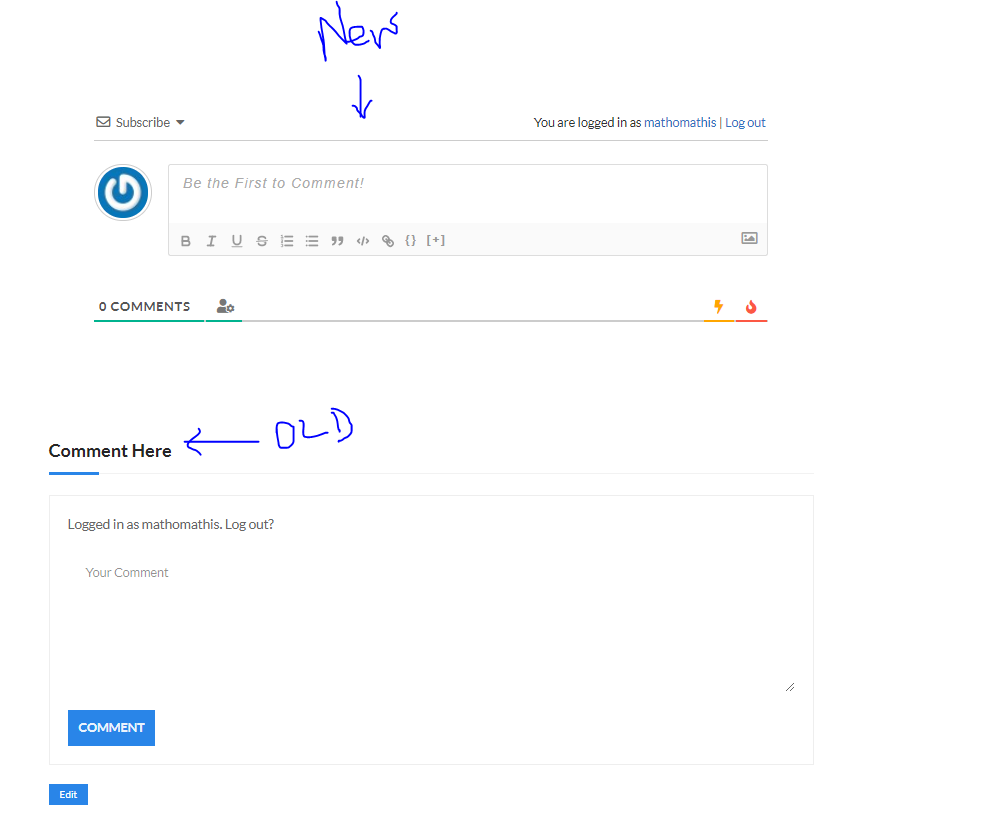
After installing wpDiscuz plugin, the old comment box is still visible
✦
✦
✦
AI is analyzing the discussion...
Translate
▼
English
Spanish
French
German
Italian
Portuguese
Russian
Chinese
Japanese
Korean
Arabic
Hindi
Dutch
Polish
Turkish
Vietnamese
Thai
Swedish
Danish
Finnish
Norwegian
Czech
Hungarian
Romanian
Greek
Hebrew
Indonesian
Malay
Ukrainian
Bulgarian
Croatian
Slovak
Slovenian
Serbian
Lithuanian
Latvian
Estonian
Show original
Translating...
Jun 26, 2020 11:17 am
(@198709mk)
New Member
Hi My name is manju and i host a website called: mathomathis
Today(26/06/2020), i installed the wpDiscuz plugin to my site, even after doing that, the old comment box is still visible, need support to remove it. I am unable to find options how to remove it.
File has been attached and FYI, you can navigate to the link: https://mathomathis.com/vastu-for-house-interiors-103-conclusion/ and check the comment section, there are 2 comment box.
Support
Translate
▼
English
Spanish
French
German
Italian
Portuguese
Russian
Chinese
Japanese
Korean
Arabic
Hindi
Dutch
Polish
Turkish
Vietnamese
Thai
Swedish
Danish
Finnish
Norwegian
Czech
Hungarian
Romanian
Greek
Hebrew
Indonesian
Malay
Ukrainian
Bulgarian
Croatian
Slovak
Slovenian
Serbian
Lithuanian
Latvian
Estonian
Show original
Translating...
Jun 26, 2020 11:40 am
(@asti)
Illustrious Member
Hi @198709mk ,
The issue comes from the active theme.
Please see the solutions you can use to solve the issue:
1. Edit the template files and remove comment_form() function. Keep only the comments_template()
2. Hide the comment box via the following CSS code:
div#respond {
Put the code in the Top Admin Bar > Customize > Additional CSS > " Additional CSS " textarea, save it and delete all caches and check again.
3. Contact the theme support and ask them to solve the issue
Super Globals
Options and Features