Hi. I'm completely green when it comes to WordPress 🙂 I downloaded and installed the plugin, but it doesn't display on the page. I was looking for advice on how to solve the problem, but I can't handle anything I don't understand. The template editor is black magic to me. I am Polish, I don't understand English very well. Can anyone help me?
In case you want to say thank you! 🙂 We'd really appreciate if you leave a good review on the plugin page. This is the best way to say thank you to this project and the support team.
@asti Thank you for the hint. I did everything right according to the instructions. Unfortunately, still not working. As I mentioned, I do not know WordPress.The site was created a long time ago by someone else. . However, I will have to opt out of this plugin and uninstall it from my site, because I will not do tips 5 and 6 myself.
Please send the admin login details to info[at]gvectors.com email address. I'll aks the developers to check the issue for you.
In case you want to say thank you! 🙂 We'd really appreciate if you leave a good review on the plugin page. This is the best way to say thank you to this project and the support team.
please leave the email subject here, to allow us easily find it.
In case you want to say thank you! 🙂 We'd really appreciate if you leave a good review on the plugin page. This is the best way to say thank you to this project and the support team.
The issue comes from the active theme. It doesn't use the core (native) Wordpress comments_template() function, thus the wpDiscuz can't be loaded.
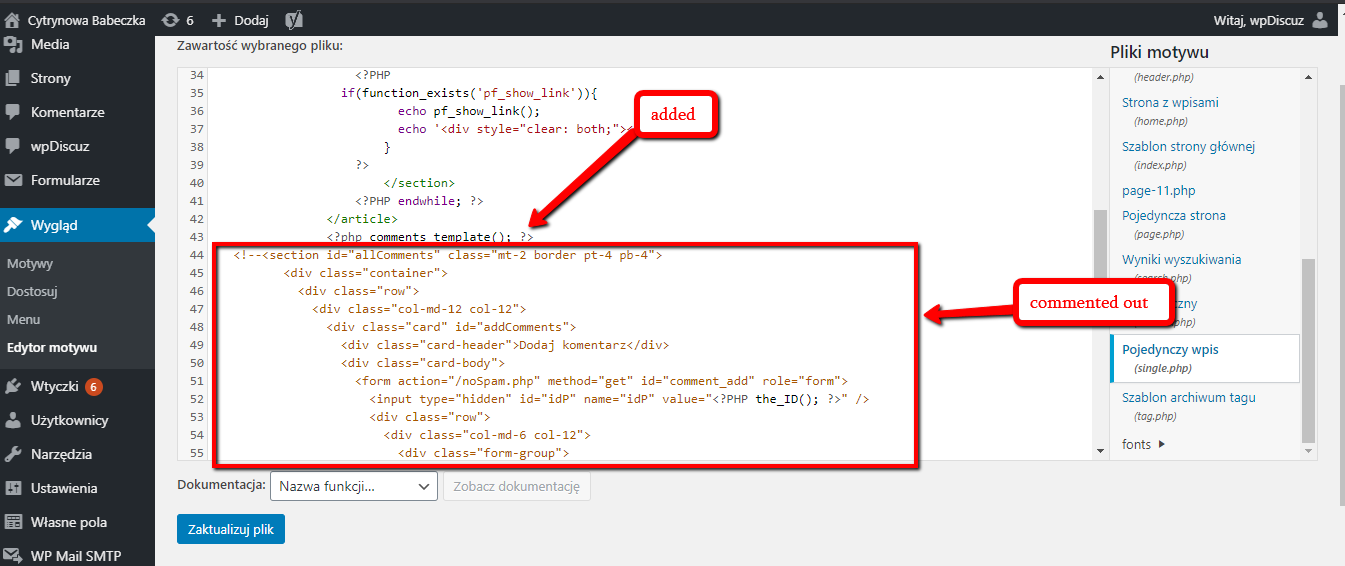
The issue is fixed by our developers. The developers have commented out the lines from 44 to 87. Then they've added the <?php comments_template(); ?> to call the comment form.
This is done for the post type in the single.php file.
If you want to enable it for other post types just do as I described before.
In case you want to say thank you! 🙂 We'd really appreciate if you leave a good review on the plugin page. This is the best way to say thank you to this project and the support team.