The effects of alcohol on sustanon 250 leucine for – real weight loss & bodybuilding benefits?
Search
Close
AI Search
Classic Search
 Search Phrase:
 Search Type:
Advanced search options
 Search in Forums:
 Search in date period:

 Sort Search Results by:

AI Assistant
Social login button...
 
Notifications
Clear all

[Solved] Social login buttons on top of the main comment form are not aligned on tablets (iPad)

3 Posts
2 Users
0 Reactions
916 Views
Posts: 31
Topic starter
Translate
English
Spanish
French
German
Italian
Portuguese
Russian
Chinese
Japanese
Korean
Arabic
Hindi
Dutch
Polish
Turkish
Vietnamese
Thai
Swedish
Danish
Finnish
Norwegian
Czech
Hungarian
Romanian
Greek
Hebrew
Indonesian
Malay
Ukrainian
Bulgarian
Croatian
Slovak
Slovenian
Serbian
Lithuanian
Latvian
Estonian
(@supertrooper)
Trusted Member
Joined: 5 years ago
[#1763]

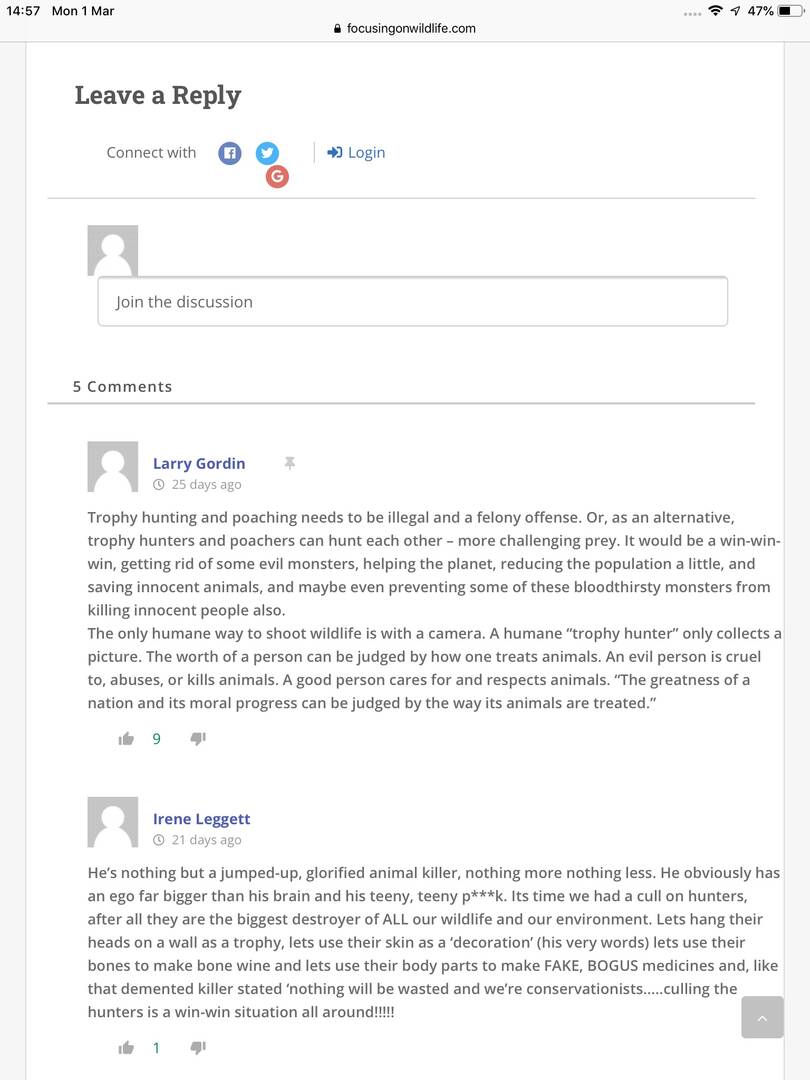
In finalizing the layout for tablets (iPad) several hours have been spent in trying to align the login social icons for the iPad tablet (see attached screenshot). The issue is not present with desktops or mobiles.

This (tablet issue) can be seen in the comments section at the bottom of the following post:

https://focusingonwildlife.com/news/26-grizzlies-captured-18-euthanized-in-wyoming-last-year/

Hoping that someone will be able to point me in the right direction.

ipad logged out


2 Replies
Asti
Posts: 8218
 Asti
Support
Translate
English
Spanish
French
German
Italian
Portuguese
Russian
Chinese
Japanese
Korean
Arabic
Hindi
Dutch
Polish
Turkish
Vietnamese
Thai
Swedish
Danish
Finnish
Norwegian
Czech
Hungarian
Romanian
Greek
Hebrew
Indonesian
Malay
Ukrainian
Bulgarian
Croatian
Slovak
Slovenian
Serbian
Lithuanian
Latvian
Estonian
(@asti)
Illustrious Member
Joined: 8 years ago

@supertrooper,

Try the following CSS code:

.wpd-social-login {
   display: flex !important;
   flex-wrap: wrap !important;
}
#wpdcom .wpd-form .wpdiscuz-textarea-wrap.wpd-txt .wpd-avatar {
   flex-basis: 48px !important;
}

Put the code in the Top Admin Bar > Customize > Additional CSS > "Additional CSS" textarea, save it, delete all kind of caches and check again. 

Please don't forget to press Ctrl+F5 (twice) on the frontend before checking.


Posts: 31
Topic starter
Translate
English
Spanish
French
German
Italian
Portuguese
Russian
Chinese
Japanese
Korean
Arabic
Hindi
Dutch
Polish
Turkish
Vietnamese
Thai
Swedish
Danish
Finnish
Norwegian
Czech
Hungarian
Romanian
Greek
Hebrew
Indonesian
Malay
Ukrainian
Bulgarian
Croatian
Slovak
Slovenian
Serbian
Lithuanian
Latvian
Estonian
(@supertrooper)
Trusted Member
Joined: 5 years ago

Hi Asti

Many thanks for the great support.

This fix worked perfectly.