


The effects of alcohol on sustanon 250 leucine for – real weight loss & bodybuilding benefits?
Search
Close
AI Search
Classic Search
 Search Phrase:
 Search Type:
Advanced search options
 Search in Forums:
 Search in date period:

 Sort Search Results by:

AI Assistant
Notifications
Clear all

[Solved] Help with CSS

26 Posts
2 Users
1 Reactions
2,595 Views
(@shira1)
Posts: 32
Eminent Member
Topic starter
Translate â–¼
English
Spanish
French
German
Italian
Portuguese
Russian
Chinese
Japanese
Korean
Arabic
Hindi
Dutch
Polish
Turkish
Vietnamese
Thai
Swedish
Danish
Finnish
Norwegian
Czech
Hungarian
Romanian
Greek
Hebrew
Indonesian
Malay
Ukrainian
Bulgarian
Croatian
Slovak
Slovenian
Serbian
Lithuanian
Latvian
Estonian
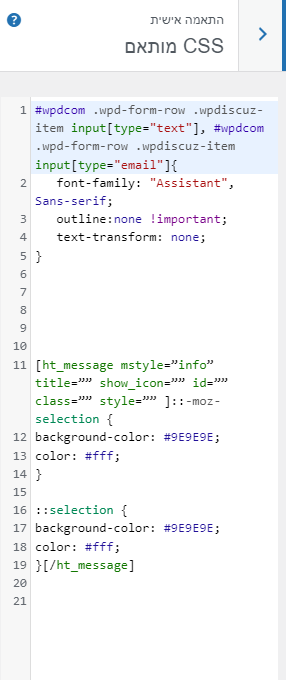
 

@asti I did that.

image

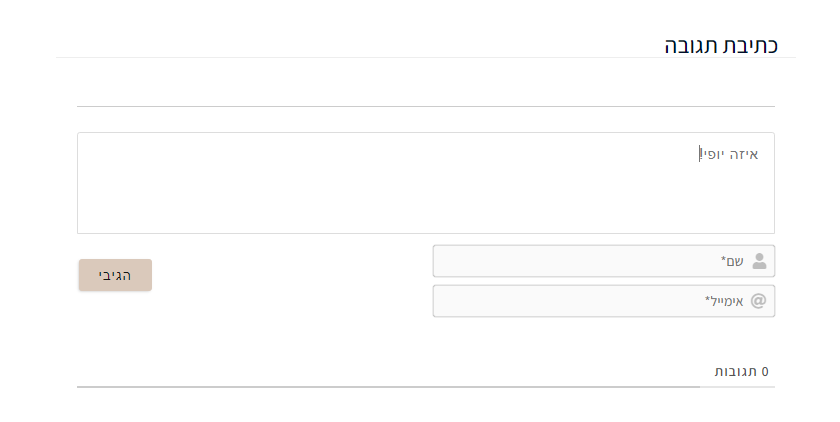
  But it still didn't change the button's font and the comment's font. You can see in the screenshot. I cleaned cache.

image

 
Posted : 05/10/2021 3:42 pm
Asti
 Asti
(@asti)
Posts: 8259
Illustrious Member Support
Translate â–¼
English
Spanish
French
German
Italian
Portuguese
Russian
Chinese
Japanese
Korean
Arabic
Hindi
Dutch
Polish
Turkish
Vietnamese
Thai
Swedish
Danish
Finnish
Norwegian
Czech
Hungarian
Romanian
Greek
Hebrew
Indonesian
Malay
Ukrainian
Bulgarian
Croatian
Slovak
Slovenian
Serbian
Lithuanian
Latvian
Estonian
 

@shira1,

Put this code as well:

#wpdcom .ql-editor > * { font-family: "Assistant", Sans-serif !important;}

In case you want to say thank you! 🙂
We'd really appreciate if you leave a good review on the plugin page.
This is the best way to say thank you to this project and the support team.

 
Posted : 05/10/2021 3:45 pm
(@shira1)
Posts: 32
Eminent Member
Topic starter
Translate â–¼
English
Spanish
French
German
Italian
Portuguese
Russian
Chinese
Japanese
Korean
Arabic
Hindi
Dutch
Polish
Turkish
Vietnamese
Thai
Swedish
Danish
Finnish
Norwegian
Czech
Hungarian
Romanian
Greek
Hebrew
Indonesian
Malay
Ukrainian
Bulgarian
Croatian
Slovak
Slovenian
Serbian
Lithuanian
Latvian
Estonian
 

@asti The comment's font has changed!!! But the button's font did not, how to change the button's font to Assistant? I also want that the comment's content will be black (#2B2B2B)


Posted : 05/10/2021 4:00 pm
Asti
 Asti
(@asti)
Posts: 8259
Illustrious Member Support
Translate â–¼
English
Spanish
French
German
Italian
Portuguese
Russian
Chinese
Japanese
Korean
Arabic
Hindi
Dutch
Polish
Turkish
Vietnamese
Thai
Swedish
Danish
Finnish
Norwegian
Czech
Hungarian
Romanian
Greek
Hebrew
Indonesian
Malay
Ukrainian
Bulgarian
Croatian
Slovak
Slovenian
Serbian
Lithuanian
Latvian
Estonian
 

@shira1,

You should write the CSS code like this:

#wpdcom .wpd-second-button, #wpdcom .wpd-prim-button {
   font-family: "Assistant", Sans-serif !important;
}

I also want that the comment's content will be black (#2B2B2B)

Change the value of the "Comment Text". It's located in the Dashboard > wpDiscuz > Settings > Styles & Colors admin page


In case you want to say thank you! 🙂
We'd really appreciate if you leave a good review on the plugin page.
This is the best way to say thank you to this project and the support team.

 
Posted : 05/10/2021 4:19 pm
(@shira1)
Posts: 32
Eminent Member
Topic starter
Translate â–¼
English
Spanish
French
German
Italian
Portuguese
Russian
Chinese
Japanese
Korean
Arabic
Hindi
Dutch
Polish
Turkish
Vietnamese
Thai
Swedish
Danish
Finnish
Norwegian
Czech
Hungarian
Romanian
Greek
Hebrew
Indonesian
Malay
Ukrainian
Bulgarian
Croatian
Slovak
Slovenian
Serbian
Lithuanian
Latvian
Estonian
 

@asti it worked!!

I have two more questions:

1. How can I place the button below the field of the email?

2. How can I increase the font size? (I want it to grow in all the plugin's text (in the comment text, the button,the written comments ...)


Posted : 05/10/2021 4:58 pm
Asti
 Asti
(@asti)
Posts: 8259
Illustrious Member Support
Translate â–¼
English
Spanish
French
German
Italian
Portuguese
Russian
Chinese
Japanese
Korean
Arabic
Hindi
Dutch
Polish
Turkish
Vietnamese
Thai
Swedish
Danish
Finnish
Norwegian
Czech
Hungarian
Romanian
Greek
Hebrew
Indonesian
Malay
Ukrainian
Bulgarian
Croatian
Slovak
Slovenian
Serbian
Lithuanian
Latvian
Estonian
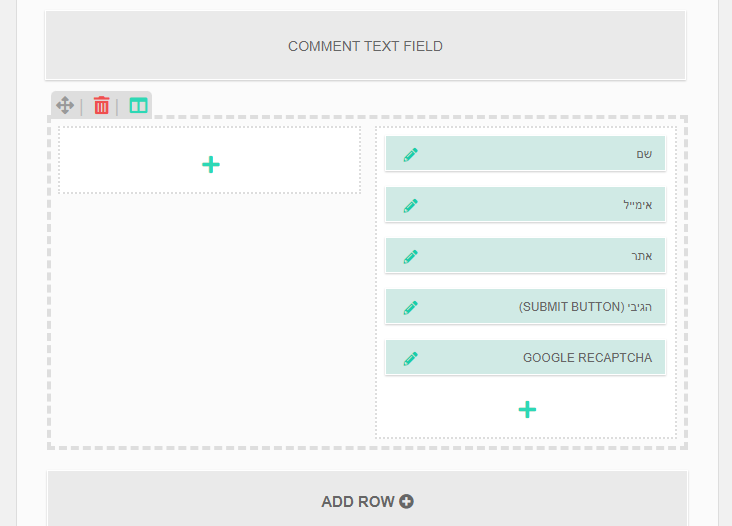
 

@shira1,

1. How can I place the button below the field of the email?

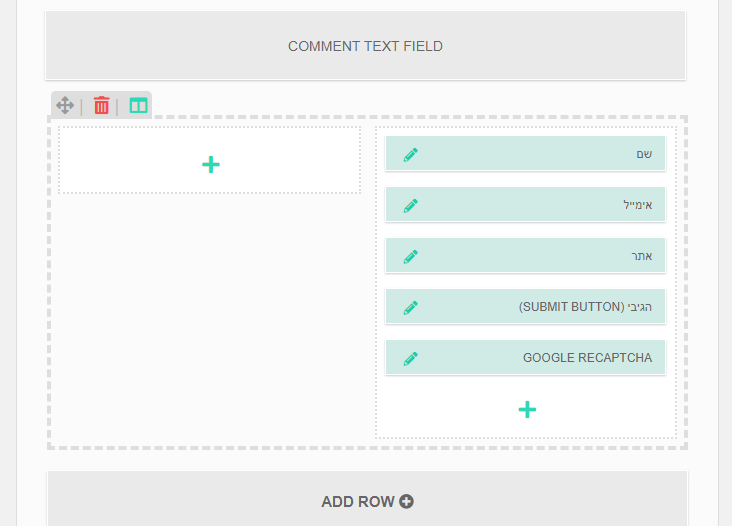
Navigate to Dashboard > wpDiscuz > Forms admin page, edit the default form, find the "COMMENT TEXT FIELD" section, drag and drop the fields as you like. 

2. How can I increase the font size? (I want it to grow in all the plugin's text (in the comment text, the button,the written comments ...)

Please note, that we don't provide support for style customization, we may help in 1-2 simple questions related to colours and background but not more. We can not help you customize all components of website style, these are custom requirements and should be done by website owners. We only help with general questions and issues.

Thank you for your understanding.

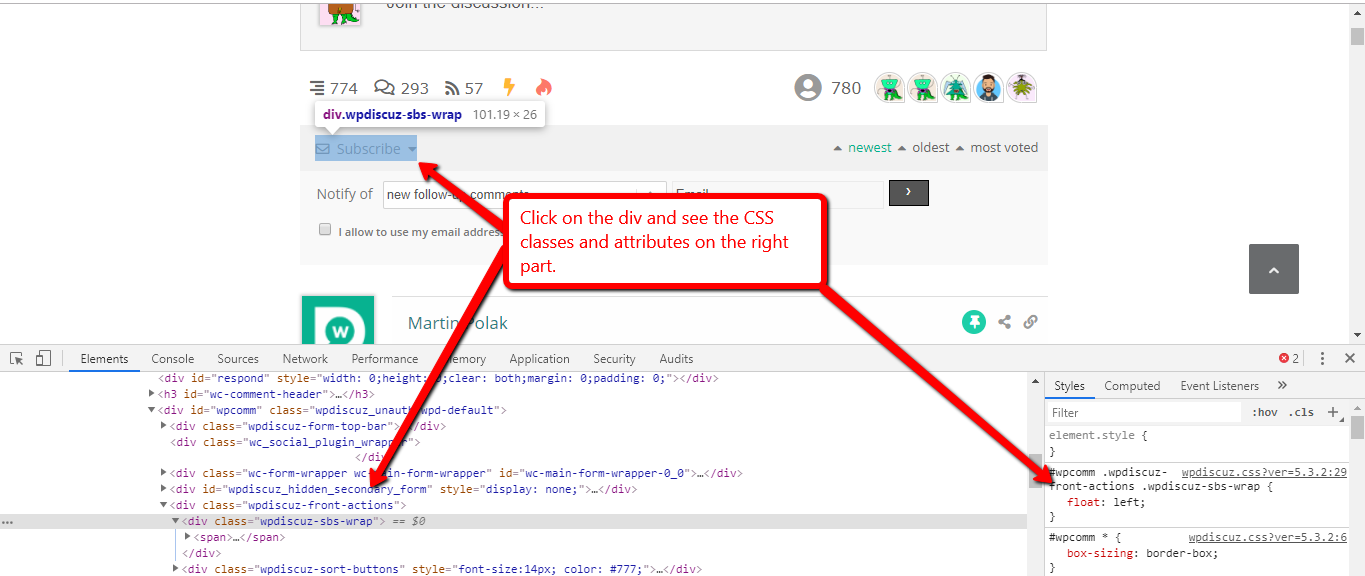
You can find all classes by pressing F12 on the browser and opening Chrome or Firefox Console, it'll help you easily write CSS rules you need to customize. 

CSS

This website should help you to write CSS rules:   https://www.w3schools.com/cssref/default.asp


In case you want to say thank you! 🙂
We'd really appreciate if you leave a good review on the plugin page.
This is the best way to say thank you to this project and the support team.

 
Posted : 05/10/2021 5:11 pm
(@shira1)
Posts: 32
Eminent Member
Topic starter
Translate â–¼
English
Spanish
French
German
Italian
Portuguese
Russian
Chinese
Japanese
Korean
Arabic
Hindi
Dutch
Polish
Turkish
Vietnamese
Thai
Swedish
Danish
Finnish
Norwegian
Czech
Hungarian
Romanian
Greek
Hebrew
Indonesian
Malay
Ukrainian
Bulgarian
Croatian
Slovak
Slovenian
Serbian
Lithuanian
Latvian
Estonian
 

@asti I'm sorry. I will not ask you anymore. 

I draged and droped the fields and now the button is in the left side, how can I straighten it to the right?

image

 
Posted : 05/10/2021 5:28 pm
Asti
 Asti
(@asti)
Posts: 8259
Illustrious Member Support
Translate â–¼
English
Spanish
French
German
Italian
Portuguese
Russian
Chinese
Japanese
Korean
Arabic
Hindi
Dutch
Polish
Turkish
Vietnamese
Thai
Swedish
Danish
Finnish
Norwegian
Czech
Hungarian
Romanian
Greek
Hebrew
Indonesian
Malay
Ukrainian
Bulgarian
Croatian
Slovak
Slovenian
Serbian
Lithuanian
Latvian
Estonian
 

@shira1,

Just move all fields to the right.  


In case you want to say thank you! 🙂
We'd really appreciate if you leave a good review on the plugin page.
This is the best way to say thank you to this project and the support team.

 
Posted : 05/10/2021 5:31 pm
(@shira1)
Posts: 32
Eminent Member
Topic starter
Translate â–¼
English
Spanish
French
German
Italian
Portuguese
Russian
Chinese
Japanese
Korean
Arabic
Hindi
Dutch
Polish
Turkish
Vietnamese
Thai
Swedish
Danish
Finnish
Norwegian
Czech
Hungarian
Romanian
Greek
Hebrew
Indonesian
Malay
Ukrainian
Bulgarian
Croatian
Slovak
Slovenian
Serbian
Lithuanian
Latvian
Estonian
 

@asti All of them are on the right side:

image

 
Posted : 05/10/2021 5:32 pm
Asti
 Asti
(@asti)
Posts: 8259
Illustrious Member Support
Translate â–¼
English
Spanish
French
German
Italian
Portuguese
Russian
Chinese
Japanese
Korean
Arabic
Hindi
Dutch
Polish
Turkish
Vietnamese
Thai
Swedish
Danish
Finnish
Norwegian
Czech
Hungarian
Romanian
Greek
Hebrew
Indonesian
Malay
Ukrainian
Bulgarian
Croatian
Slovak
Slovenian
Serbian
Lithuanian
Latvian
Estonian
 

@shira1,

Then, move them to left.  


In case you want to say thank you! 🙂
We'd really appreciate if you leave a good review on the plugin page.
This is the best way to say thank you to this project and the support team.

 
Posted : 05/10/2021 5:33 pm
(@shira1)
Posts: 32
Eminent Member
Topic starter
Translate â–¼
English
Spanish
French
German
Italian
Portuguese
Russian
Chinese
Japanese
Korean
Arabic
Hindi
Dutch
Polish
Turkish
Vietnamese
Thai
Swedish
Danish
Finnish
Norwegian
Czech
Hungarian
Romanian
Greek
Hebrew
Indonesian
Malay
Ukrainian
Bulgarian
Croatian
Slovak
Slovenian
Serbian
Lithuanian
Latvian
Estonian
 

@asti Now all the fields are on the left side. Never mind, I will leave it like the it was before


Posted : 05/10/2021 5:38 pm
Asti reacted
Page 2 / 2