The effects of alcohol on
sustanon 250 leucine for – real weight loss & bodybuilding benefits?
[Solved] Custom Shape for Custom Ratings
✦ Summarize Topic
✦
✦
✦
AI is analyzing the discussion...
(@zo-zo-lee)
Posts: 9
Active Member
Translate
▼
English
Spanish
French
German
Italian
Portuguese
Russian
Chinese
Japanese
Korean
Arabic
Hindi
Dutch
Polish
Turkish
Vietnamese
Thai
Swedish
Danish
Finnish
Norwegian
Czech
Hungarian
Romanian
Greek
Hebrew
Indonesian
Malay
Ukrainian
Bulgarian
Croatian
Slovak
Slovenian
Serbian
Lithuanian
Latvian
Estonian
Show original
Translating...
[#10852]
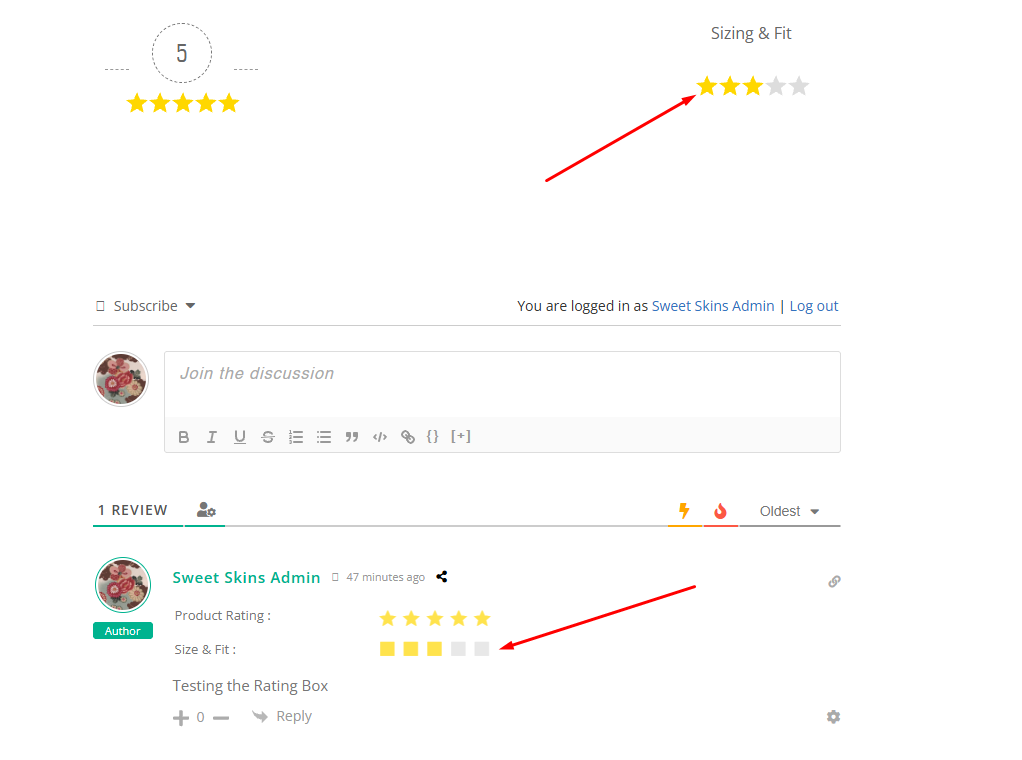
If I add a custom icon to my custom rating field, it makes no sense to display the result as stars anyway... (in this case, it should be a range from too small to too loose, so 3 is perfect, not 5)
How can I change the shape for the results display so that it's bars instead of stars?
Posted : 04/08/2025 11:01 am
(@jacob)
Posts: 134
Estimable Member Support
(@zo-zo-lee)
Posts: 9
Active Member
Translate
▼
English
Spanish
French
German
Italian
Portuguese
Russian
Chinese
Japanese
Korean
Arabic
Hindi
Dutch
Polish
Turkish
Vietnamese
Thai
Swedish
Danish
Finnish
Norwegian
Czech
Hungarian
Romanian
Greek
Hebrew
Indonesian
Malay
Ukrainian
Bulgarian
Croatian
Slovak
Slovenian
Serbian
Lithuanian
Latvian
Estonian
Show original
Translating...
Thank you!
Posted : 05/08/2025 5:33 am
(@jacob)
Posts: 134
Estimable Member Support
Translate
▼
English
Spanish
French
German
Italian
Portuguese
Russian
Chinese
Japanese
Korean
Arabic
Hindi
Dutch
Polish
Turkish
Vietnamese
Thai
Swedish
Danish
Finnish
Norwegian
Czech
Hungarian
Romanian
Greek
Hebrew
Indonesian
Malay
Ukrainian
Bulgarian
Croatian
Slovak
Slovenian
Serbian
Lithuanian
Latvian
Estonian
Show original
Translating...
@zo-zo-lee
You can use the provided hooks and do something like this
add_filter('wpdiscuz_full_star_svg', function ($svg, $type, $icon) {
    if ($icon === 'fas fa-square') {
        $svg = '<svg width="100" height="100" viewBox="0 0 24 24" xmlns="http://www.w3.org/2000/svg"><path d="M10 10 H90 V90 H10 Z" fill="none" class="wpd-star"/></svg>';
    }

    return $svg;
}, 10, 3);

add_filter('wpdiscuz_half_star_svg', function ($svg, $type, $icon) {
    if ($icon === 'fas fa-square') {
        $svg = '<svg viewBox="0 0 24 24" xmlns="http://www.w3.org/2000/svg"><path d="M10 10 H90 V90 H10 Z" fill="none" class="wpd-star"/><path d="M10 10 H17 V90 H10 Z" fill="none" class="wpd-star wpd-active"/></svg>';
    }

    return $svg;
}, 10, 3);
In case you want to say thank you! 🙂
We'd really appreciate if you leave a good review on the plugin page. This is the best way to say thank you to this project and the support team.
Posted : 05/08/2025 7:38 pm
(@zo-zo-lee)
Posts: 9
Active Member
Translate
▼
English
Spanish
French
German
Italian
Portuguese
Russian
Chinese
Japanese
Korean
Arabic
Hindi
Dutch
Polish
Turkish
Vietnamese
Thai
Swedish
Danish
Finnish
Norwegian
Czech
Hungarian
Romanian
Greek
Hebrew
Indonesian
Malay
Ukrainian
Bulgarian
Croatian
Slovak
Slovenian
Serbian
Lithuanian
Latvian
Estonian
Show original
Translating...
Ahh, now I get it. Thank you so much! 😊
Posted : 07/08/2025 8:02 am
Super Globals
Options and Features