The effects of alcohol on
sustanon 250 leucine for – real weight loss & bodybuilding benefits?
Issue [Solved] Inline Comment Button Unreadable
✦ Summarize Topic
✦
✦
✦
AI is analyzing the discussion...
(@silkenapex)
Posts: 2
New Member
Translate
▼
English
Spanish
French
German
Italian
Portuguese
Russian
Chinese
Japanese
Korean
Arabic
Hindi
Dutch
Polish
Turkish
Vietnamese
Thai
Swedish
Danish
Finnish
Norwegian
Czech
Hungarian
Romanian
Greek
Hebrew
Indonesian
Malay
Ukrainian
Bulgarian
Croatian
Slovak
Slovenian
Serbian
Lithuanian
Latvian
Estonian
Show original
Translating...
[#9066]
Hi everyone!
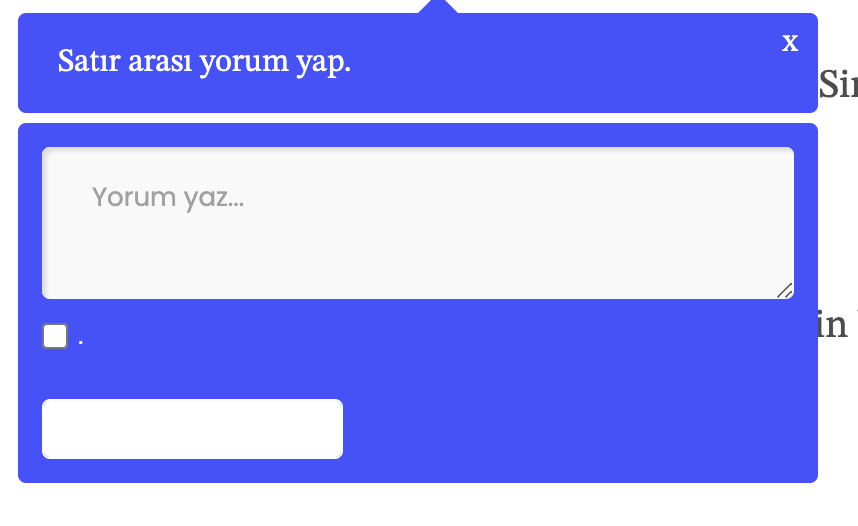
I have an issue and I think its a conflict with dark mode / light mode feature of my website. Here's screenshots. Default "COMMENT" text is unreadable because it is white. While hovering problem disappears. How can I fix it? Also I want to get rid of the checkbox but I can't find how.
Thanks in advance!
Posted : 27/09/2024 9:51 pm
(@asti)
Posts: 8277
Illustrious Member Support
Translate
▼
English
Spanish
French
German
Italian
Portuguese
Russian
Chinese
Japanese
Korean
Arabic
Hindi
Dutch
Polish
Turkish
Vietnamese
Thai
Swedish
Danish
Finnish
Norwegian
Czech
Hungarian
Romanian
Greek
Hebrew
Indonesian
Malay
Ukrainian
Bulgarian
Croatian
Slovak
Slovenian
Serbian
Lithuanian
Latvian
Estonian
Show original
Translating...
Hi,
Please leave the example URL where we can see the issue.
In case you want to say thank you! 🙂 We'd really appreciate if you leave a good review on the plugin page. This is the best way to say thank you to this project and the support team.
Posted : 28/09/2024 11:39 am
(@silkenapex)
Posts: 2
New Member
Translate
▼
English
Spanish
French
German
Italian
Portuguese
Russian
Chinese
Japanese
Korean
Arabic
Hindi
Dutch
Polish
Turkish
Vietnamese
Thai
Swedish
Danish
Finnish
Norwegian
Czech
Hungarian
Romanian
Greek
Hebrew
Indonesian
Malay
Ukrainian
Bulgarian
Croatian
Slovak
Slovenian
Serbian
Lithuanian
Latvian
Estonian
Show original
Translating...
I fixed the button issue but I can't remove the notification checkbox
is there any option in settings about that?
url is: typeink.co
Posted : 28/09/2024 2:37 pm
(@asti)
Posts: 8277
Illustrious Member Support
Translate
▼
English
Spanish
French
German
Italian
Portuguese
Russian
Chinese
Japanese
Korean
Arabic
Hindi
Dutch
Polish
Turkish
Vietnamese
Thai
Swedish
Danish
Finnish
Norwegian
Czech
Hungarian
Romanian
Greek
Hebrew
Indonesian
Malay
Ukrainian
Bulgarian
Croatian
Slovak
Slovenian
Serbian
Lithuanian
Latvian
Estonian
Show original
Translating...
@silkenapex
You can hide it using CSS code:
.wpd-inline-form .wpd-inline-notification {
     display: none;
}
In case you want to say thank you! 🙂 We'd really appreciate if you leave a good review on the plugin page. This is the best way to say thank you to this project and the support team.
Posted : 30/09/2024 1:20 pm
Super Globals
Options and Features