The effects of alcohol on
sustanon 250 leucine for – real weight loss & bodybuilding benefits?
Issue [Solved] Design issue - urgent request for update! HELP!
✦
✦
✦
AI is analyzing the discussion...
Translate
▼
English
Spanish
French
German
Italian
Portuguese
Russian
Chinese
Japanese
Korean
Arabic
Hindi
Dutch
Polish
Turkish
Vietnamese
Thai
Swedish
Danish
Finnish
Norwegian
Czech
Hungarian
Romanian
Greek
Hebrew
Indonesian
Malay
Ukrainian
Bulgarian
Croatian
Slovak
Slovenian
Serbian
Lithuanian
Latvian
Estonian
Show original
Translating...
Jan 31, 2025 5:57 pm
(@tomlandon-net)
Eminent Member
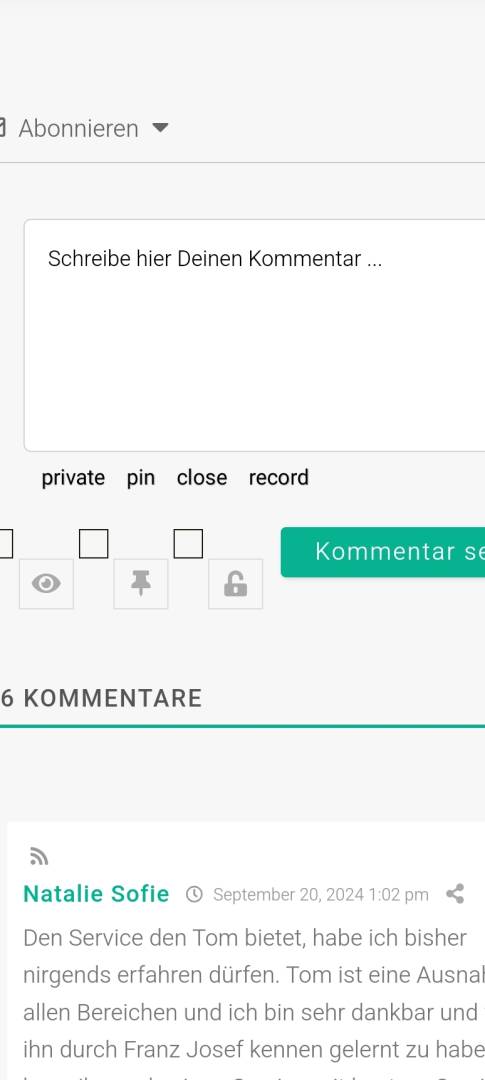
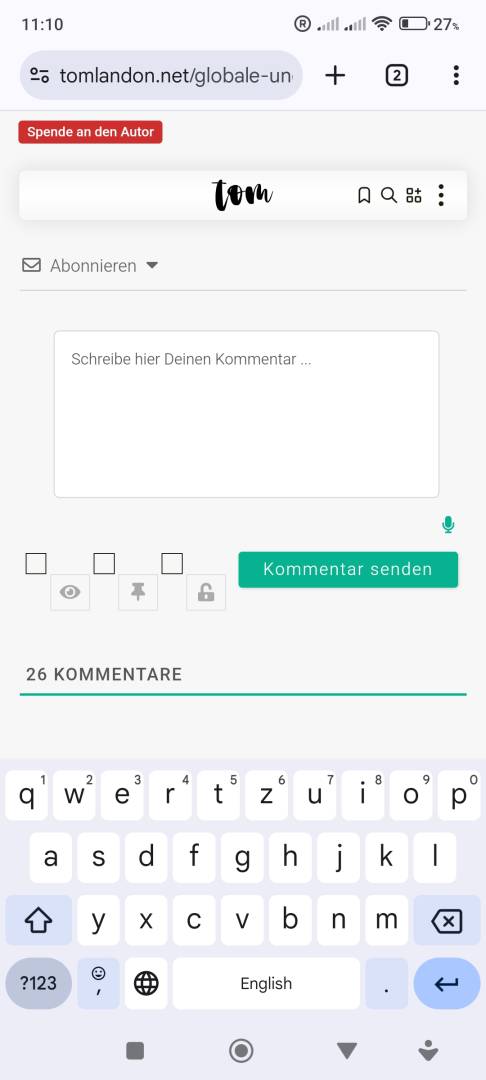
Hello, there. First of all lots of thanks for your great work - and the already purchased plugins (audio comment, widgets, secret comments, online users, user notifications). But: The more plugins i am purchasing and activating, the more unsorted is the surrounding of the comment form field looking. In detail: I would like (MUST) have all the icons lined up either to the left, the right, under or above the comment text field. Because currently this is a total mess. Slme of the icons (micro, bell, ...) are right, some of these are below. PLEASE, PLEASE help me to have this solved. I also would be ready to sponsor this update/option. Because in the meantime a cannot use the plugins (addons) due to this issue. Thank you so much! Truly ... Tom.
Translate
▼
English
Spanish
French
German
Italian
Portuguese
Russian
Chinese
Japanese
Korean
Arabic
Hindi
Dutch
Polish
Turkish
Vietnamese
Thai
Swedish
Danish
Finnish
Norwegian
Czech
Hungarian
Romanian
Greek
Hebrew
Indonesian
Malay
Ukrainian
Bulgarian
Croatian
Slovak
Slovenian
Serbian
Lithuanian
Latvian
Estonian
Show original
Translating...
Feb 01, 2025 2:08 am
(@tomlandon-net)
Eminent Member
I would like to have all the form feature icons (or text links) in a horicontal row either inside bottom line of the text field/commemt area or below the text area (comment field).
Thanks a lot!
(@asti)
Illustrious Member
Posts: 8365
Feb 01, 2025 1:57 pm
Translate
▼
English
Spanish
French
German
Italian
Portuguese
Russian
Chinese
Japanese
Korean
Arabic
Hindi
Dutch
Polish
Turkish
Vietnamese
Thai
Swedish
Danish
Finnish
Norwegian
Czech
Hungarian
Romanian
Greek
Hebrew
Indonesian
Malay
Ukrainian
Bulgarian
Croatian
Slovak
Slovenian
Serbian
Lithuanian
Latvian
Estonian
Show original
Translating...
@tomlandon-net
Could you please provide a screenshot of the issue?
(@tomlandon-net)
Eminent Member
Posts: 14
Feb 01, 2025 2:14 pm
Translate
▼
English
Spanish
French
German
Italian
Portuguese
Russian
Chinese
Japanese
Korean
Arabic
Hindi
Dutch
Polish
Turkish
Vietnamese
Thai
Swedish
Danish
Finnish
Norwegian
Czech
Hungarian
Romanian
Greek
Hebrew
Indonesian
Malay
Ukrainian
Bulgarian
Croatian
Slovak
Slovenian
Serbian
Lithuanian
Latvian
Estonian
Show original
Translating...
@asti Thank you so much for answering. I really appreciate your speed.
Please see the attached screenshot as requested.
Truly
Tom
(@tomlandon-net)
Eminent Member
Posts: 14
Feb 01, 2025 2:34 pm
Translate
▼
English
Spanish
French
German
Italian
Portuguese
Russian
Chinese
Japanese
Korean
Arabic
Hindi
Dutch
Polish
Turkish
Vietnamese
Thai
Swedish
Danish
Finnish
Norwegian
Czech
Hungarian
Romanian
Greek
Hebrew
Indonesian
Malay
Ukrainian
Bulgarian
Croatian
Slovak
Slovenian
Serbian
Lithuanian
Latvian
Estonian
Show original
Translating...
For me and my 5.5 Million readers per year (i guess) it would be PERFEKT, to have it as simple, as possible. Accurate lined up text links would be GREAT - or tiny icons (font awesome) to choose.
Thank you very much for the consideration.
Tom
(@tomlandon-net)
Eminent Member
Posts: 14
Feb 01, 2025 2:16 pm
Translate
▼
English
Spanish
French
German
Italian
Portuguese
Russian
Chinese
Japanese
Korean
Arabic
Hindi
Dutch
Polish
Turkish
Vietnamese
Thai
Swedish
Danish
Finnish
Norwegian
Czech
Hungarian
Romanian
Greek
Hebrew
Indonesian
Malay
Ukrainian
Bulgarian
Croatian
Slovak
Slovenian
Serbian
Lithuanian
Latvian
Estonian
Show original
Translating...
(@asti)
Illustrious Member
Posts: 8365
Feb 01, 2025 2:45 pm
Translate
▼
English
Spanish
French
German
Italian
Portuguese
Russian
Chinese
Japanese
Korean
Arabic
Hindi
Dutch
Polish
Turkish
Vietnamese
Thai
Swedish
Danish
Finnish
Norwegian
Czech
Hungarian
Romanian
Greek
Hebrew
Indonesian
Malay
Ukrainian
Bulgarian
Croatian
Slovak
Slovenian
Serbian
Lithuanian
Latvian
Estonian
Show original
Translating...
@tomlandon-net
This is a minor CSS conflict with the theme or other plugins. Unfortunately, these buttons are not visible to guests, so we need admin access to identify the correct CSS rule to fix the issue.
Please send the admin login details to info[at]gvectors.com, and we’ll provide a solution soon.
Support
Translate
▼
English
Spanish
French
German
Italian
Portuguese
Russian
Chinese
Japanese
Korean
Arabic
Hindi
Dutch
Polish
Turkish
Vietnamese
Thai
Swedish
Danish
Finnish
Norwegian
Czech
Hungarian
Romanian
Greek
Hebrew
Indonesian
Malay
Ukrainian
Bulgarian
Croatian
Slovak
Slovenian
Serbian
Lithuanian
Latvian
Estonian
Show original
Translating...
Feb 01, 2025 3:19 pm
(@asti)
Illustrious Member
Hi,
Please use the CSS code below:
#wpdcom .wpd_label input[type="checkbox"].wpd_label__checkbox {
   display: none !important;
}
label span:not(.required) {
  margin-left: 3px !important;
}
Insert the code in the "Custom CSS code " textarea, located in the Dashboard > wpDiscuz > Settings > Styles & Colors admin page.
Don't forget to delete the caches before checking.
(@tomlandon-net)
Eminent Member
Posts: 14
Feb 01, 2025 3:55 pm
Translate
▼
English
Spanish
French
German
Italian
Portuguese
Russian
Chinese
Japanese
Korean
Arabic
Hindi
Dutch
Polish
Turkish
Vietnamese
Thai
Swedish
Danish
Finnish
Norwegian
Czech
Hungarian
Romanian
Greek
Hebrew
Indonesian
Malay
Ukrainian
Bulgarian
Croatian
Slovak
Slovenian
Serbian
Lithuanian
Latvian
Estonian
Show original
Translating...
@asti Dear all, thank you so very much! Solved - with your incredible help.
Something i can do for you?
Truly
Tom
(@asti)
Illustrious Member
Posts: 8365
Feb 01, 2025 3:55 pm
Translate
▼
English
Spanish
French
German
Italian
Portuguese
Russian
Chinese
Japanese
Korean
Arabic
Hindi
Dutch
Polish
Turkish
Vietnamese
Thai
Swedish
Danish
Finnish
Norwegian
Czech
Hungarian
Romanian
Greek
Hebrew
Indonesian
Malay
Ukrainian
Bulgarian
Croatian
Slovak
Slovenian
Serbian
Lithuanian
Latvian
Estonian
Show original
Translating...
@tomlandon-net
We'd really appreciate if you leave a good review on the plugin page. This is the best way to say thank you to this project and the support team.
Translate
▼
English
Spanish
French
German
Italian
Portuguese
Russian
Chinese
Japanese
Korean
Arabic
Hindi
Dutch
Polish
Turkish
Vietnamese
Thai
Swedish
Danish
Finnish
Norwegian
Czech
Hungarian
Romanian
Greek
Hebrew
Indonesian
Malay
Ukrainian
Bulgarian
Croatian
Slovak
Slovenian
Serbian
Lithuanian
Latvian
Estonian
Show original
Translating...
Feb 02, 2025 1:21 am
(@tomlandon-net)
Eminent Member
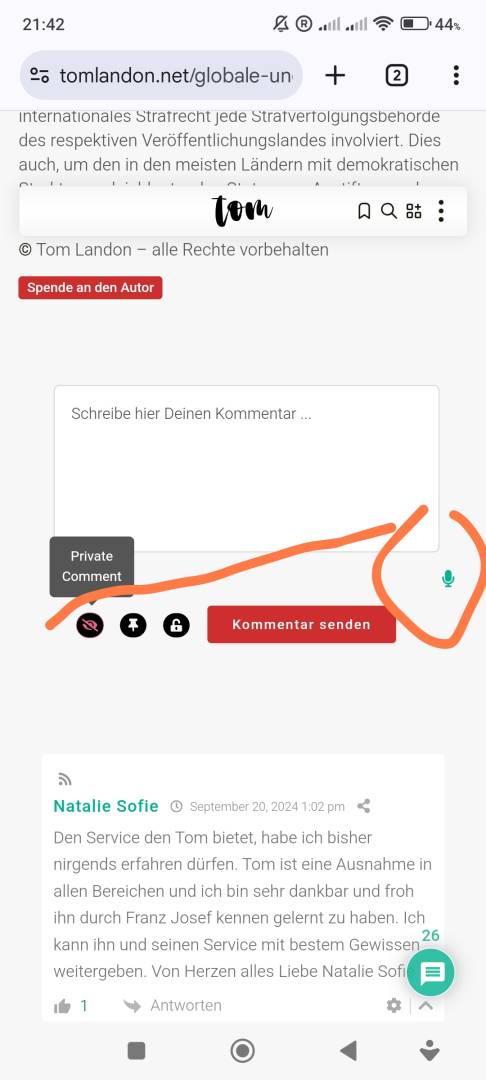
Again: Thank you so very much for helping. Question: Is there a way to have two more icons (micro and dashboard icon)
lined up with the 3/4 icons (please see attached screen shot), i am already using?
(@asti)
Illustrious Member
Posts: 8365
Feb 03, 2025 2:29 pm
Translate
▼
English
Spanish
French
German
Italian
Portuguese
Russian
Chinese
Japanese
Korean
Arabic
Hindi
Dutch
Polish
Turkish
Vietnamese
Thai
Swedish
Danish
Finnish
Norwegian
Czech
Hungarian
Romanian
Greek
Hebrew
Indonesian
Malay
Ukrainian
Bulgarian
Croatian
Slovak
Slovenian
Serbian
Lithuanian
Latvian
Estonian
Show original
Translating...
Hi Tom,
I'm really sorry, but there isn't an easy solution we can provide for this. The elements are not within the same parent element, so there is no simple CSS code to achieve this.
You can try using the jQuery code provided below. However, we cannot guarantee that the design won't be affected, so you may need additional CSS adjustments.
jQuery(document).ready(function() {
 jQuery("#wac-audio-0_0").prependTo(".wc-field-submit");
});
For guidance on adding JavaScript to WordPress pages, you may find this article helpful: https://www.wpbeginner.com/wp-tutorials/how-to-easily-add-javascript-in-wordpress-pages-or-posts/
(@tomlandon-net)
Eminent Member
Posts: 14
Feb 03, 2025 3:32 pm
Translate
▼
English
Spanish
French
German
Italian
Portuguese
Russian
Chinese
Japanese
Korean
Arabic
Hindi
Dutch
Polish
Turkish
Vietnamese
Thai
Swedish
Danish
Finnish
Norwegian
Czech
Hungarian
Romanian
Greek
Hebrew
Indonesian
Malay
Ukrainian
Bulgarian
Croatian
Slovak
Slovenian
Serbian
Lithuanian
Latvian
Estonian
Show original
Translating...
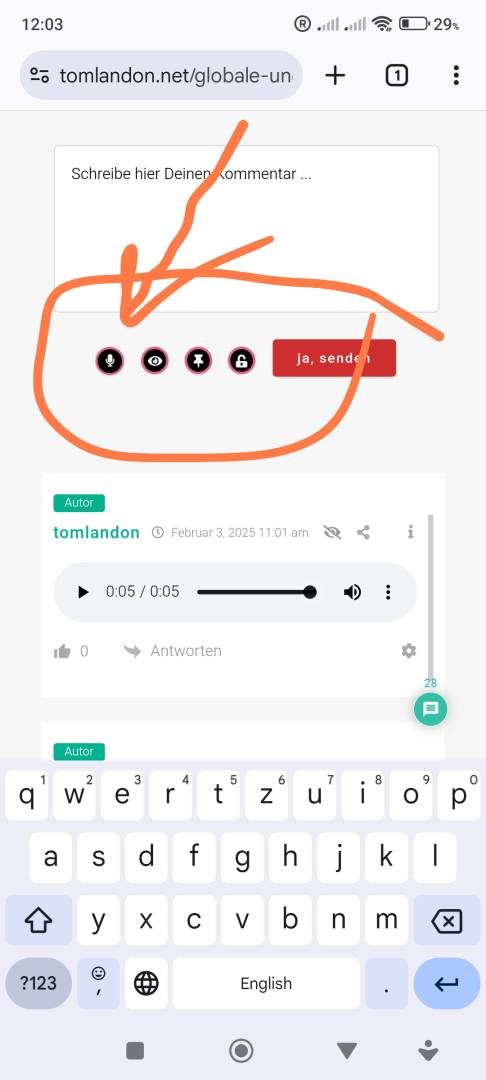
@asti Dear Asti, this has been working super nice. Thank you so much. Please see the attached image.
To implant the jQuery provided by you, i used the free wp plugin WPCode Lite . For further adjustments i easely wrote the following .css snipped:
.fa-microphone { border-radius: 100%!important; border-style: solid!important; border-color: #e9608e!important; border-width: 2px!important; font-size: 10px!important; color: #ffffff!important; background-color: #000000!important; padding-top: 4px!important; padding-right: 6px!important; width: 23px!important; height: 23px!important; position: relative!important; top: 6px!important; right: 9px!important; }
Maybe it is helpful for someone else.
Thank you so very much!
Truly
Tom
Super Globals
Options and Features