The effects of alcohol on
sustanon 250 leucine for – real weight loss & bodybuilding benefits?
[Solved] Follow notification emails going to user other than follow user.
✦
✦
✦
AI is analyzing the discussion...
Translate
▼
English
Spanish
French
German
Italian
Portuguese
Russian
Chinese
Japanese
Korean
Arabic
Hindi
Dutch
Polish
Turkish
Vietnamese
Thai
Swedish
Danish
Finnish
Norwegian
Czech
Hungarian
Romanian
Greek
Hebrew
Indonesian
Malay
Ukrainian
Bulgarian
Croatian
Slovak
Slovenian
Serbian
Lithuanian
Latvian
Estonian
Show original
Translating...
Nov 03, 2021 12:42 am
(@ronnie-tanner)
Eminent Member
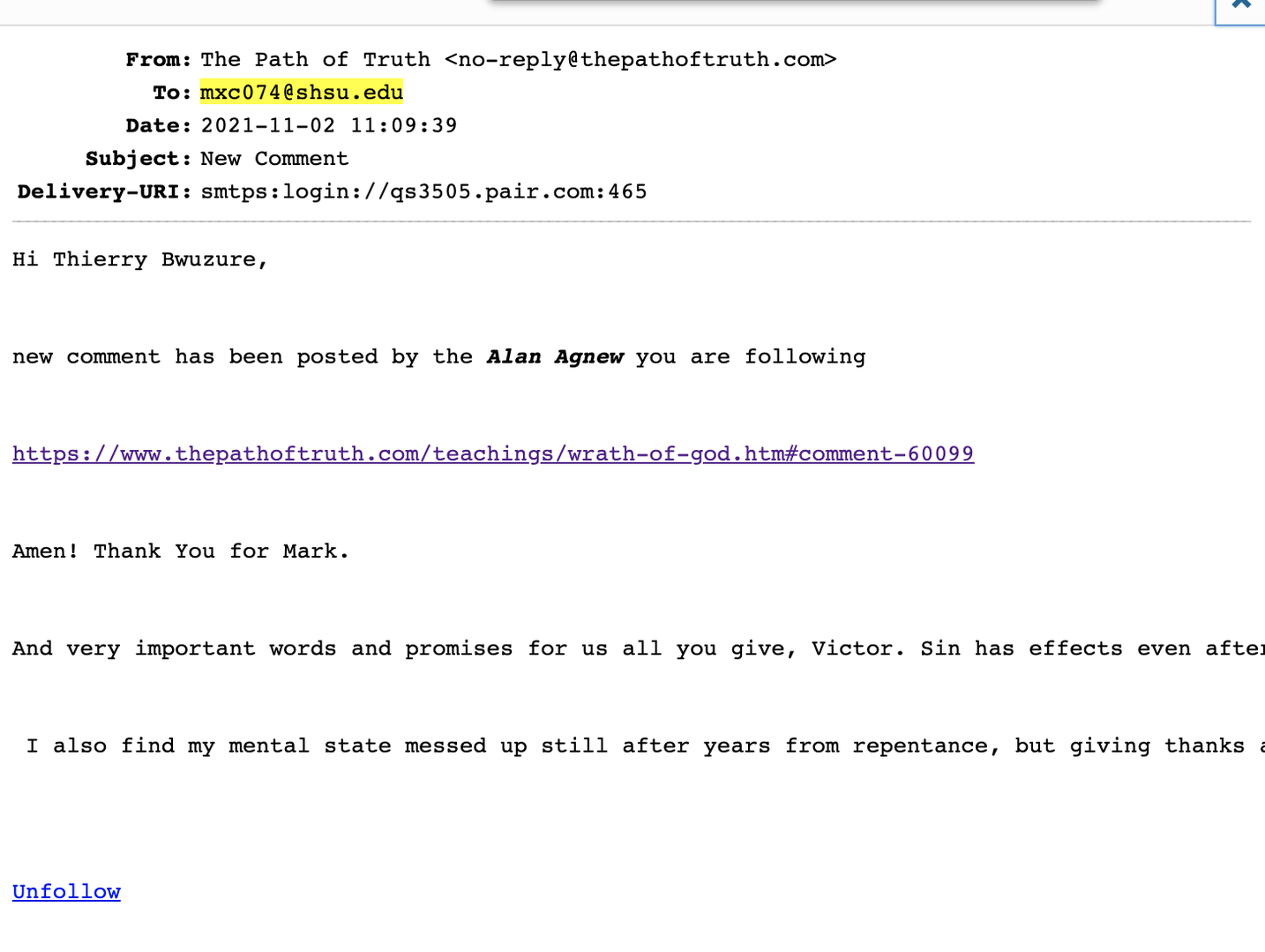
A user reported receiving a comment notification from a follow, but it was for another users follow.
I verified via SMTP log that the email for User A was indeed sent to User B. This is for the "Follow" functionality. Both User A and User B follow the same person that the new comment was sent for. User A should not have received the notification for User B's follow, only their own.
Support
Translate
▼
English
Spanish
French
German
Italian
Portuguese
Russian
Chinese
Japanese
Korean
Arabic
Hindi
Dutch
Polish
Turkish
Vietnamese
Thai
Swedish
Danish
Finnish
Norwegian
Czech
Hungarian
Romanian
Greek
Hebrew
Indonesian
Malay
Ukrainian
Bulgarian
Croatian
Slovak
Slovenian
Serbian
Lithuanian
Latvian
Estonian
Show original
Translating...
Nov 03, 2021 12:30 pm
(@asti)
Illustrious Member
Hi Ronnie Tanner,
Both User A and User B follow the same person that the new comment was sent for.
If user A B X A B X
(@ronnie-tanner)
Eminent Member
Posts: 23
Nov 03, 2021 4:32 pm
Translate
▼
English
Spanish
French
German
Italian
Portuguese
Russian
Chinese
Japanese
Korean
Arabic
Hindi
Dutch
Polish
Turkish
Vietnamese
Thai
Swedish
Danish
Finnish
Norwegian
Czech
Hungarian
Romanian
Greek
Hebrew
Indonesian
Malay
Ukrainian
Bulgarian
Croatian
Slovak
Slovenian
Serbian
Lithuanian
Latvian
Estonian
Show original
Translating...
@asti yes, I understand both User A and B should get notifications but in my case User A is receiving User B’s notification.
(@asti)
Illustrious Member
Posts: 8364
Nov 03, 2021 4:40 pm
Translate
▼
English
Spanish
French
German
Italian
Portuguese
Russian
Chinese
Japanese
Korean
Arabic
Hindi
Dutch
Polish
Turkish
Vietnamese
Thai
Swedish
Danish
Finnish
Norwegian
Czech
Hungarian
Romanian
Greek
Hebrew
Indonesian
Malay
Ukrainian
Bulgarian
Croatian
Slovak
Slovenian
Serbian
Lithuanian
Latvian
Estonian
Show original
Translating...
@ronnie-tanner ,
Please clarify a bit, if those two users A and B follow the same X user, how it can be detected each one A or B should receive the notification?
(@ronnie-tanner)
Eminent Member
Posts: 23
Nov 03, 2021 4:43 pm
Translate
▼
English
Spanish
French
German
Italian
Portuguese
Russian
Chinese
Japanese
Korean
Arabic
Hindi
Dutch
Polish
Turkish
Vietnamese
Thai
Swedish
Danish
Finnish
Norwegian
Czech
Hungarian
Romanian
Greek
Hebrew
Indonesian
Malay
Ukrainian
Bulgarian
Croatian
Slovak
Slovenian
Serbian
Lithuanian
Latvian
Estonian
Show original
Translating...
@asti
User A gets a follow/New Comment notification when User X posts but the heading in the email says:
”Hi User B!”
Can you look at original attachment?
(@asti)
Illustrious Member
Posts: 8364
Nov 03, 2021 4:58 pm
Translate
▼
English
Spanish
French
German
Italian
Portuguese
Russian
Chinese
Japanese
Korean
Arabic
Hindi
Dutch
Polish
Turkish
Vietnamese
Thai
Swedish
Danish
Finnish
Norwegian
Czech
Hungarian
Romanian
Greek
Hebrew
Indonesian
Malay
Ukrainian
Bulgarian
Croatian
Slovak
Slovenian
Serbian
Lithuanian
Latvian
Estonian
Show original
Translating...
Thank you for clarifying @ronnie-tanner ,
We're going to check the issue on our test website. We'll update this topic ASAP.
(@asti)
Illustrious Member
Posts: 8364
Nov 03, 2021 5:27 pm
Translate
▼
English
Spanish
French
German
Italian
Portuguese
Russian
Chinese
Japanese
Korean
Arabic
Hindi
Dutch
Polish
Turkish
Vietnamese
Thai
Swedish
Danish
Finnish
Norwegian
Czech
Hungarian
Romanian
Greek
Hebrew
Indonesian
Malay
Ukrainian
Bulgarian
Croatian
Slovak
Slovenian
Serbian
Lithuanian
Latvian
Estonian
Show original
Translating...
@ronnie-tanner ,
we've found the reason for the issue. It'll be fired in the next version.
If you need to fix it ASAP, please send the admin login details to info[at]gvectors.com email address. The developers will fix it on your website until the new version is realized.
(@ronnie-tanner)
Eminent Member
Posts: 23
Nov 03, 2021 6:47 pm
Translate
▼
English
Spanish
French
German
Italian
Portuguese
Russian
Chinese
Japanese
Korean
Arabic
Hindi
Dutch
Polish
Turkish
Vietnamese
Thai
Swedish
Danish
Finnish
Norwegian
Czech
Hungarian
Romanian
Greek
Hebrew
Indonesian
Malay
Ukrainian
Bulgarian
Croatian
Slovak
Slovenian
Serbian
Lithuanian
Latvian
Estonian
Show original
Translating...
@asti I've sent the email to get this done as soon as possible.
On an unrelated note. Is there an add-on to include the "Reply" button but when clicked, force the user to Login or Register. I see it working here on this site.
(@asti)
Illustrious Member
Posts: 8364
Nov 04, 2021 12:58 pm
Translate
▼
English
Spanish
French
German
Italian
Portuguese
Russian
Chinese
Japanese
Korean
Arabic
Hindi
Dutch
Polish
Turkish
Vietnamese
Thai
Swedish
Danish
Finnish
Norwegian
Czech
Hungarian
Romanian
Greek
Hebrew
Indonesian
Malay
Ukrainian
Bulgarian
Croatian
Slovak
Slovenian
Serbian
Lithuanian
Latvian
Estonian
Show original
Translating...
@ronnie-tanner ,
https://wpdiscuz.com/community/bug-reports/follow-notification-emails-going-to-user-other-than-follow-user/#post-12025
It's fixed on your website. The changes will be included in the next version of the wpdiscuz plugin. You can update the plugin once the new version is ready.
On an unrelated note. Is there an add-on to include the "Reply" button but when clicked, force the user to Login or Register. I see it working here on this site.
I'm really sorry, but in the case of the wpDiscuz plugin, there is no easy solution for this. This requires large changes in the plugin codes.
(@ronnie-tanner)
Eminent Member
Posts: 23
Nov 07, 2021 1:29 am
Translate
▼
English
Spanish
French
German
Italian
Portuguese
Russian
Chinese
Japanese
Korean
Arabic
Hindi
Dutch
Polish
Turkish
Vietnamese
Thai
Swedish
Danish
Finnish
Norwegian
Czech
Hungarian
Romanian
Greek
Hebrew
Indonesian
Malay
Ukrainian
Bulgarian
Croatian
Slovak
Slovenian
Serbian
Lithuanian
Latvian
Estonian
Show original
Translating...
@asti Thank you for the quick fix.
As far as the reply/login or register option is this something that can be customized by a 3rd party developer or is that not allowed with your plugin?
(@asti)
Illustrious Member
Posts: 8364
Nov 08, 2021 11:21 am
Translate
▼
English
Spanish
French
German
Italian
Portuguese
Russian
Chinese
Japanese
Korean
Arabic
Hindi
Dutch
Polish
Turkish
Vietnamese
Thai
Swedish
Danish
Finnish
Norwegian
Czech
Hungarian
Romanian
Greek
Hebrew
Indonesian
Malay
Ukrainian
Bulgarian
Croatian
Slovak
Slovenian
Serbian
Lithuanian
Latvian
Estonian
Show original
Translating...
@ronnie-tanner ,
It's allowed to customize the wpDiscuz plugin. However, as I've already mentioned the this requires large changes in the plugin codes. In any case, you should decide either to change it or not.
(@ronnie-tanner)
Eminent Member
Posts: 23
Nov 08, 2021 5:53 pm
Translate
▼
English
Spanish
French
German
Italian
Portuguese
Russian
Chinese
Japanese
Korean
Arabic
Hindi
Dutch
Polish
Turkish
Vietnamese
Thai
Swedish
Danish
Finnish
Norwegian
Czech
Hungarian
Romanian
Greek
Hebrew
Indonesian
Malay
Ukrainian
Bulgarian
Croatian
Slovak
Slovenian
Serbian
Lithuanian
Latvian
Estonian
Show original
Translating...
Super Globals
Options and Features