The effects of alcohol on sustanon 250 leucine for – real weight loss & bodybuilding benefits?
Search
Close
AI Search
Classic Search
 Search Phrase:
 Search Type:
Advanced search options
 Search in Forums:
 Search in date period:

 Sort Search Results by:

AI Assistant
A non-numeric value...
 
Notifications
Clear all

[Solved] A non-numeric value encountered in VS 7.1.4

17 Posts
2 Users
0 Reactions
2,380 Views
Posts: 10
Topic starter
Translate
English
Spanish
French
German
Italian
Portuguese
Russian
Chinese
Japanese
Korean
Arabic
Hindi
Dutch
Polish
Turkish
Vietnamese
Thai
Swedish
Danish
Finnish
Norwegian
Czech
Hungarian
Romanian
Greek
Hebrew
Indonesian
Malay
Ukrainian
Bulgarian
Croatian
Slovak
Slovenian
Serbian
Lithuanian
Latvian
Estonian
(@wpdiscuzuser300)
Active Member
Joined: 5 years ago
[#1967]

There seems to have been a bug introduced in either version 7.1.4 or 7.1.5 of the plugin. It has not been fixed with vs 7.2. I am currently using version 7.1.3 which does not have the bug.


Using any plugin version higher than 7.1.3, I see the following error on select pages of my website:


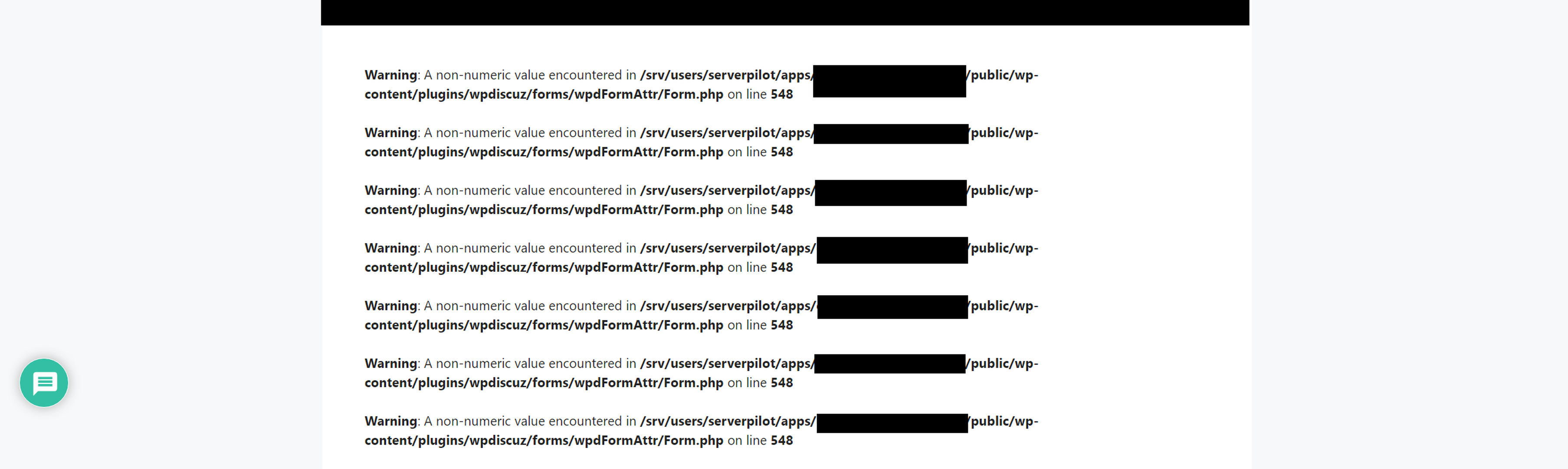
Warning: A non-numeric value encountered in xxxxxxx/public/wp-content/plugins/wpdiscuz/forms/wpdFormAttr/Form.php on line 548


This error shows on some pages where I have reviews enabled and am using shortcodes to show review averages. 


16 Replies
Asti
Posts: 8215
 Asti
Support
Translate
English
Spanish
French
German
Italian
Portuguese
Russian
Chinese
Japanese
Korean
Arabic
Hindi
Dutch
Polish
Turkish
Vietnamese
Thai
Swedish
Danish
Finnish
Norwegian
Czech
Hungarian
Romanian
Greek
Hebrew
Indonesian
Malay
Ukrainian
Bulgarian
Croatian
Slovak
Slovenian
Serbian
Lithuanian
Latvian
Estonian
(@asti)
Illustrious Member
Joined: 8 years ago

@wpdiscuzuser300,

Please update the wpDiscuz to the latest version (v. 7.2.0) and navigate to Dashboard > wpDiscuz > Forms admin page, edit the form, and just click on the "Update" button. Then delete all caches and check again.


7 Replies
(@wpdiscuzuser300)
Joined: 5 years ago

Active Member
Posts: 10
Translate
English
Spanish
French
German
Italian
Portuguese
Russian
Chinese
Japanese
Korean
Arabic
Hindi
Dutch
Polish
Turkish
Vietnamese
Thai
Swedish
Danish
Finnish
Norwegian
Czech
Hungarian
Romanian
Greek
Hebrew
Indonesian
Malay
Ukrainian
Bulgarian
Croatian
Slovak
Slovenian
Serbian
Lithuanian
Latvian
Estonian

@asti This doesn't work. And I'm not using any caching plugins or any other type of caching.


Asti
 Asti
Support
(@asti)
Joined: 8 years ago

Illustrious Member
Posts: 8215
Asti
Translate
English
Spanish
French
German
Italian
Portuguese
Russian
Chinese
Japanese
Korean
Arabic
Hindi
Dutch
Polish
Turkish
Vietnamese
Thai
Swedish
Danish
Finnish
Norwegian
Czech
Hungarian
Romanian
Greek
Hebrew
Indonesian
Malay
Ukrainian
Bulgarian
Croatian
Slovak
Slovenian
Serbian
Lithuanian
Latvian
Estonian

@wpdiscuzuser300,

Please navigate to Dashboard > wpDiscuz > Tools admin page click on the "Rebuild Ratings" button. 


(@wpdiscuzuser300)
Joined: 5 years ago

Active Member
Posts: 10
Asti
Translate
English
Spanish
French
German
Italian
Portuguese
Russian
Chinese
Japanese
Korean
Arabic
Hindi
Dutch
Polish
Turkish
Vietnamese
Thai
Swedish
Danish
Finnish
Norwegian
Czech
Hungarian
Romanian
Greek
Hebrew
Indonesian
Malay
Ukrainian
Bulgarian
Croatian
Slovak
Slovenian
Serbian
Lithuanian
Latvian
Estonian

@asti rebuild tables and fix tables was already done and repeated. it does not help


Asti
 Asti
Support
(@asti)
Joined: 8 years ago

Illustrious Member
Posts: 8215
Asti
Asti
Translate
English
Spanish
French
German
Italian
Portuguese
Russian
Chinese
Japanese
Korean
Arabic
Hindi
Dutch
Polish
Turkish
Vietnamese
Thai
Swedish
Danish
Finnish
Norwegian
Czech
Hungarian
Romanian
Greek
Hebrew
Indonesian
Malay
Ukrainian
Bulgarian
Croatian
Slovak
Slovenian
Serbian
Lithuanian
Latvian
Estonian

@wpdiscuzuser300,

Could you please send the admin login details to info[at]gvectors.com email address? I'll ask the developers to check the issue for you. 


(@wpdiscuzuser300)
Joined: 5 years ago

Active Member
Posts: 10
Asti
Asti
Translate
English
Spanish
French
German
Italian
Portuguese
Russian
Chinese
Japanese
Korean
Arabic
Hindi
Dutch
Polish
Turkish
Vietnamese
Thai
Swedish
Danish
Finnish
Norwegian
Czech
Hungarian
Romanian
Greek
Hebrew
Indonesian
Malay
Ukrainian
Bulgarian
Croatian
Slovak
Slovenian
Serbian
Lithuanian
Latvian
Estonian

@asti can you provide an alternative solution? I do not give out admin info.


Asti
 Asti
Support
(@asti)
Joined: 8 years ago

Illustrious Member
Posts: 8215
Asti
Asti
Asti
Translate
English
Spanish
French
German
Italian
Portuguese
Russian
Chinese
Japanese
Korean
Arabic
Hindi
Dutch
Polish
Turkish
Vietnamese
Thai
Swedish
Danish
Finnish
Norwegian
Czech
Hungarian
Romanian
Greek
Hebrew
Indonesian
Malay
Ukrainian
Bulgarian
Croatian
Slovak
Slovenian
Serbian
Lithuanian
Latvian
Estonian

We don't find such an issue on our test websites. This is something specific in your case. 

I may suggest you create a dev/staging copy of your website in some sub-domain. Remove all information that you don't want to share, make sure the problem exists and send admin details to us. You can use Duplicator to create that site.


(@wpdiscuzuser300)
Joined: 5 years ago

Active Member
Posts: 10
Asti
Asti
Translate
English
Spanish
French
German
Italian
Portuguese
Russian
Chinese
Japanese
Korean
Arabic
Hindi
Dutch
Polish
Turkish
Vietnamese
Thai
Swedish
Danish
Finnish
Norwegian
Czech
Hungarian
Romanian
Greek
Hebrew
Indonesian
Malay
Ukrainian
Bulgarian
Croatian
Slovak
Slovenian
Serbian
Lithuanian
Latvian
Estonian

@asti It is not specific to my site. I just tested on a brand new site with nothing on it. I now have this problem on 3 websites. After further troubleshooting, I have found the problem. You should be able to replicate it on your end and update the Wpdiscuz plugin to fix it.

Create a form or edit the default form and use multiple custom rating fields with it. Set "allow post rating" to no in the form. Create a post and use the shortcode [wpdrating show-average = false] with that post. Publish the post. Leave a comment on the post that gives ratings for each field. Publish the comment. You will then see the averages for each custom rating field in the post. Everything looks fine and is working as it should at this point. Now go to the Wordpress dashboard to manage your comments. Delete the comment with the ratings that you just published. Return to the post you created on the front end and the previously reported error will be there. Furthermore, you'll see NAN shown as a rating for each field. 


Posts: 10
Topic starter
Translate
English
Spanish
French
German
Italian
Portuguese
Russian
Chinese
Japanese
Korean
Arabic
Hindi
Dutch
Polish
Turkish
Vietnamese
Thai
Swedish
Danish
Finnish
Norwegian
Czech
Hungarian
Romanian
Greek
Hebrew
Indonesian
Malay
Ukrainian
Bulgarian
Croatian
Slovak
Slovenian
Serbian
Lithuanian
Latvian
Estonian
(@wpdiscuzuser300)
Active Member
Joined: 5 years ago

What's the status of the bug I reported here?


2 Replies
Asti
 Asti
Support
(@asti)
Joined: 8 years ago

Illustrious Member
Posts: 8215
Translate
English
Spanish
French
German
Italian
Portuguese
Russian
Chinese
Japanese
Korean
Arabic
Hindi
Dutch
Polish
Turkish
Vietnamese
Thai
Swedish
Danish
Finnish
Norwegian
Czech
Hungarian
Romanian
Greek
Hebrew
Indonesian
Malay
Ukrainian
Bulgarian
Croatian
Slovak
Slovenian
Serbian
Lithuanian
Latvian
Estonian

@wpdiscuzuser300,

This will be fixed in the next version. 


(@wpdiscuzuser300)
Joined: 5 years ago

Active Member
Posts: 10
Translate
English
Spanish
French
German
Italian
Portuguese
Russian
Chinese
Japanese
Korean
Arabic
Hindi
Dutch
Polish
Turkish
Vietnamese
Thai
Swedish
Danish
Finnish
Norwegian
Czech
Hungarian
Romanian
Greek
Hebrew
Indonesian
Malay
Ukrainian
Bulgarian
Croatian
Slovak
Slovenian
Serbian
Lithuanian
Latvian
Estonian

@asti Thanks for the update!


Posts: 10
Topic starter
Translate
English
Spanish
French
German
Italian
Portuguese
Russian
Chinese
Japanese
Korean
Arabic
Hindi
Dutch
Polish
Turkish
Vietnamese
Thai
Swedish
Danish
Finnish
Norwegian
Czech
Hungarian
Romanian
Greek
Hebrew
Indonesian
Malay
Ukrainian
Bulgarian
Croatian
Slovak
Slovenian
Serbian
Lithuanian
Latvian
Estonian
(@wpdiscuzuser300)
Active Member
Joined: 5 years ago

I've noticed there have since been two updates out to the plugin since this issue was reported. The issue has still not been fixed. Is there an update to the timeline for this?


4 Replies
Asti
 Asti
Support
(@asti)
Joined: 8 years ago

Illustrious Member
Posts: 8215
Translate
English
Spanish
French
German
Italian
Portuguese
Russian
Chinese
Japanese
Korean
Arabic
Hindi
Dutch
Polish
Turkish
Vietnamese
Thai
Swedish
Danish
Finnish
Norwegian
Czech
Hungarian
Romanian
Greek
Hebrew
Indonesian
Malay
Ukrainian
Bulgarian
Croatian
Slovak
Slovenian
Serbian
Lithuanian
Latvian
Estonian

@wpdiscuzuser300,

The issue should have already been solved. Please check again and make sure it's not an old error. 

Also, please leave a screenshot of the error. 


(@wpdiscuzuser300)
Joined: 5 years ago

Active Member
Posts: 10
Translate
English
Spanish
French
German
Italian
Portuguese
Russian
Chinese
Japanese
Korean
Arabic
Hindi
Dutch
Polish
Turkish
Vietnamese
Thai
Swedish
Danish
Finnish
Norwegian
Czech
Hungarian
Romanian
Greek
Hebrew
Indonesian
Malay
Ukrainian
Bulgarian
Croatian
Slovak
Slovenian
Serbian
Lithuanian
Latvian
Estonian

@asti The error is still there. I'm not sure why a screenshot is needed when I reported the error exactly as it is shown. But if you insist

WPDISCUZ 2
WPDISCUZ 1

Asti
 Asti
Support
(@asti)
Joined: 8 years ago

Illustrious Member
Posts: 8215
Asti
Translate
English
Spanish
French
German
Italian
Portuguese
Russian
Chinese
Japanese
Korean
Arabic
Hindi
Dutch
Polish
Turkish
Vietnamese
Thai
Swedish
Danish
Finnish
Norwegian
Czech
Hungarian
Romanian
Greek
Hebrew
Indonesian
Malay
Ukrainian
Bulgarian
Croatian
Slovak
Slovenian
Serbian
Lithuanian
Latvian
Estonian

@wpdiscuzuser300,

Please follow the steps below:

1. Open the wp-content/plugins/wpdiscuz/forms/wpdFormAttr/Form.php file

2. Find the 494-495 lines 

3. Replace the code in the lines with the following one:

$avg = floatval(get_post_meta($post->ID, wpdFormConst::WPDISCUZ_RATING_SEPARATE_AVG . $field, true));
$c = intval(get_post_meta($post->ID, wpdFormConst::WPDISCUZ_RATING_SEPARATE_COUNT . $field, true));

Save the changes, delete all kind of caches and check again.

Let usknow if you still see the issue.


(@wpdiscuzuser300)
Joined: 5 years ago

Active Member
Posts: 10
Asti
Translate
English
Spanish
French
German
Italian
Portuguese
Russian
Chinese
Japanese
Korean
Arabic
Hindi
Dutch
Polish
Turkish
Vietnamese
Thai
Swedish
Danish
Finnish
Norwegian
Czech
Hungarian
Romanian
Greek
Hebrew
Indonesian
Malay
Ukrainian
Bulgarian
Croatian
Slovak
Slovenian
Serbian
Lithuanian
Latvian
Estonian

@asti changing the code to what you suggested fixes it.


Share: