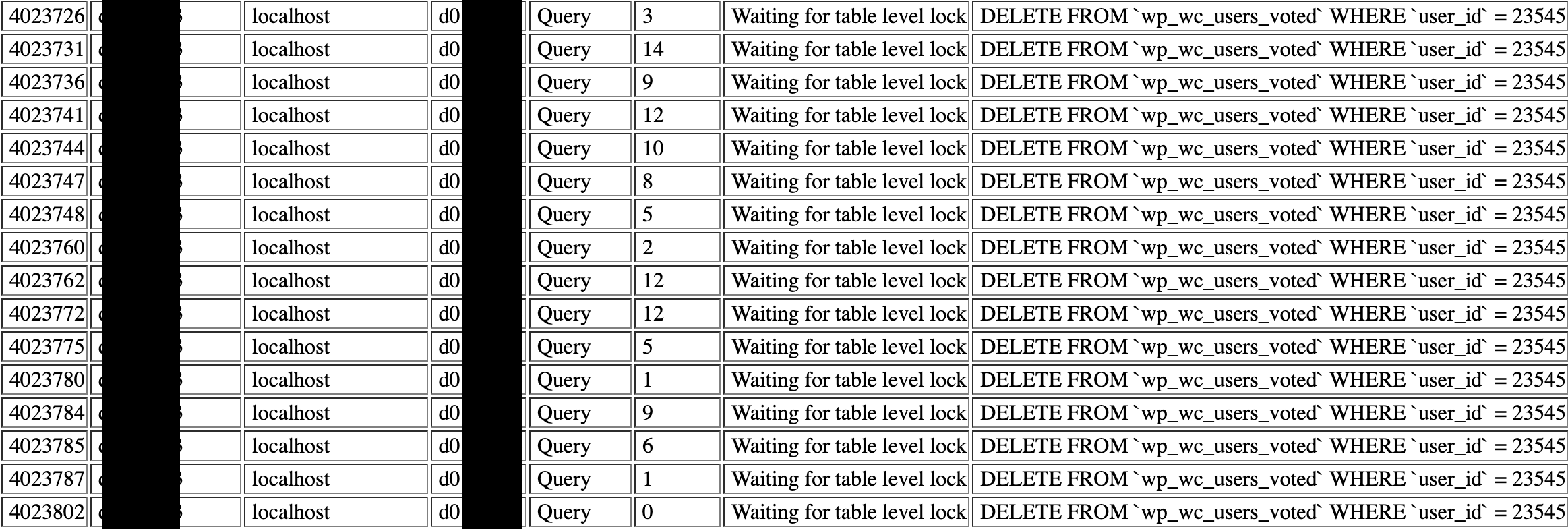
Hi,
After updating from 7.1.1 to any newer version, I get a “Nonce is invalid” error when trying to post a comment. Guests how are not logged in get “Commenting is closed”.
Upon checking the console, it links this part in the code:
$('#wpd-comm-'+uniqueID+' > .wpd-comment-wrap .wpd-comment-right .wpd_editable_comment').hide();$('#wpd-comm-'+uniqueID+' > .wpd-comment-wrap .wpd-comment-last-edited').hide();}else{wpdiscuzAjaxObj.setCommentMessage(wpdiscuzAjaxObj[r.data],'error');}}else{console.log(r);}
I did try to clear all caches, JS cache, CDN cache, etc., didn’t solve the issue.
Also, a second bug: about once per day, my database server is brought down by WP Discuz because it creates too many requests, like this one:
DELETE FROM wp_wc_users_voted WHERE user_id = 23269
What could cause this?
Appreciate any tips to solve this, thanks! Unfortunately I cannot provide a URL to check this as this issue brings down my website or impedes on basic functions.
Please leave the example URL where we can see the issue.
In case you want to say thank you! 🙂
We'd really appreciate if you leave a good review on the plugin page.
This is the best way to say thank you to this project and the support team.
As written above I cannot provide URL because that will wreck my page.
Maybe you can help me with my second issue: why WP Discuz is wrecking my database with these MySQL requests:
The SQL may work only in case the user is being deleted. No other way for the SQL request.
In case you want to say thank you! 🙂
We'd really appreciate if you leave a good review on the plugin page.
This is the best way to say thank you to this project and the support team.
regarding the first issue, we can't check without the URL.
In case you want to say thank you! 🙂
We'd really appreciate if you leave a good review on the plugin page.
This is the best way to say thank you to this project and the support team.
@asti Is there a way I can manually disable this query in the source code? Since I don't update the plugin anyway, I might as well change the code. If you tell me where to find the code triggering this, that would help me a lot, thanks in advance
We're really sorry, but there is no easy solution we can post here.
In case you want to say thank you! 🙂
We'd really appreciate if you leave a good review on the plugin page.
This is the best way to say thank you to this project and the support team.