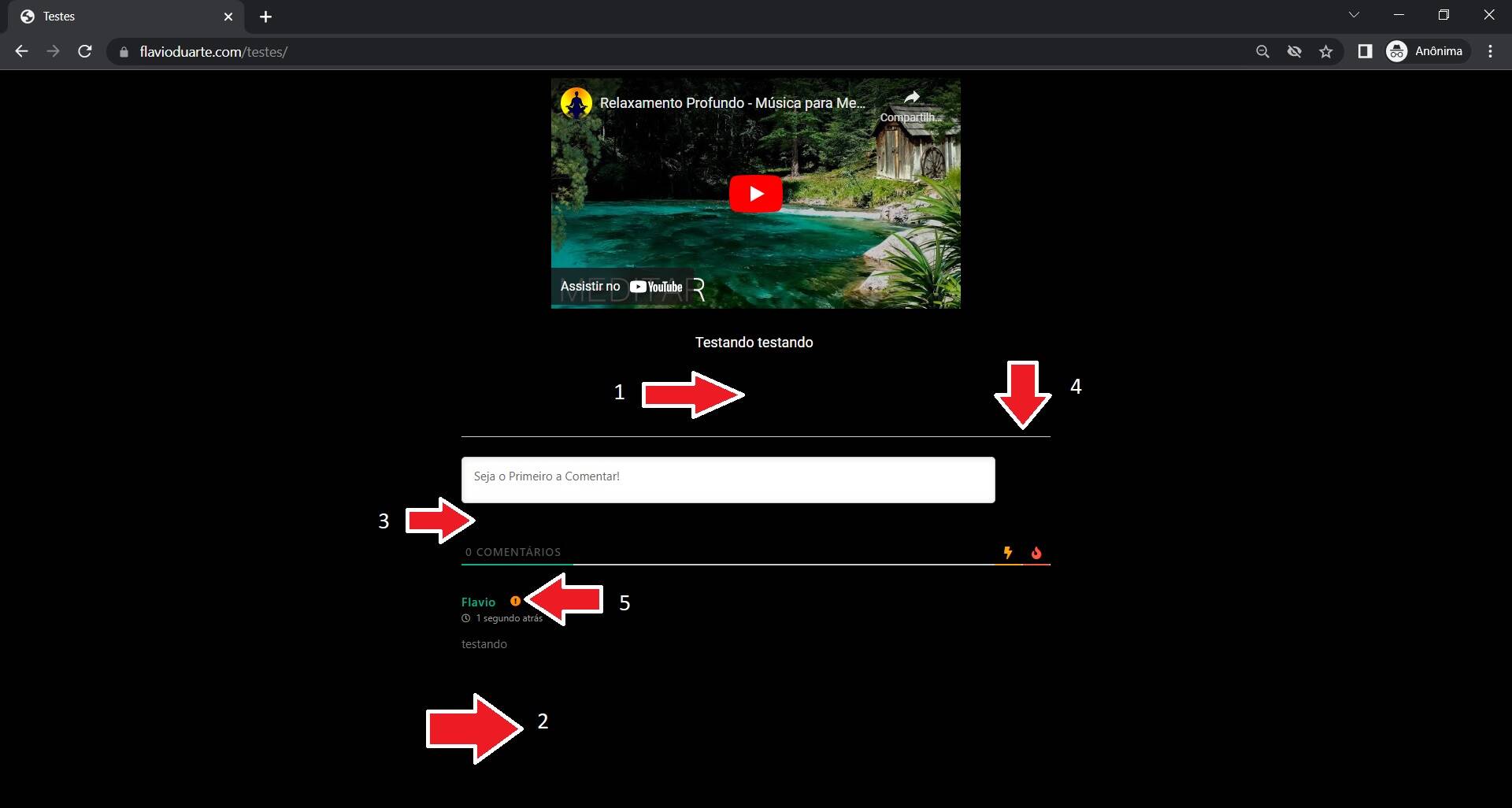
1, 2 and 3: How to decrease this empty spaces? It is too much empty space. The margin is too big
4: How to remove this bar?
5: How to remove this icon that appears when the comment is awaiting moderation?
See the picture please.
Thanks
1, 2 and 3: How to decrease this empty spaces? It is too much empty space. The margin is too big
4: How to remove this bar?
Regarding these points use the CSS solution below:
#comments, #wpdcom{
margin:0 auto;
}
#wpdcom .wpd-form-head{
display: none !important;
}
Put the code in the Top Admin Bar > Customize > Additional CSS > "Additional CSS" textarea, save it, delete all caches and check again.
5: How to remove this icon that appears when the comment is awaiting moderation?
This point is needed to be clarified.
Do you want to get rid of the moderation feature at all? That is all comments are being published immediately without holding for moderation.
Or do you want to hide just the icon so that the comments are being held for moderation, but the icon isn't visible?
In case you want to say thank you! 🙂
We'd really appreciate if you leave a good review on the plugin page.
This is the best way to say thank you to this project and the support team.
Thanks for the answer. I want to hide just the icon so that the comments are being held for moderation, but the icon isn't visible.
Use this CSS code:
#wpdcom .wpd-comment .wpd-comment-status .wpd-unapproved{
display:none;
}
Please don't forget to press Ctrl+F5 (twice) on the frontend before checking to reload the updated CSS file.
In case you want to say thank you! 🙂
We'd really appreciate if you leave a good review on the plugin page.
This is the best way to say thank you to this project and the support team.
The CSS code is provided below:
#wpdcom #wpd-threads {
margin-top: 0;
}
In case you want to say thank you! 🙂
We'd really appreciate if you leave a good review on the plugin page.
This is the best way to say thank you to this project and the support team.
OK thank you!!! Everything worked perfectly!!! I wish you a good day!!!