The effects of alcohol on sustanon 250 leucine for – real weight loss & bodybuilding benefits?
Search
Close
AI Search
Classic Search
 Search Phrase:
 Search Type:
Advanced search options
 Search in Forums:
 Search in date period:

 Sort Search Results by:

Filter by custom fields

Topic prefix

AI Assistant
Prevent other custo...
 
Notifications
Clear all

[Solved] Prevent other custom rating fields from reducing the product rating

8 Posts
2 Users
0 Reactions
10 K Views
(@zo-zo-lee)
Posts: 9
Active Member
Topic starter
Translate
English
Spanish
French
German
Italian
Portuguese
Russian
Chinese
Japanese
Korean
Arabic
Hindi
Dutch
Polish
Turkish
Vietnamese
Thai
Swedish
Danish
Finnish
Norwegian
Czech
Hungarian
Romanian
Greek
Hebrew
Indonesian
Malay
Ukrainian
Bulgarian
Croatian
Slovak
Slovenian
Serbian
Lithuanian
Latvian
Estonian
 
[#10860]

Problem trying to add a custom rating field to products.
  I want each of these to be distinct separate ratings that do not have any effect on each other.
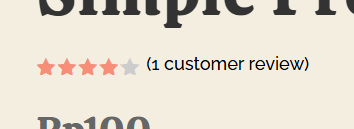
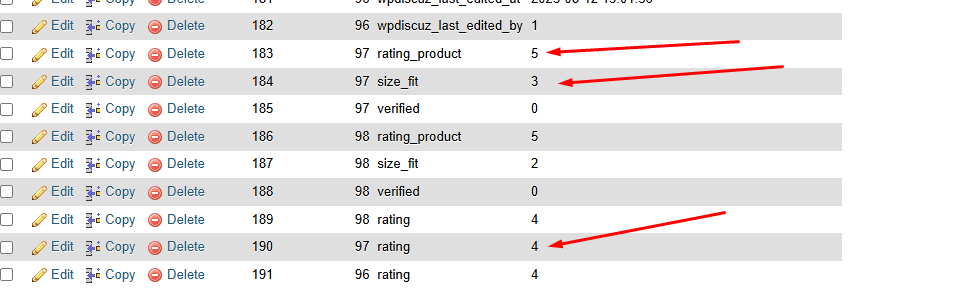
  However, if I give the product 5 stars, and then give the size 3 stars, the product rating automatically reduces itself to 4 stars.

stop averaging other fields

How can I separate a custom rating field for information purposes only, so that it does not reduce the overall product rating? 


Posted : 07/08/2025 2:04 pm
(@zackar)
Posts: 67
Trusted Member Support
Translate
English
Spanish
French
German
Italian
Portuguese
Russian
Chinese
Japanese
Korean
Arabic
Hindi
Dutch
Polish
Turkish
Vietnamese
Thai
Swedish
Danish
Finnish
Norwegian
Czech
Hungarian
Romanian
Greek
Hebrew
Indonesian
Malay
Ukrainian
Bulgarian
Croatian
Slovak
Slovenian
Serbian
Lithuanian
Latvian
Estonian
 

Hi @zo-zo-lee

Kindly change the ratings field meta key 'rating' in the wpDiscuz Form to a different value.


Posted : 12/08/2025 12:40 pm
(@zo-zo-lee)
Posts: 9
Active Member
Topic starter
Translate
English
Spanish
French
German
Italian
Portuguese
Russian
Chinese
Japanese
Korean
Arabic
Hindi
Dutch
Polish
Turkish
Vietnamese
Thai
Swedish
Danish
Finnish
Norwegian
Czech
Hungarian
Romanian
Greek
Hebrew
Indonesian
Malay
Ukrainian
Bulgarian
Croatian
Slovak
Slovenian
Serbian
Lithuanian
Latvian
Estonian
 

Thanks,
  Is there another way to hook that meta key into the woocommerce rating system?


Posted : 12/08/2025 3:49 pm
(@zackar)
Posts: 67
Trusted Member Support
Translate
English
Spanish
French
German
Italian
Portuguese
Russian
Chinese
Japanese
Korean
Arabic
Hindi
Dutch
Polish
Turkish
Vietnamese
Thai
Swedish
Danish
Finnish
Norwegian
Czech
Hungarian
Romanian
Greek
Hebrew
Indonesian
Malay
Ukrainian
Bulgarian
Croatian
Slovak
Slovenian
Serbian
Lithuanian
Latvian
Estonian


@zo-zo-lee

No hooks needed. Everything can be done from the admin panel.


Posted : 12/08/2025 5:25 pm
(@zo-zo-lee)
Posts: 9
Active Member
Topic starter
Translate
English
Spanish
French
German
Italian
Portuguese
Russian
Chinese
Japanese
Korean
Arabic
Hindi
Dutch
Polish
Turkish
Vietnamese
Thai
Swedish
Danish
Finnish
Norwegian
Czech
Hungarian
Romanian
Greek
Hebrew
Indonesian
Malay
Ukrainian
Bulgarian
Croatian
Slovak
Slovenian
Serbian
Lithuanian
Latvian
Estonian
 

I've tried all of that.
  The problem is that the rating then do not show in the general woocommerce rating displays, unless the meta key is "rating"
  But if the main rating field meta key is "rating" then it just averages in my new "size_fit" meta key, or any other ratings or sliding scale information I might want to add, into the main rating and doesn't display any averages for those ones at all.
  I'm trying to get the products to work so that they can give a product 5 stars, but select three for size and fit (center, or just right) just for information purposes.  


Posted : 12/08/2025 5:33 pm
(@zo-zo-lee)
Posts: 9
Active Member
Topic starter
Translate
English
Spanish
French
German
Italian
Portuguese
Russian
Chinese
Japanese
Korean
Arabic
Hindi
Dutch
Polish
Turkish
Vietnamese
Thai
Swedish
Danish
Finnish
Norwegian
Czech
Hungarian
Romanian
Greek
Hebrew
Indonesian
Malay
Ukrainian
Bulgarian
Croatian
Slovak
Slovenian
Serbian
Lithuanian
Latvian
Estonian
 

Or woocommerce just adds its own "rating" key and averages my custom ratings - which is the same problem, it's reduced by the informational keys

image

 
Posted : 12/08/2025 5:46 pm
(@zo-zo-lee)
Posts: 9
Active Member
Topic starter
Translate
English
Spanish
French
German
Italian
Portuguese
Russian
Chinese
Japanese
Korean
Arabic
Hindi
Dutch
Polish
Turkish
Vietnamese
Thai
Swedish
Danish
Finnish
Norwegian
Czech
Hungarian
Romanian
Greek
Hebrew
Indonesian
Malay
Ukrainian
Bulgarian
Croatian
Slovak
Slovenian
Serbian
Lithuanian
Latvian
Estonian
 
image

 
Posted : 12/08/2025 5:49 pm
(@zo-zo-lee)
Posts: 9
Active Member
Topic starter
Translate
English
Spanish
French
German
Italian
Portuguese
Russian
Chinese
Japanese
Korean
Arabic
Hindi
Dutch
Polish
Turkish
Vietnamese
Thai
Swedish
Danish
Finnish
Norwegian
Czech
Hungarian
Romanian
Greek
Hebrew
Indonesian
Malay
Ukrainian
Bulgarian
Croatian
Slovak
Slovenian
Serbian
Lithuanian
Latvian
Estonian
 

I found a solution that seems to work with custom code to force woocommerce to look only at my custom rating_product key

/**
 * Force WooCommerce to use only the main 'rating' meta and ignore 'size_fit'
 */
add_filter('woocommerce_product_get_average_rating', 'custom_woocommerce_average_rating', 20, 2);

function custom_woocommerce_average_rating($average, $product) {
    // Get all comments/ratings for the product
    $args = array(
        'post_id' => $product->get_id(),
        'status' => 'approve',
        'meta_key' => 'rating_product', // Only get comments with your custom rating field
    );
    
    $comments = get_comments($args);
    
    if (!$comments) return $average;
    
    $total = 0;
    $count = 0;
    
    foreach ($comments as $comment) {
        $rating = get_comment_meta($comment->comment_ID, 'rating_product', true);
        if ($rating) {
            $total += (float) $rating;
            $count++;
        }
    }
    
    return ($count > 0) ? ($total / $count) : $average;
}

 
Posted : 12/08/2025 6:23 pm