The effects of alcohol on sustanon 250 leucine for – real weight loss & bodybuilding benefits?
Search
Close
AI Search
Classic Search
 Search Phrase:
 Search Type:
Advanced search options
 Search in Forums:
 Search in date period:

 Sort Search Results by:

AI Assistant
Numbering used in R...
 
Share:
Notifications
Clear all

[Solved] Numbering used in Rich Editor, but doesn't show in posted comment

6 Posts
2 Users
0 Reactions
1,878 Views
Posts: 24
Topic starter
Translate
English
Spanish
French
German
Italian
Portuguese
Russian
Chinese
Japanese
Korean
Arabic
Hindi
Dutch
Polish
Turkish
Vietnamese
Thai
Swedish
Danish
Finnish
Norwegian
Czech
Hungarian
Romanian
Greek
Hebrew
Indonesian
Malay
Ukrainian
Bulgarian
Croatian
Slovak
Slovenian
Serbian
Lithuanian
Latvian
Estonian
(@kfangurl)
Eminent Member
Joined: 5 years ago
[#2089]

Hello again,

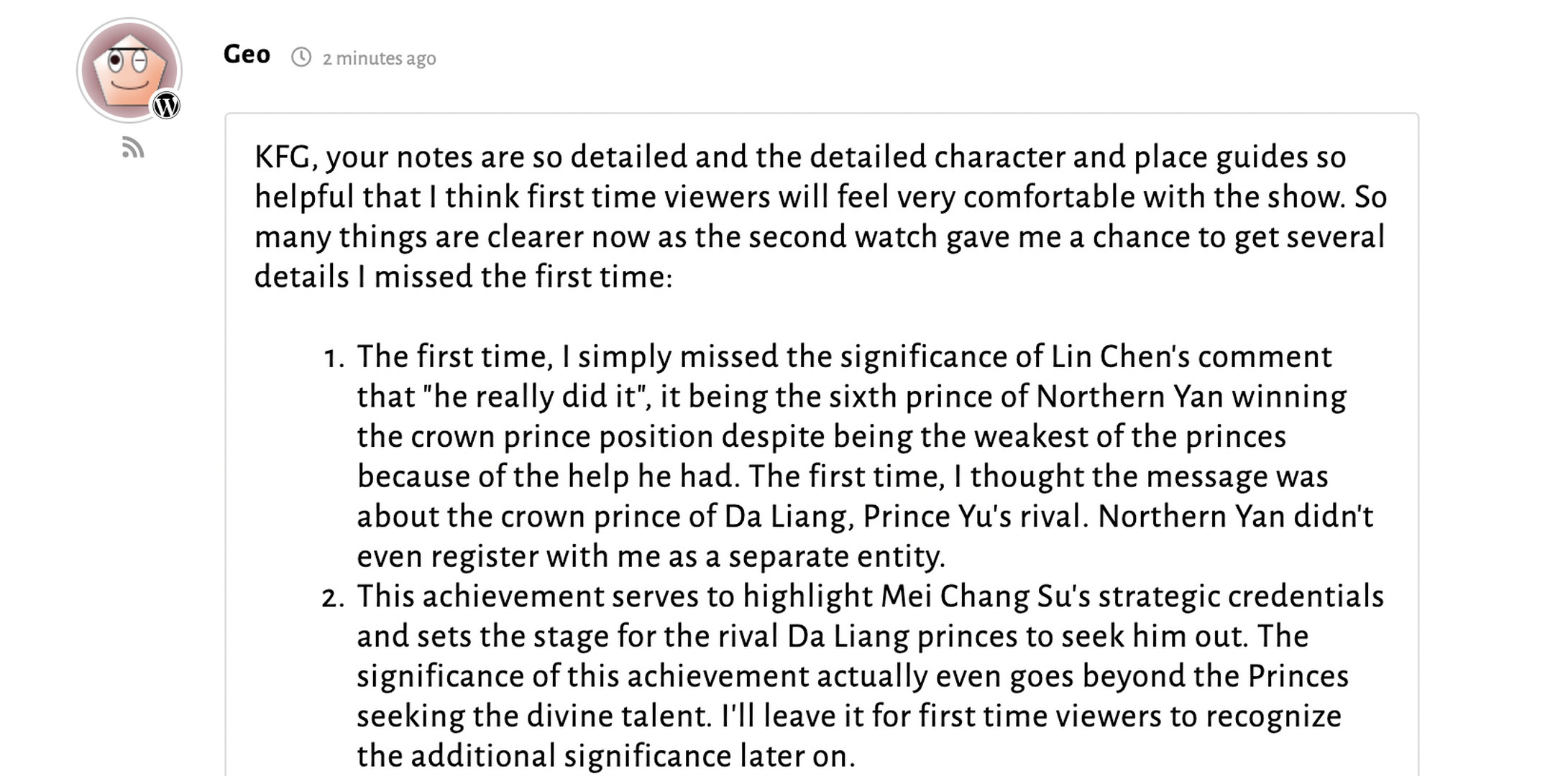
My readers are starting to use the Rich Editor to post their comments, and I've noticed what appears to be a hiccup. When I click on readers' comments to check, they are using the numbered list to break down their thoughts, but in the final comment, the numbers do not show, and instead the font is shown as smaller. This makes their numbered thoughts look like a big block of smaller text. Screenshots attached, the one with numbered list, is what it looks like raw, when in the edit mode, and the one without the numbered list, is what it looks like after it's posted. 

Could you please advise a fix for me please? Thank you!

Screen Shot 2021 05 26 at 2.43.30 PM
Screen Shot 2021 05 26 at 2.43.45 PM

5 Replies
Posts: 24
Topic starter
Translate
English
Spanish
French
German
Italian
Portuguese
Russian
Chinese
Japanese
Korean
Arabic
Hindi
Dutch
Polish
Turkish
Vietnamese
Thai
Swedish
Danish
Finnish
Norwegian
Czech
Hungarian
Romanian
Greek
Hebrew
Indonesian
Malay
Ukrainian
Bulgarian
Croatian
Slovak
Slovenian
Serbian
Lithuanian
Latvian
Estonian
(@kfangurl)
Eminent Member
Joined: 5 years ago

I have a bit more information to add. I noticed that my reader managed to get the numbered list to work, but only by having the numbers doubled in edit mode. I don't think this is a good permanent solution and so I do still need your help, but I thought it might be useful information. 

I am attaching the screenshots here. Again, I will paste first the raw edit mode, and then the final comment appearance.

Thank you in advance for your help and advice!

Screen Shot 2021 05 26 at 2.58.33 PM
Screen Shot 2021 05 26 at 2.58.46 PM

4 Replies
Asti
 Asti
Support
(@asti)
Joined: 8 years ago

Illustrious Member
Posts: 8210
Translate
English
Spanish
French
German
Italian
Portuguese
Russian
Chinese
Japanese
Korean
Arabic
Hindi
Dutch
Polish
Turkish
Vietnamese
Thai
Swedish
Danish
Finnish
Norwegian
Czech
Hungarian
Romanian
Greek
Hebrew
Indonesian
Malay
Ukrainian
Bulgarian
Croatian
Slovak
Slovenian
Serbian
Lithuanian
Latvian
Estonian

@kfangurl,

We'll need some example URL to check the issue. Please leave it here. 


(@kfangurl)
Joined: 5 years ago

Eminent Member
Posts: 24
Translate
English
Spanish
French
German
Italian
Portuguese
Russian
Chinese
Japanese
Korean
Arabic
Hindi
Dutch
Polish
Turkish
Vietnamese
Thai
Swedish
Danish
Finnish
Norwegian
Czech
Hungarian
Romanian
Greek
Hebrew
Indonesian
Malay
Ukrainian
Bulgarian
Croatian
Slovak
Slovenian
Serbian
Lithuanian
Latvian
Estonian

@asti Sure thing!

The url of the post itself is: https://thefangirlverdict.com/2021/05/26/open-thread-nirvana-in-fire-episodes-1-2-3/

The url of posts which displayed the numbering issue are:

https://thefangirlverdict.com/2021/05/26/open-thread-nirvana-in-fire-episodes-1-2-3/#comment-97515

and

https://thefangirlverdict.com/2021/05/26/open-thread-nirvana-in-fire-episodes-1-2-3/#comment-97547

As I mentioned in my earlier comment, comment-97547 shows correctly now, but in the raw edit format, my reader is actually using double the numbering, to achieve the result (screenshot in earlier message).

In comment-97515, my reader used the numbered list, and it does not show at all.

If you need more information than this, please let me know! Thank you for your time!


Asti
 Asti
Support
(@asti)
Joined: 8 years ago

Illustrious Member
Posts: 8210
Asti
Translate
English
Spanish
French
German
Italian
Portuguese
Russian
Chinese
Japanese
Korean
Arabic
Hindi
Dutch
Polish
Turkish
Vietnamese
Thai
Swedish
Danish
Finnish
Norwegian
Czech
Hungarian
Romanian
Greek
Hebrew
Indonesian
Malay
Ukrainian
Bulgarian
Croatian
Slovak
Slovenian
Serbian
Lithuanian
Latvian
Estonian

@kfangurl,

This is also the CSS conflict. One of the active plugins or theme adds the {list-style: none;} CSS rule for all the ol, ul elements. Please watch this video to better understand the issue: https://www.screencast.com/t/70Q7XWf4g8Rj

Below is provided the CSS solution you can use to solve the issue: 

ol {
    list-style: decimal !important;
}
ul{
    list-style: revert !important;
}


(@kfangurl)
Joined: 5 years ago

Eminent Member
Posts: 24
Asti
Translate
English
Spanish
French
German
Italian
Portuguese
Russian
Chinese
Japanese
Korean
Arabic
Hindi
Dutch
Polish
Turkish
Vietnamese
Thai
Swedish
Danish
Finnish
Norwegian
Czech
Hungarian
Romanian
Greek
Hebrew
Indonesian
Malay
Ukrainian
Bulgarian
Croatian
Slovak
Slovenian
Serbian
Lithuanian
Latvian
Estonian

@asti Hi! Thank you so much for the video and the fix! I must admit that I am not savvy enough to understand the video that you so helpfully provided, but I am very grateful for the fix, I have just tried it out, and it works beautifully! All the numbered lists are showing correctly now! 

Thank you so much! 😀


Share: