The effects of alcohol on sustanon 250 leucine for – real weight loss & bodybuilding benefits?
Search
Close
AI Search
Classic Search
 Search Phrase:
 Search Type:
Advanced search options
 Search in Forums:
 Search in date period:

 Sort Search Results by:

AI Assistant
How to prevent acce...
 
Share:
Notifications
Clear all

Question [Solved] How to prevent access to backend (dashboard and login page)

4 Posts
2 Users
1 Reactions
1,384 Views
Posts: 32
Topic starter
Translate
English
Spanish
French
German
Italian
Portuguese
Russian
Chinese
Japanese
Korean
Arabic
Hindi
Dutch
Polish
Turkish
Vietnamese
Thai
Swedish
Danish
Finnish
Norwegian
Czech
Hungarian
Romanian
Greek
Hebrew
Indonesian
Malay
Ukrainian
Bulgarian
Croatian
Slovak
Slovenian
Serbian
Lithuanian
Latvian
Estonian
(@doctorbr)
Trusted Member
Joined: 2 years ago
[#7801]

Registration on my site is disabled and the only way to comment is via social login. But logged people can see the admin bar and access the pages (URLs) /wp-admin and /wp-login / and /wp-admin/profile.php

Is there a configuration on WPDiscuz, or a code (snippet), to prevent such access?

I don’t want users to ever see the WordPress back-end (!) 


3 Replies
Asti
Posts: 8210
 Asti
Support
Translate
English
Spanish
French
German
Italian
Portuguese
Russian
Chinese
Japanese
Korean
Arabic
Hindi
Dutch
Polish
Turkish
Vietnamese
Thai
Swedish
Danish
Finnish
Norwegian
Czech
Hungarian
Romanian
Greek
Hebrew
Indonesian
Malay
Ukrainian
Bulgarian
Croatian
Slovak
Slovenian
Serbian
Lithuanian
Latvian
Estonian
(@asti)
Illustrious Member
Joined: 8 years ago

Hi @doctorbr,

This artilce should be helpful for you: https://blog.hubspot.com/website/how-to-limit-wordpress-dashboard-access


Posts: 32
Topic starter
Translate
English
Spanish
French
German
Italian
Portuguese
Russian
Chinese
Japanese
Korean
Arabic
Hindi
Dutch
Polish
Turkish
Vietnamese
Thai
Swedish
Danish
Finnish
Norwegian
Czech
Hungarian
Romanian
Greek
Hebrew
Indonesian
Malay
Ukrainian
Bulgarian
Croatian
Slovak
Slovenian
Serbian
Lithuanian
Latvian
Estonian
(@doctorbr)
Trusted Member
Joined: 2 years ago

Hello, @Asti

I added 2 snippets (codes below).

add_action('after_setup_theme', 'remove_admin_bar');
function remove_admin_bar() {
if (!current_user_can('administrator') && !is_admin()) {
 show_admin_bar(false);
}
}


add_action( 'init', 'blockusers_init' );
function blockusers_init() {
if ( is_admin() && ! current_user_can( 'administrator' ) && ! ( defined( 'DOING_AJAX' ) && DOING_AJAX ) ) {
wp_safe_redirect( home_url() );
exit;
}
}

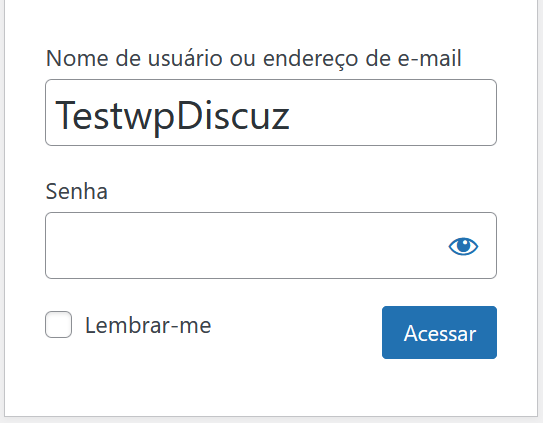
But users logged in by wpDiscuz via social login can still access the /wp-login.php page and this generates a lot of confusion, as the username collected by wpDiscuz appears as a user name in the “User Name” field of the default WordPress form (page /wp-login.php).

2023 12 19 12 46 25

Is there an effective way to change URL /wp-login.php via wpDiscuz?


1 Reply
Asti
 Asti
Support
(@asti)
Joined: 8 years ago

Illustrious Member
Posts: 8210
Translate
English
Spanish
French
German
Italian
Portuguese
Russian
Chinese
Japanese
Korean
Arabic
Hindi
Dutch
Polish
Turkish
Vietnamese
Thai
Swedish
Danish
Finnish
Norwegian
Czech
Hungarian
Romanian
Greek
Hebrew
Indonesian
Malay
Ukrainian
Bulgarian
Croatian
Slovak
Slovenian
Serbian
Lithuanian
Latvian
Estonian

@doctorbr,

Sure if you have a login page you can isnert the URL in the Dashboard > wpDiscuz > Settings > User Authorization and Profile Data tab. 

More info here: https://wpdiscuz.com/community/f-a-q/change-login-url/


Share: