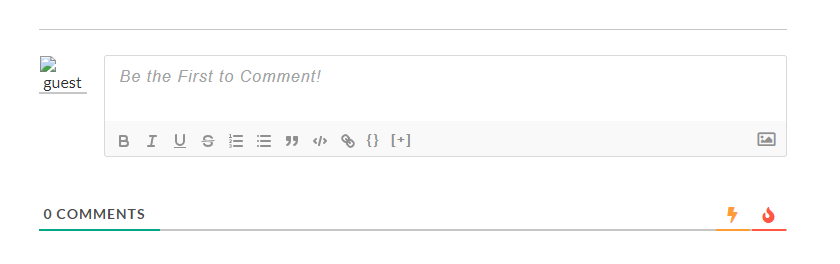
I have just installed wpDiscuz and I'm quite happy with it so far, however the guest avatar is broken and I can't work out why. Clearing the avatar cache has not helped.
Please try to deactivate the Cloudflare CAPTCHA, delete all caches and check again.
In case you want to say thank you! 🙂 We'd really appreciate if you leave a good review on the plugin page. This is the best way to say thank you to this project and the support team.
Open your own support topic and leave the URL where we can see the issue.
In case you want to say thank you! 🙂 We'd really appreciate if you leave a good review on the plugin page. This is the best way to say thank you to this project and the support team.
Please navigate to the Dashboard > Settings > Discussion admin page and choose some other value for the avatar in the "Default Avatar" section.
In case you want to say thank you! 🙂 We'd really appreciate if you leave a good review on the plugin page. This is the best way to say thank you to this project and the support team.
Could you please send the admin login details to info[at]gvectors.com email address? I'll ask the developers to check the issue for you.
In case you want to say thank you! 🙂 We'd really appreciate if you leave a good review on the plugin page. This is the best way to say thank you to this project and the support team.
Please share the email subject here once the email is sent.
In case you want to say thank you! 🙂 We'd really appreciate if you leave a good review on the plugin page. This is the best way to say thank you to this project and the support team.
This is not a website issue, rather a gravatar server issue.
Your plugin will have to use another Guest Gravatar URL. Changing the Gravatar in Dashboard > Settings > Discussion does not help since the native WordPress comments template does not use a Gravatar for guests, only your plugin does.
The developers are already checking the issue. I'll let you know once I get news for you.
In case you want to say thank you! 🙂 We'd really appreciate if you leave a good review on the plugin page. This is the best way to say thank you to this project and the support team.
The issue will be fixed in the next version of the wpDiscuz plugin (no ETA).
In case you want to say thank you! 🙂 We'd really appreciate if you leave a good review on the plugin page. This is the best way to say thank you to this project and the support team.