

The effects of alcohol on sustanon 250 leucine for – real weight loss & bodybuilding benefits?
Search
Close
AI Search
Classic Search
 Search Phrase:
 Search Type:
Advanced search options
 Search in Forums:
 Search in date period:

 Sort Search Results by:

AI Assistant
Update to Version 7...
 
Notifications
Clear all

[Solved] Update to Version 7.0.0 broke comment formatting and icons

5 Posts
2 Users
1 Reactions
7,404 Views
Posts: 5
Topic starter
Translate
English
Spanish
French
German
Italian
Portuguese
Russian
Chinese
Japanese
Korean
Arabic
Hindi
Dutch
Polish
Turkish
Vietnamese
Thai
Swedish
Danish
Finnish
Norwegian
Czech
Hungarian
Romanian
Greek
Hebrew
Indonesian
Malay
Ukrainian
Bulgarian
Croatian
Slovak
Slovenian
Serbian
Lithuanian
Latvian
Estonian
(@carrie-two-small-potates)
Active Member
Joined: 6 years ago
[#111]

We updated this morning to the new version, and it looks so promising with all the cool new features!

Unfortunately, the update broke many of the features in the plugin for us. We followed the directions to regenerate all data.

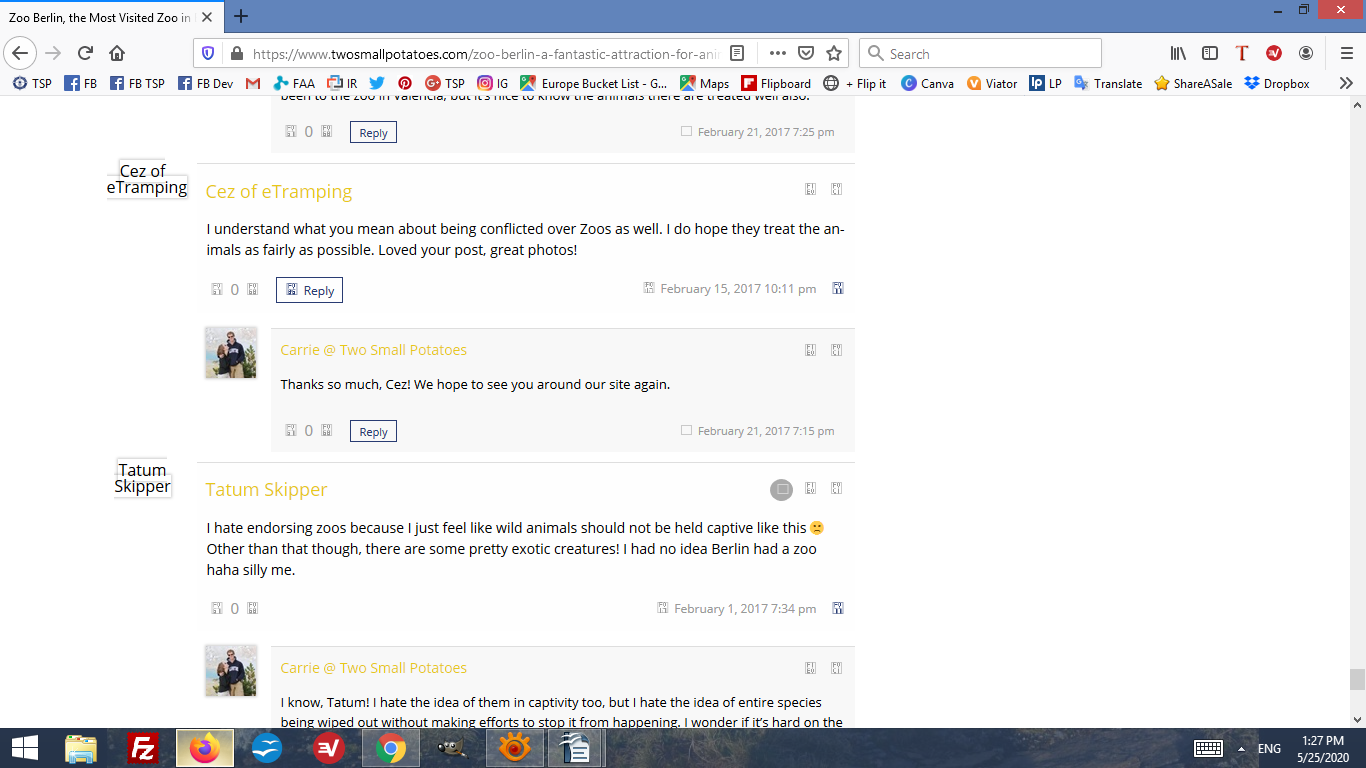
As soon as we updated the plugin, it broke the formatting on our comment sections.  All icons and images for users leaving comments are broken. Only the blue boxes for Facebook and Twitter show up at all, not any of the other sites people can use to leave comments, like Google or Disqus. Please see screenshot.

Screenshot (652)

 We flushed our cache with Siteground, Cloudflare, and cleared all local caches on Chrome. We get the same broken results on Firefox and Chrome incognito mode.

We use the Valenti theme and our theme and all plugins are current.

We're located in Germany but have our VPN turned off.

Ideas to troubleshoot?


4 Replies
Tom
Posts: 512
 Tom
Support
Translate
English
Spanish
French
German
Italian
Portuguese
Russian
Chinese
Japanese
Korean
Arabic
Hindi
Dutch
Polish
Turkish
Vietnamese
Thai
Swedish
Danish
Finnish
Norwegian
Czech
Hungarian
Romanian
Greek
Hebrew
Indonesian
Malay
Ukrainian
Bulgarian
Croatian
Slovak
Slovenian
Serbian
Lithuanian
Latvian
Estonian
(@tomson)
Honorable Member
Joined: 10 years ago

Hi @carrie-two-small-potates,

I don't see the update on the screenshot. I still see wpDiscuz 5.3.5 layout, this is not the wpDiscuz 7. So you have a very hard cache that have not been reset. Please delete all caches, then delete all caches again and again. Then purge CDN if you have.


Reply
1 Reply
(@carrie-two-small-potates)
Joined: 6 years ago

Active Member
Posts: 5
Translate
English
Spanish
French
German
Italian
Portuguese
Russian
Chinese
Japanese
Korean
Arabic
Hindi
Dutch
Polish
Turkish
Vietnamese
Thai
Swedish
Danish
Finnish
Norwegian
Czech
Hungarian
Romanian
Greek
Hebrew
Indonesian
Malay
Ukrainian
Bulgarian
Croatian
Slovak
Slovenian
Serbian
Lithuanian
Latvian
Estonian


@tomson That was a crazy fast response, thank you!  Hmm, ok, I'll flush again and see if I can find some cache lurking that I missed.


Reply
Tom
Posts: 512
 Tom
Support
Translate
English
Spanish
French
German
Italian
Portuguese
Russian
Chinese
Japanese
Korean
Arabic
Hindi
Dutch
Polish
Turkish
Vietnamese
Thai
Swedish
Danish
Finnish
Norwegian
Czech
Hungarian
Romanian
Greek
Hebrew
Indonesian
Malay
Ukrainian
Bulgarian
Croatian
Slovak
Slovenian
Serbian
Lithuanian
Latvian
Estonian
(@tomson)
Honorable Member
Joined: 10 years ago

@carrie-two-small-potates,

Your website is HARD CACHED by WP-Optimize, reset the plugin cache and even disable it if the problem exists.

And please remember, all new versions of wpDiscuz come tested and don't have problems. 99% problems come from cache plugins that don't allow to load new CSS and JS files, they keep old outdated files and try to load with new wpDiscuz plugin. So you'll always have tons of problems with updates if you don't reset caches properly.


Reply
Posts: 5
Topic starter
Translate
English
Spanish
French
German
Italian
Portuguese
Russian
Chinese
Japanese
Korean
Arabic
Hindi
Dutch
Polish
Turkish
Vietnamese
Thai
Swedish
Danish
Finnish
Norwegian
Czech
Hungarian
Romanian
Greek
Hebrew
Indonesian
Malay
Ukrainian
Bulgarian
Croatian
Slovak
Slovenian
Serbian
Lithuanian
Latvian
Estonian
(@carrie-two-small-potates)
Active Member
Joined: 6 years ago

Tom, that did the trick. I deactivated and reactivated the plugin and it resolved almost all the issues. We still don't see the icons for Google or Wordpress, but I'll take another look at the tutorials on WP Discuz. Thanks!


Reply
Share: