The effects of alcohol on sustanon 250 leucine for – real weight loss & bodybuilding benefits?
Search
Close
AI Search
Classic Search
 Search Phrase:
 Search Type:
Advanced search options
 Search in Forums:
 Search in date period:

 Sort Search Results by:

AI Assistant
"Post" button CSS g...
 
Notifications
Clear all

Question [Solved] "Post" button CSS glitched out

3 Posts
2 Users
0 Reactions
1,100 Views
Posts: 7
Topic starter
Translate
English
Spanish
French
German
Italian
Portuguese
Russian
Chinese
Japanese
Korean
Arabic
Hindi
Dutch
Polish
Turkish
Vietnamese
Thai
Swedish
Danish
Finnish
Norwegian
Czech
Hungarian
Romanian
Greek
Hebrew
Indonesian
Malay
Ukrainian
Bulgarian
Croatian
Slovak
Slovenian
Serbian
Lithuanian
Latvian
Estonian
(@hyrulianknight)
Active Member
Joined: 2 years ago
[#7860]

Hello there!

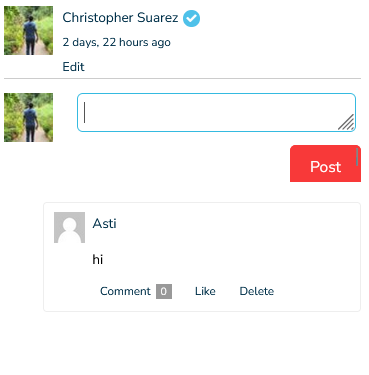
Unsure why my previous thread was removed but I'm still having an issue whereby when a picture is in the lightbox and button is cut off at the bottom and there is like a blue line. I think the button is too big because there is a slight scroll wheel on the side, could someone please in helping me to fix it?

Screenshot 2024 01 22 160211

 Appreciate any help!


Here is a temp login as a subscriber (it is a private facebook-like forum for my family)


https://librodelafamilia.com/wp-admin/?wtlwp_token=75b535935bff7b14937e7ae6dc4c59ad67126608f0cc237bdf88742909e42f361db52ad61378eb4e23ac525a77f6575389df296dd79b9efbfd15e53735775db8


2 Replies
Posts: 7
Topic starter
Translate
English
Spanish
French
German
Italian
Portuguese
Russian
Chinese
Japanese
Korean
Arabic
Hindi
Dutch
Polish
Turkish
Vietnamese
Thai
Swedish
Danish
Finnish
Norwegian
Czech
Hungarian
Romanian
Greek
Hebrew
Indonesian
Malay
Ukrainian
Bulgarian
Croatian
Slovak
Slovenian
Serbian
Lithuanian
Latvian
Estonian
(@hyrulianknight)
Active Member
Joined: 2 years ago

Nevermind, I figured it out, I simply needed to change the padding because the button was too large. Anyone else that has the issue just change the padding to the appropriate number that works for you.


.registration-login-submit, .user-menu-dropdown .dropdown-footer a.button, .wp-block-button__link, .wp-element-button, a.read-more.button, button[type="submit"], input[type="button"], input[type="reset"], input[type="submit"] {
font-family: inherit;
font-size: inherit;
color: #fff;
padding: 5px 10px;
}

1 Reply
Asti
 Asti
Support
(@asti)
Joined: 8 years ago

Illustrious Member
Posts: 8220
Translate
English
Spanish
French
German
Italian
Portuguese
Russian
Chinese
Japanese
Korean
Arabic
Hindi
Dutch
Polish
Turkish
Vietnamese
Thai
Swedish
Danish
Finnish
Norwegian
Czech
Hungarian
Romanian
Greek
Hebrew
Indonesian
Malay
Ukrainian
Bulgarian
Croatian
Slovak
Slovenian
Serbian
Lithuanian
Latvian
Estonian

Dear @hyrulianknight,

It wasn't removed. Here it is: https://wpdiscuz.com/community/wpdiscuz-integration/glitched-button-style-and-text-font-color/#post-22968

Anyway, thank you for letting us know. Glad to hear that the issue is solved.

We're going to mark both threads as resolved. Feel free to open a new topic if you have further questions.