The effects of alcohol on
sustanon 250 leucine for – real weight loss & bodybuilding benefits?
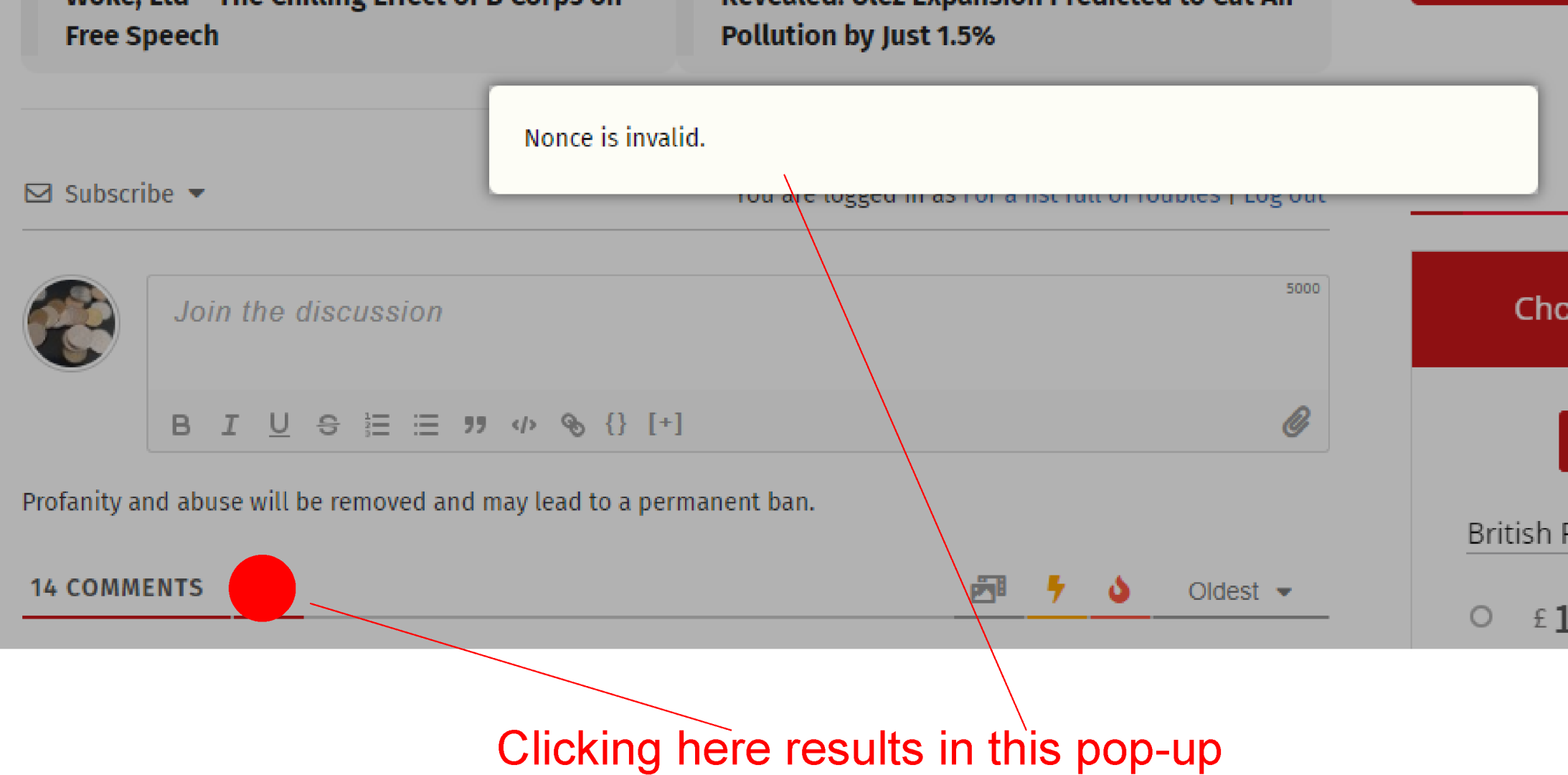
Bug [Solved] "Nonce is invalid" AJAX response on clicking "My content and settings" link
✦
✦
✦
AI is analyzing the discussion...
Translate
▼
English
Spanish
French
German
Italian
Portuguese
Russian
Chinese
Japanese
Korean
Arabic
Hindi
Dutch
Polish
Turkish
Vietnamese
Thai
Swedish
Danish
Finnish
Norwegian
Czech
Hungarian
Romanian
Greek
Hebrew
Indonesian
Malay
Ukrainian
Bulgarian
Croatian
Slovak
Slovenian
Serbian
Lithuanian
Latvian
Estonian
Show original
Translating...
Aug 11, 2023 4:46 pm
(@solarian)
Active Member
Since the latest update, users are getting “Nonce is invalid” when clicking on the “My content and settings” profile pic at the top of the comments section (see below image). This happens even when the page is freshly refreshed/reloaded.
As well as looking into the underlying bug, could you also please change the wording of the error message? In the UK, the term “nonce” is well-known slang for a person who takes a criminally unhealthy interest in children. As such, the message has been interpreted by more than one user as an insult.
Support
Translate
▼
English
Spanish
French
German
Italian
Portuguese
Russian
Chinese
Japanese
Korean
Arabic
Hindi
Dutch
Polish
Turkish
Vietnamese
Thai
Swedish
Danish
Finnish
Norwegian
Czech
Hungarian
Romanian
Greek
Hebrew
Indonesian
Malay
Ukrainian
Bulgarian
Croatian
Slovak
Slovenian
Serbian
Lithuanian
Latvian
Estonian
Show original
Translating...
Aug 11, 2023 4:59 pm
(@asti)
Illustrious Member
@solarian ,
Try to switch on the"Use WordPress native AJAX functions " option in the Dashboard > wpDiscuz > Settings > General Settings tab. Delete all caches and check again.
Translate
▼
English
Spanish
French
German
Italian
Portuguese
Russian
Chinese
Japanese
Korean
Arabic
Hindi
Dutch
Polish
Turkish
Vietnamese
Thai
Swedish
Danish
Finnish
Norwegian
Czech
Hungarian
Romanian
Greek
Hebrew
Indonesian
Malay
Ukrainian
Bulgarian
Croatian
Slovak
Slovenian
Serbian
Lithuanian
Latvian
Estonian
Show original
Translating...
Aug 11, 2023 5:05 pm
(@solarian)
Active Member
I've turned off the cache in wpDiscuz and purged my other caches, changed to WP AJAX functions and it still seems to be happening.
(@asti)
Illustrious Member
Posts: 8362
Aug 11, 2023 5:11 pm
Translate
▼
English
Spanish
French
German
Italian
Portuguese
Russian
Chinese
Japanese
Korean
Arabic
Hindi
Dutch
Polish
Turkish
Vietnamese
Thai
Swedish
Danish
Finnish
Norwegian
Czech
Hungarian
Romanian
Greek
Hebrew
Indonesian
Malay
Ukrainian
Bulgarian
Croatian
Slovak
Slovenian
Serbian
Lithuanian
Latvian
Estonian
Show original
Translating...
@solarian ,
We'll check and get back to you ASAP.
(@asti)
Illustrious Member
Posts: 8362
Aug 12, 2023 1:34 pm
Translate
▼
English
Spanish
French
German
Italian
Portuguese
Russian
Chinese
Japanese
Korean
Arabic
Hindi
Dutch
Polish
Turkish
Vietnamese
Thai
Swedish
Danish
Finnish
Norwegian
Czech
Hungarian
Romanian
Greek
Hebrew
Indonesian
Malay
Ukrainian
Bulgarian
Croatian
Slovak
Slovenian
Serbian
Lithuanian
Latvian
Estonian
Show original
Translating...
@solarian ,
The issue will be fixed in the next version. I'll update this topic once it's ready.
Translate
▼
English
Spanish
French
German
Italian
Portuguese
Russian
Chinese
Japanese
Korean
Arabic
Hindi
Dutch
Polish
Turkish
Vietnamese
Thai
Swedish
Danish
Finnish
Norwegian
Czech
Hungarian
Romanian
Greek
Hebrew
Indonesian
Malay
Ukrainian
Bulgarian
Croatian
Slovak
Slovenian
Serbian
Lithuanian
Latvian
Estonian
Show original
Translating...
Aug 12, 2023 2:35 pm
(@solarian)
Active Member
Thanks very much for resolving this.
Can you also tell me whether you are intending to change the text of the error message, so as to avoid the problem mentioned in the OP? May I suggest something like “Incorrect validation code. Please refresh the page and try again.”
(@asti)
Illustrious Member
Posts: 8362
Aug 14, 2023 11:51 am
Translate
▼
English
Spanish
French
German
Italian
Portuguese
Russian
Chinese
Japanese
Korean
Arabic
Hindi
Dutch
Polish
Turkish
Vietnamese
Thai
Swedish
Danish
Finnish
Norwegian
Czech
Hungarian
Romanian
Greek
Hebrew
Indonesian
Malay
Ukrainian
Bulgarian
Croatian
Slovak
Slovenian
Serbian
Lithuanian
Latvian
Estonian
Show original
Translating...
@solarian ,
The issue is fixed in the latest version (v. 7.6.3) of the wpDiscuz plugin.
Please properly delete all kinds of caches before checking.
Translate
▼
English
Spanish
French
German
Italian
Portuguese
Russian
Chinese
Japanese
Korean
Arabic
Hindi
Dutch
Polish
Turkish
Vietnamese
Thai
Swedish
Danish
Finnish
Norwegian
Czech
Hungarian
Romanian
Greek
Hebrew
Indonesian
Malay
Ukrainian
Bulgarian
Croatian
Slovak
Slovenian
Serbian
Lithuanian
Latvian
Estonian
Show original
Translating...
Aug 14, 2023 2:06 pm
(@solarian)
Active Member
Many thanks, all working.
Super Globals
Options and Features