The effects of alcohol on sustanon 250 leucine for – real weight loss & bodybuilding benefits?
Search
Close
AI Search
Classic Search
 Search Phrase:
 Search Type:
Advanced search options
 Search in Forums:
 Search in date period:

 Sort Search Results by:

AI Assistant
“My Content and Set...
 
Share:
Notifications
Clear all

Issue “My Content and Settings” button is not visible for guests

4 Posts
2 Users
0 Reactions
991 Views
Posts: 2
Topic starter
Translate
English
Spanish
French
German
Italian
Portuguese
Russian
Chinese
Japanese
Korean
Arabic
Hindi
Dutch
Polish
Turkish
Vietnamese
Thai
Swedish
Danish
Finnish
Norwegian
Czech
Hungarian
Romanian
Greek
Hebrew
Indonesian
Malay
Ukrainian
Bulgarian
Croatian
Slovak
Slovenian
Serbian
Lithuanian
Latvian
Estonian
(@ubweb)
New Member
Joined: 2 years ago
[#7982]

Dear WPDiscuz team, 

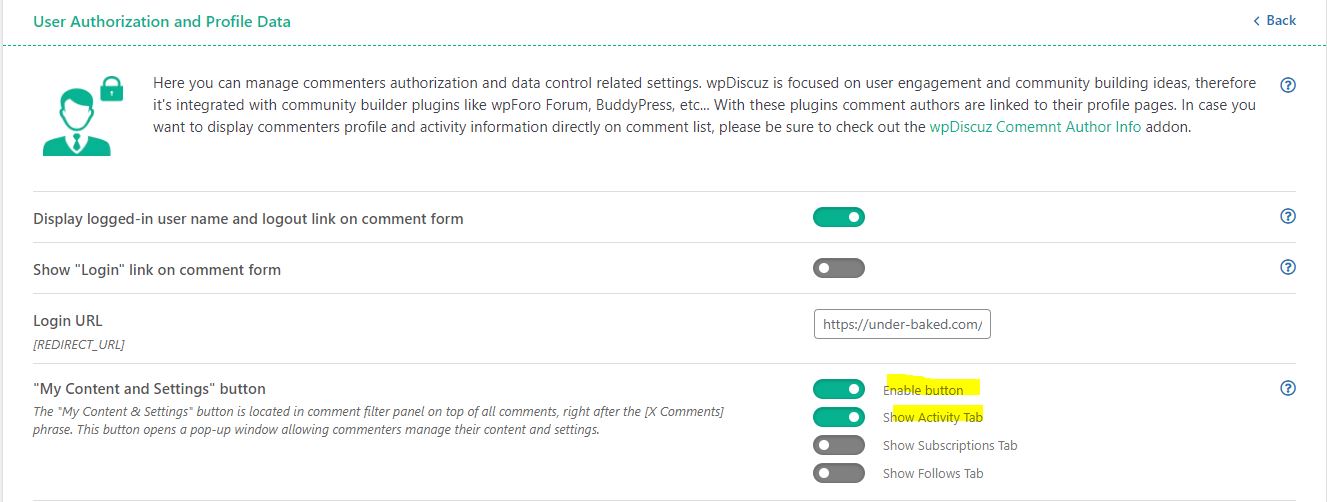
As the title suggests, “My Content and Settings” button is not visible for guests, although it is toggled to ON in the plugin's settings. 
I am not implementing users subscription on my website, amd would like to allow guests to delete their comments. You may check an example page here.

I've tested it after logging out of my username, tried incognito mode and accessing from a mobile device. The button is not visible. I would also to confirm that I did not use any CSS code to manipulate anything else related to WPDiscuz plugin.

Your support as to how to resolve this issue is highly appreciated.

My Content and Settings button

 thank you and kind regards,


3 Replies
Asti
Posts: 8210
 Asti
Support
Translate
English
Spanish
French
German
Italian
Portuguese
Russian
Chinese
Japanese
Korean
Arabic
Hindi
Dutch
Polish
Turkish
Vietnamese
Thai
Swedish
Danish
Finnish
Norwegian
Czech
Hungarian
Romanian
Greek
Hebrew
Indonesian
Malay
Ukrainian
Bulgarian
Croatian
Slovak
Slovenian
Serbian
Lithuanian
Latvian
Estonian
(@asti)
Illustrious Member
Joined: 8 years ago

Hi, 

This kind of issue is usually caused by conflict with other plugins.

Please deactivate the plugins one by one and check after each deactivation to find the problem maker.

Keep the cache plugin (if you have) deactivated during this testing process.

If you can't find the problem maker, send the admin login details to info[at]gvectors.com email address. I'll ask the developers to check the issue for you.


Reply
2 Replies
(@ubweb)
Joined: 2 years ago

New Member
Posts: 2
Translate
English
Spanish
French
German
Italian
Portuguese
Russian
Chinese
Japanese
Korean
Arabic
Hindi
Dutch
Polish
Turkish
Vietnamese
Thai
Swedish
Danish
Finnish
Norwegian
Czech
Hungarian
Romanian
Greek
Hebrew
Indonesian
Malay
Ukrainian
Bulgarian
Croatian
Slovak
Slovenian
Serbian
Lithuanian
Latvian
Estonian

@asti Hi Asti,

Many thanks for looking into this. My immediate suspect was the caching plugin (LiteSpeed Cache) and the button was visible again once I disabled it. 
Do you have any good guesses as to which setting could be causing this issue? 
I have tried messing with the CSS & JS page optimization settings but it didn't seem to work unfortunately. 

Thank you and kind regards,


Reply
Asti
 Asti
Support
(@asti)
Joined: 8 years ago

Illustrious Member
Posts: 8210
Asti
Translate
English
Spanish
French
German
Italian
Portuguese
Russian
Chinese
Japanese
Korean
Arabic
Hindi
Dutch
Polish
Turkish
Vietnamese
Thai
Swedish
Danish
Finnish
Norwegian
Czech
Hungarian
Romanian
Greek
Hebrew
Indonesian
Malay
Ukrainian
Bulgarian
Croatian
Slovak
Slovenian
Serbian
Lithuanian
Latvian
Estonian

@ubweb,

I recommend reaching out to LiteSpeed Cache support to ask about the correct method for excluding the wpDiscuz plugin.


Reply
Share: