The effects of alcohol on
sustanon 250 leucine for – real weight loss & bodybuilding benefits?
[Solved] wpDiscuz throws fatal errors when multisite is migrated to new location
✦ Summarize Topic
✦
✦
✦
AI is analyzing the discussion...
(@stepht)
Posts: 2
New Member
Translate
▼
English
Spanish
French
German
Italian
Portuguese
Russian
Chinese
Japanese
Korean
Arabic
Hindi
Dutch
Polish
Turkish
Vietnamese
Thai
Swedish
Danish
Finnish
Norwegian
Czech
Hungarian
Romanian
Greek
Hebrew
Indonesian
Malay
Ukrainian
Bulgarian
Croatian
Slovak
Slovenian
Serbian
Lithuanian
Latvian
Estonian
Show original
Translating...
[#2062]
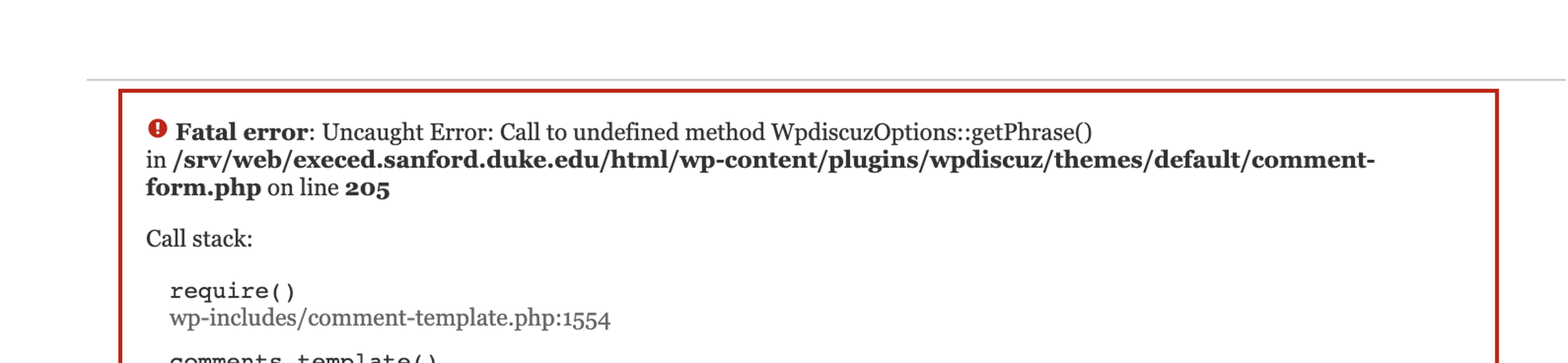
Similar to this thread ( https://wpdiscuz.com/community/troubleshooting/copy-over-to-testing-server-broke-wpdiscuz/), I've copied a multisite install to a new location and wpDiscuz is throwing fatal errors. I've sucessfully done this in the past, so I'm not sure what's different about this new location.
Existing sites w/wpDiscuz throw this error in the new location:
A brand new site throws this error:
I've tried everything I can think of - uninstall/install wpDiscuz, new themes, etc. I've also tried this solution ( https://wpdiscuz.com/community/troubleshooting/copy-over-to-testing-server-broke-wpdiscuz/) but that didn't work either.
Any and all help would be appreciated.
Thank-you.
Posted : 19/05/2021 5:28 pm
(@stepht)
Posts: 2
New Member
Translate
▼
English
Spanish
French
German
Italian
Portuguese
Russian
Chinese
Japanese
Korean
Arabic
Hindi
Dutch
Polish
Turkish
Vietnamese
Thai
Swedish
Danish
Finnish
Norwegian
Czech
Hungarian
Romanian
Greek
Hebrew
Indonesian
Malay
Ukrainian
Bulgarian
Croatian
Slovak
Slovenian
Serbian
Lithuanian
Latvian
Estonian
Show original
Translating...
I think I've got it sorted. I removed the site-level installs of wpDiscuz and network activated it. Then I edited the default form and saved and cleared the cache (as the previous advice suggested) and that seems to have resolved all the errors.
Posted : 19/05/2021 6:04 pm
(@asti)
Posts: 8284
Illustrious Member Support
Translate
▼
English
Spanish
French
German
Italian
Portuguese
Russian
Chinese
Japanese
Korean
Arabic
Hindi
Dutch
Polish
Turkish
Vietnamese
Thai
Swedish
Danish
Finnish
Norwegian
Czech
Hungarian
Romanian
Greek
Hebrew
Indonesian
Malay
Ukrainian
Bulgarian
Croatian
Slovak
Slovenian
Serbian
Lithuanian
Latvian
Estonian
Show original
Translating...
Thank you for letting us know. Glad to hear that the issue is solved.
In case you want to say thank you! 🙂 We'd really appreciate if you leave a good review on the plugin page. This is the best way to say thank you to this project and the support team.
Posted : 20/05/2021 12:24 pm
Super Globals
Options and Features