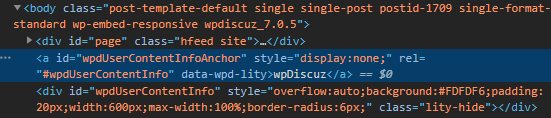
I'm doing a Cloudflare HTTP/3 test run on my site with a Chrome Canary browser and I tried an SEO Lighthouse check. There is one line of CSS with display:none that is not picked up if I run the test on the standard version of Chrome but it appears on the Canary browser.
Please advise if this is something I need to do anything about for my SEO because I'm troubleshooting a noindex issue right now on several pages of my site and wondering if this has anything to do with it.
This issue will be fixed in the next update. If you need to get it resolved asap, please let us know. We'll provide you an instruction.
In case you want to say thank you! 🙂 We'd really appreciate if you leave a good review on the plugin page. This is the best way to say thank you to this project and the support team.
Hi @asti, if this has any impact on my current SEO indexing status then please do provide the instruction. Otherwise I'm fine with waiting for the update and marking this post as resolved. Thanks.
Please ignore that report. This is a JavaScript button, this is not a link. It opens commenters information in a pop-up window, it should not be crawlable.
In case you want to say thank you! 🙂 We'd really appreciate if you leave a good review on the plugin page. This is the best way to say thank you to this project and the support team.
@asti Yes, please fix it in the new updates, because as a website designer, it is important for my clients what score they get in technical SEO and tools like page speed.