The effects of alcohol on sustanon 250 leucine for – real weight loss & bodybuilding benefits?
Search
Close
AI Search
Classic Search
 Search Phrase:
 Search Type:
Advanced search options
 Search in Forums:
 Search in date period:

 Sort Search Results by:

AI Assistant
Share:
Notifications
Clear all

[Solved] No comments icon.

6 Posts
2 Users
0 Reactions
1,586 Views
Posts: 9
Topic starter
Translate
English
Spanish
French
German
Italian
Portuguese
Russian
Chinese
Japanese
Korean
Arabic
Hindi
Dutch
Polish
Turkish
Vietnamese
Thai
Swedish
Danish
Finnish
Norwegian
Czech
Hungarian
Romanian
Greek
Hebrew
Indonesian
Malay
Ukrainian
Bulgarian
Croatian
Slovak
Slovenian
Serbian
Lithuanian
Latvian
Estonian
(@czarekplpl)
Active Member
Joined: 5 years ago
[#1467]

Hello.

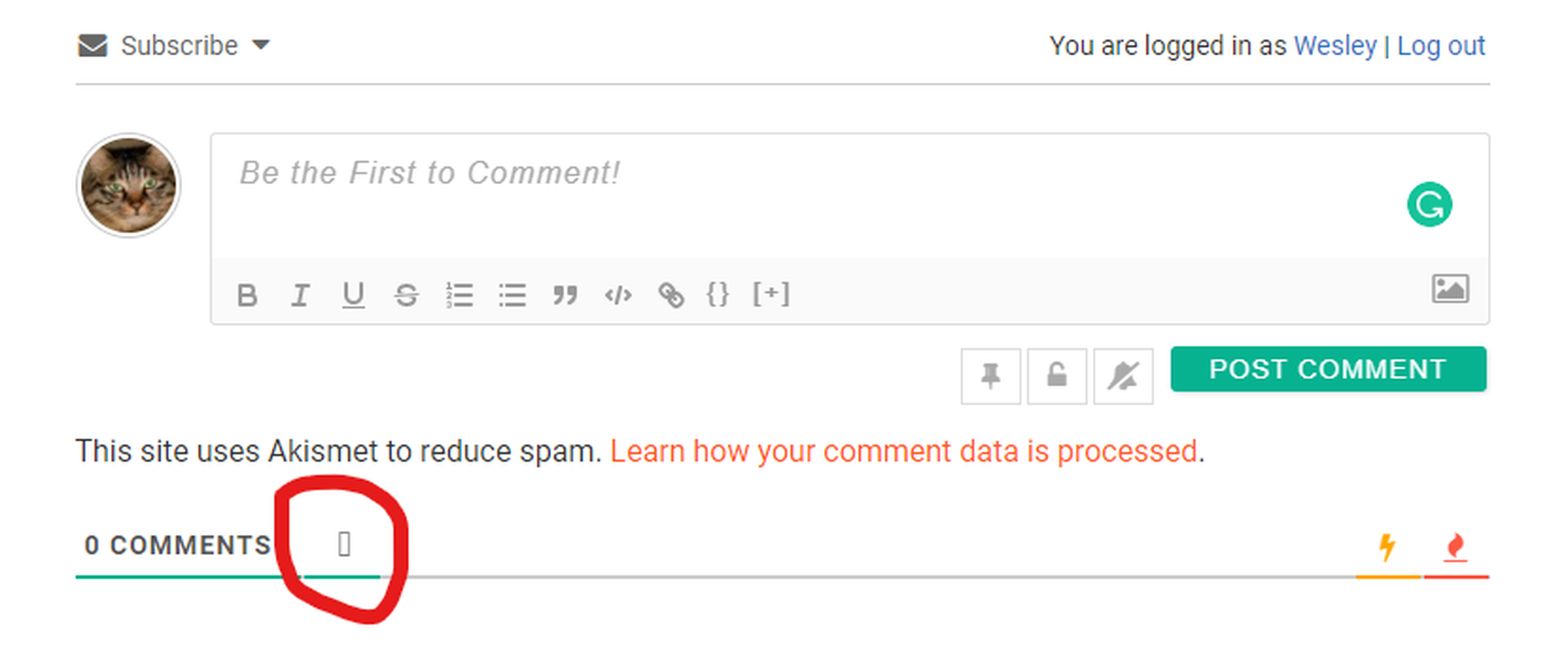
I have no comments icon. There is only a small rectangle instead.

How to fix it?

See the print screen.

image

5 Replies
Asti
Posts: 8210
 Asti
Support
Translate
English
Spanish
French
German
Italian
Portuguese
Russian
Chinese
Japanese
Korean
Arabic
Hindi
Dutch
Polish
Turkish
Vietnamese
Thai
Swedish
Danish
Finnish
Norwegian
Czech
Hungarian
Romanian
Greek
Hebrew
Indonesian
Malay
Ukrainian
Bulgarian
Croatian
Slovak
Slovenian
Serbian
Lithuanian
Latvian
Estonian
(@asti)
Illustrious Member
Joined: 8 years ago

@czarekplpl,

This is just a small CSS conflict the active theme or other plugins. Please leave some example URL to allow us to debug the issue and provide some CSS solution for you. 


Posts: 9
Topic starter
Translate
English
Spanish
French
German
Italian
Portuguese
Russian
Chinese
Japanese
Korean
Arabic
Hindi
Dutch
Polish
Turkish
Vietnamese
Thai
Swedish
Danish
Finnish
Norwegian
Czech
Hungarian
Romanian
Greek
Hebrew
Indonesian
Malay
Ukrainian
Bulgarian
Croatian
Slovak
Slovenian
Serbian
Lithuanian
Latvian
Estonian
(@czarekplpl)
Active Member
Joined: 5 years ago
1 Reply
Asti
 Asti
Support
(@asti)
Joined: 8 years ago

Illustrious Member
Posts: 8210
Translate
English
Spanish
French
German
Italian
Portuguese
Russian
Chinese
Japanese
Korean
Arabic
Hindi
Dutch
Polish
Turkish
Vietnamese
Thai
Swedish
Danish
Finnish
Norwegian
Czech
Hungarian
Romanian
Greek
Hebrew
Indonesian
Malay
Ukrainian
Bulgarian
Croatian
Slovak
Slovenian
Serbian
Lithuanian
Latvian
Estonian

@czarekplpl,

Use the CSS code below:

#wpdcom .fa, #wpdcom .far, #wpdcom .fas {
font-family: "Font Awesome 5 Free";
font-weight:900;
}

Put the code in the Top Admin Bar > Customize > Additional CSS > "Additional CSS" textarea, save it, delete all caches and check again.

 Please don't forget to press Ctrl+F5 (twice) on the frontend before checking.


Posts: 9
Topic starter
Translate
English
Spanish
French
German
Italian
Portuguese
Russian
Chinese
Japanese
Korean
Arabic
Hindi
Dutch
Polish
Turkish
Vietnamese
Thai
Swedish
Danish
Finnish
Norwegian
Czech
Hungarian
Romanian
Greek
Hebrew
Indonesian
Malay
Ukrainian
Bulgarian
Croatian
Slovak
Slovenian
Serbian
Lithuanian
Latvian
Estonian
(@czarekplpl)
Active Member
Joined: 5 years ago

It works. Thank you very much. Topic solved.

Rgds

Wesley.


1 Reply
Asti
 Asti
Support
(@asti)
Joined: 8 years ago

Illustrious Member
Posts: 8210
Translate
English
Spanish
French
German
Italian
Portuguese
Russian
Chinese
Japanese
Korean
Arabic
Hindi
Dutch
Polish
Turkish
Vietnamese
Thai
Swedish
Danish
Finnish
Norwegian
Czech
Hungarian
Romanian
Greek
Hebrew
Indonesian
Malay
Ukrainian
Bulgarian
Croatian
Slovak
Slovenian
Serbian
Lithuanian
Latvian
Estonian

@czarekplpl,

We'd really appreciate and be thankful if you leave a good review on the plugin page. This is the best way to say thank you to this project and support team.


Share: