I also used the Gutenberg block on this article here:
https://oneburleson.com/burleson-texas-runoff-election-results/
When clicking on the icon, nothing happens.
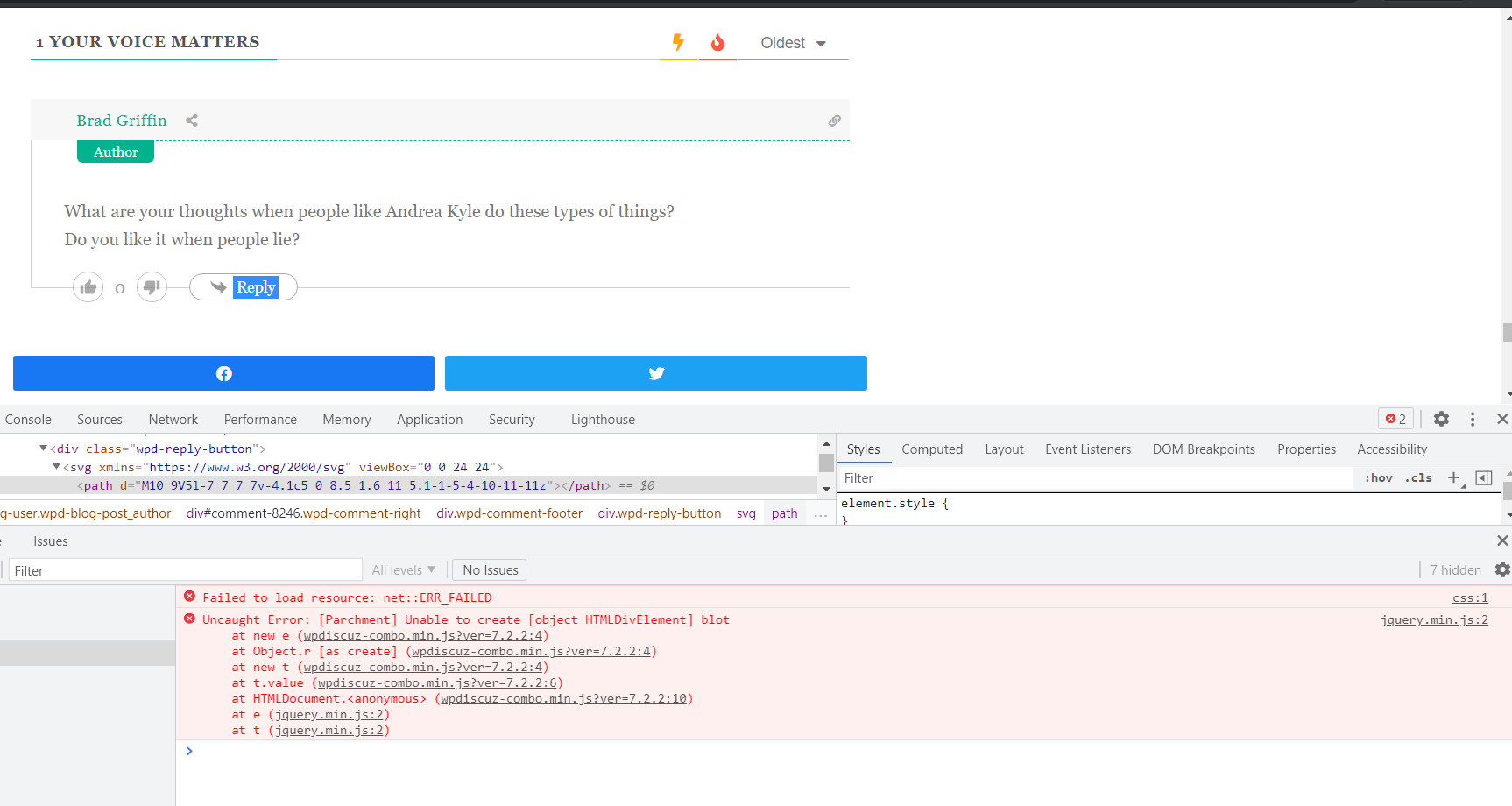
I do see this error in the Chrome error console log: https://prnt.sc/15bjm34
Uncaught Error: [Parchment] Unable to create [object HTMLDivElement] blot
at new e (wpdiscuz-combo.min.js?ver=7.2.2:4)
at Object.r [as create] (wpdiscuz-combo.min.js?ver=7.2.2:4)
at new t (wpdiscuz-combo.min.js?ver=7.2.2:4)
at t.value (wpdiscuz-combo.min.js?ver=7.2.2:6)
at HTMLDocument.<anonymous> (wpdiscuz-combo.min.js?ver=7.2.2:10)
at e (jquery.min.js:2)
at t (jquery.min.js:2)
.........and, as someone just pointed out as well, users cannot click on the `REPLY` button.
Again, the error showing in the Chrome console log seems to be pointing to the similar error:
jquery.min.js:2 Uncaught Error: [Parchment] Unable to create [object HTMLDivElement] blot
at new e (wpdiscuz-combo.min.js?ver=7.2.2:4)
at Object.r [as create] (wpdiscuz-combo.min.js?ver=7.2.2:4)
at new t (wpdiscuz-combo.min.js?ver=7.2.2:4)
at t.value (wpdiscuz-combo.min.js?ver=7.2.2:6)
at HTMLDocument.<anonymous> (wpdiscuz-combo.min.js?ver=7.2.2:10)
at e (jquery.min.js:2)
at t (jquery.min.js:2)
This kind of issue is usually caused by either conflict with other plugins or the active theme. Please deactivate the plugins/theme one by one and check after each deactivation to find the problem maker one.
In case you want to say thank you! 🙂
We'd really appreciate if you leave a good review on the plugin page.
This is the best way to say thank you to this project and the support team.
It's a live news site. Why would one sit there and deactivate plugins and themes just to find a bug? That response is the oldest in the world and no longer works for WordPress support.
It's been tested on 2019 and other themes and the same error console presents itself.
jquery.min.js:2 Uncaught Error: [Parchment] Unable to create [object HTMLDivElement] blot
at new e (wpdiscuz-combo.min.js?ver=7.2.2:4)
at Object.r [as create] (wpdiscuz-combo.min.js?ver=7.2.2:4)
at new t (wpdiscuz-combo.min.js?ver=7.2.2:4)
at t.value (wpdiscuz-combo.min.js?ver=7.2.2:6)
at HTMLDocument.<anonymous> (wpdiscuz-combo.min.js?ver=7.2.2:10)
at e (jquery.min.js:2)
at t (jquery.min.js:2)
That whole response of "DEACTIVATE EVERYTHING IN THE WORLD" is old.
This is a support forum. Test the plugin on your site, in your theme, with the Automattic Newspack Theme, Astra, or 2019 or whatever other theme you'd like.
Then fire up some plugins like AMP, WooCommerce, and things like that. And make sure the plugin's functionality still works. I have no problem even PAYING for support for a free plugin, but if we can't narrow down the source of the bug, then it doesn't do any good at all.
What is causing the minified javascript to not load? That's the fix. Let's see if we can get that question answered.
Please navigate to Dashboard > wpDiscuz > Settings > General Settings admin page, disable the following two options and let us know:
- Combine JS and CSS Files to Optimize Page Loading Speed
- Minify JS and CSS Files to Optimize Page Loading Speed
In case you want to say thank you! 🙂
We'd really appreciate if you leave a good review on the plugin page.
This is the best way to say thank you to this project and the support team.
Nope. That didn't do anything either.
Again, I'm using this theme:
https://github.com/Automattic/newspack-theme and it's associated plugins https://github.com/Automattic/newspack-plugin
There's nothing too crazy going on inside. I would rather write the news than be in support forums. So if you'll email me at news@oneburleson.com & let me know an estimate of how much money it will take to find the bug, I will happily pay it.
Thank You
I also noticed that the comment box isn't showing as well. Again, just take my money and let's get it fixed 😉
Please send the admin login details to info[at]gvectors.com email address. I'll ask the developers to check the issue.
In case you want to say thank you! 🙂
We'd really appreciate if you leave a good review on the plugin page.
This is the best way to say thank you to this project and the support team.
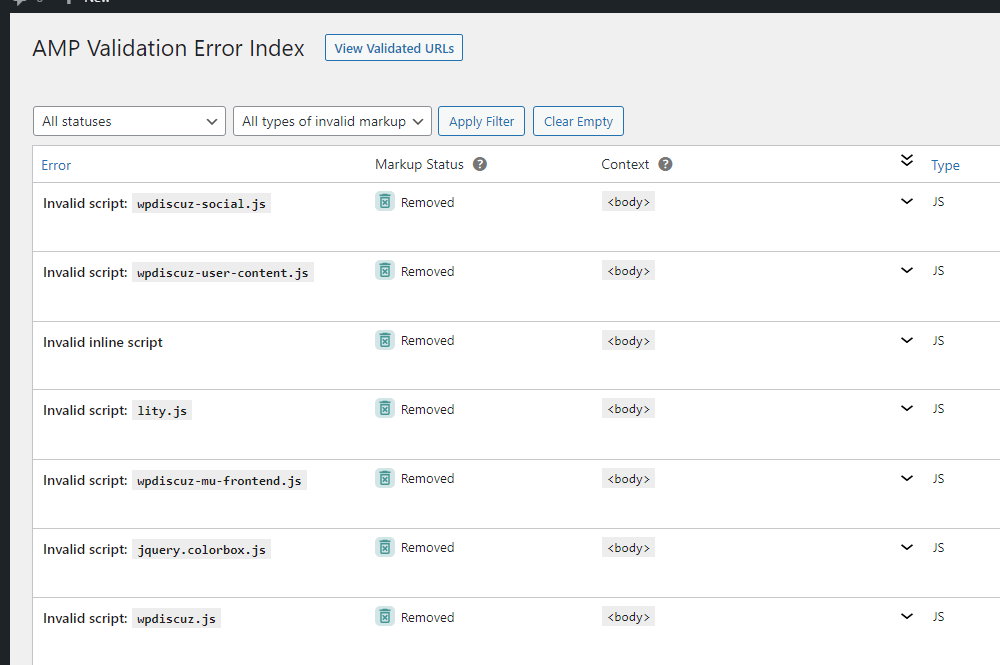
@asti in both this thread and a few others, would AMP have anything to do with these issues?
I just noticed this:
It's possible. To make sure, just deactivate it, delete all kind of caches and check again.
In case you want to say thank you! 🙂
We'd really appreciate if you leave a good review on the plugin page.
This is the best way to say thank you to this project and the support team.
@asti Nope. That didn't help either.
Feel free to open the link in an incognito window and see the same effect as well.
Here's the link again:
https://oneburleson.com/burleson-texas-runoff-election-results/
Please feel free to check it A.S.A.P as this site simply cannot afford to leave all AMP capacity entirely disabled for a lengthy period of time.
Again, A.M.P. does not appear to be the problem.
Please watch this video: https://www.screencast.com/t/yVb5aMlD
It seems the issue is solved.
In case you want to say thank you! 🙂
We'd really appreciate if you leave a good review on the plugin page.
This is the best way to say thank you to this project and the support team.
🤦♀️🤦♂️ somewhere, there's a breakdown in basic communication.
I just told you that I turned OFF all A.M.P. features didn't I?
somewhere, there's a breakdown in basic communication.
Let's make the following clarification?
If you turn OFF all A.M.P. features it works fine, isn't it?
In case you want to say thank you! 🙂
We'd really appreciate if you leave a good review on the plugin page.
This is the best way to say thank you to this project and the support team.