The effects of alcohol on
sustanon 250 leucine for – real weight loss & bodybuilding benefits?
[Solved] Can't login with Linkedin
✦
✦
✦
AI is analyzing the discussion...
Translate
▼
English
Spanish
French
German
Italian
Portuguese
Russian
Chinese
Japanese
Korean
Arabic
Hindi
Dutch
Polish
Turkish
Vietnamese
Thai
Swedish
Danish
Finnish
Norwegian
Czech
Hungarian
Romanian
Greek
Hebrew
Indonesian
Malay
Ukrainian
Bulgarian
Croatian
Slovak
Slovenian
Serbian
Lithuanian
Latvian
Estonian
Show original
Translating...
Jul 15, 2020 12:08 am
(@maxodors)
New Member
Dear Sir or Madam,
I tried to make login with LinkedIn for my website, but it did not work, while google and twitter work fine. I went multiple times through the provided instructions. However, when I try to connect with LinkedIn, there is an error: "LinkedIn authentication failed (Oauth code does not exist)
My redirect URL is https://maxcapital.blog/wpdiscuz_auth/linkedin/
I would appreciate any help.
Thanks
Maxim
Support
Translate
▼
English
Spanish
French
German
Italian
Portuguese
Russian
Chinese
Japanese
Korean
Arabic
Hindi
Dutch
Polish
Turkish
Vietnamese
Thai
Swedish
Danish
Finnish
Norwegian
Czech
Hungarian
Romanian
Greek
Hebrew
Indonesian
Malay
Ukrainian
Bulgarian
Croatian
Slovak
Slovenian
Serbian
Lithuanian
Latvian
Estonian
Show original
Translating...
Jul 15, 2020 4:47 pm
(@asti)
Illustrious Member
Hi @maxodors ,
We don't find such an issue on our test websites. Could you please send the admin login details to info[at]gvectors.com email address? I'll ask the developers to check the issue for you.
(@maxodors)
New Member
Posts: 2
Jul 15, 2020 5:04 pm
Translate
▼
English
Spanish
French
German
Italian
Portuguese
Russian
Chinese
Japanese
Korean
Arabic
Hindi
Dutch
Polish
Turkish
Vietnamese
Thai
Swedish
Danish
Finnish
Norwegian
Czech
Hungarian
Romanian
Greek
Hebrew
Indonesian
Malay
Ukrainian
Bulgarian
Croatian
Slovak
Slovenian
Serbian
Lithuanian
Latvian
Estonian
Show original
Translating...
@asti Thank you, I sent it.
Translate
▼
English
Spanish
French
German
Italian
Portuguese
Russian
Chinese
Japanese
Korean
Arabic
Hindi
Dutch
Polish
Turkish
Vietnamese
Thai
Swedish
Danish
Finnish
Norwegian
Czech
Hungarian
Romanian
Greek
Hebrew
Indonesian
Malay
Ukrainian
Bulgarian
Croatian
Slovak
Slovenian
Serbian
Lithuanian
Latvian
Estonian
Show original
Translating...
Jul 16, 2020 10:21 pm
(@aymeric_c)
New Member
Hello WPdiscuz team,
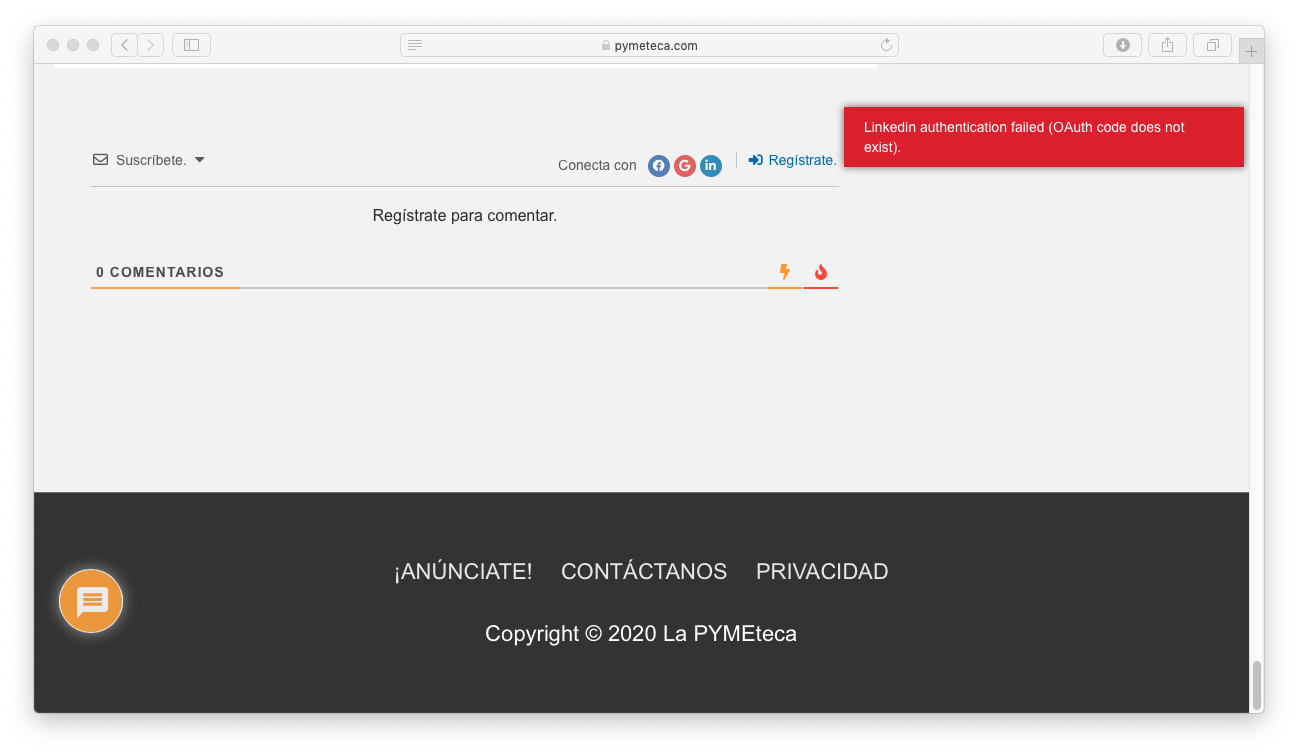
I am having exactly the same problem on the comment section of the following post : https://pymeteca.com/5-razones-para-empezar-un-negocio/
I checked and re-checked the configuration, but can't find the problem...
(BTW : Facebook and Google login work fine.)
Thanks in advance for your help !
(@asti)
Illustrious Member
Posts: 8365
Jul 17, 2020 12:53 pm
Translate
▼
English
Spanish
French
German
Italian
Portuguese
Russian
Chinese
Japanese
Korean
Arabic
Hindi
Dutch
Polish
Turkish
Vietnamese
Thai
Swedish
Danish
Finnish
Norwegian
Czech
Hungarian
Romanian
Greek
Hebrew
Indonesian
Malay
Ukrainian
Bulgarian
Croatian
Slovak
Slovenian
Serbian
Lithuanian
Latvian
Estonian
Show original
Translating...
@aymeric_c ,
Please wait a bit, we'll update the doc very soon. So you'll be able to configure the API correctly.
Translate
▼
English
Spanish
French
German
Italian
Portuguese
Russian
Chinese
Japanese
Korean
Arabic
Hindi
Dutch
Polish
Turkish
Vietnamese
Thai
Swedish
Danish
Finnish
Norwegian
Czech
Hungarian
Romanian
Greek
Hebrew
Indonesian
Malay
Ukrainian
Bulgarian
Croatian
Slovak
Slovenian
Serbian
Lithuanian
Latvian
Estonian
Show original
Translating...
Jul 17, 2020 2:55 pm
(@sanya_hriplivuy)
New Member
Hi, I have a similar Linkedin login error: "LinkedIn authentication failed (Oauth code does not exist)
My redirect URL is https://frontegg.com/wpdiscuz_auth/linkedin/
Can you help me with this? Thanks.
(@asti)
Illustrious Member
Posts: 8365
Jul 17, 2020 3:02 pm
Translate
▼
English
Spanish
French
German
Italian
Portuguese
Russian
Chinese
Japanese
Korean
Arabic
Hindi
Dutch
Polish
Turkish
Vietnamese
Thai
Swedish
Danish
Finnish
Norwegian
Czech
Hungarian
Romanian
Greek
Hebrew
Indonesian
Malay
Ukrainian
Bulgarian
Croatian
Slovak
Slovenian
Serbian
Lithuanian
Latvian
Estonian
Show original
Translating...
(@sanya_hriplivuy)
New Member
Posts: 2
Jul 22, 2020 6:27 pm
Translate
▼
English
Spanish
French
German
Italian
Portuguese
Russian
Chinese
Japanese
Korean
Arabic
Hindi
Dutch
Polish
Turkish
Vietnamese
Thai
Swedish
Danish
Finnish
Norwegian
Czech
Hungarian
Romanian
Greek
Hebrew
Indonesian
Malay
Ukrainian
Bulgarian
Croatian
Slovak
Slovenian
Serbian
Lithuanian
Latvian
Estonian
Show original
Translating...
@asti Thank you so much, problem solved. Respect for your team!
Translate
▼
English
Spanish
French
German
Italian
Portuguese
Russian
Chinese
Japanese
Korean
Arabic
Hindi
Dutch
Polish
Turkish
Vietnamese
Thai
Swedish
Danish
Finnish
Norwegian
Czech
Hungarian
Romanian
Greek
Hebrew
Indonesian
Malay
Ukrainian
Bulgarian
Croatian
Slovak
Slovenian
Serbian
Lithuanian
Latvian
Estonian
Show original
Translating...
Jul 17, 2020 4:08 pm
(@aymeric_c)
New Member
Thanks a lot, dear support team / Asti.
Unfortunately in my case it doesn't seem to work.
When navigating to the Products page and selecting the “Sign in with LinkedIn” option, it takes my to a page with documentation. It does not let me agree with the terms and continue as described in your doc.
(@asti)
Illustrious Member
Posts: 8365
Jul 18, 2020 5:15 pm
Translate
▼
English
Spanish
French
German
Italian
Portuguese
Russian
Chinese
Japanese
Korean
Arabic
Hindi
Dutch
Polish
Turkish
Vietnamese
Thai
Swedish
Danish
Finnish
Norwegian
Czech
Hungarian
Romanian
Greek
Hebrew
Indonesian
Malay
Ukrainian
Bulgarian
Croatian
Slovak
Slovenian
Serbian
Lithuanian
Latvian
Estonian
Show original
Translating...
@aymeric_c ,
This is something linked to LinkedIn configurations and doesn't have any relation to us. You should read the doc you've been redirected and find the solution there.
Translate
▼
English
Spanish
French
German
Italian
Portuguese
Russian
Chinese
Japanese
Korean
Arabic
Hindi
Dutch
Polish
Turkish
Vietnamese
Thai
Swedish
Danish
Finnish
Norwegian
Czech
Hungarian
Romanian
Greek
Hebrew
Indonesian
Malay
Ukrainian
Bulgarian
Croatian
Slovak
Slovenian
Serbian
Lithuanian
Latvian
Estonian
Show original
Translating...
Jul 18, 2020 10:22 pm
(@aymeric_c)
New Member
Super Globals
Options and Features